
Hi,
I have an issue where my Z axis tries to go above the limit before starting the job. It looks like it is trying to home the Z axis before starting but for some reason it wants to go above the limit set by the homing routine. This happens with soft limits off.
see video
I posted this issue in the Inventables forum in the F360 Post thread. And the author has some comments regarding G53 and some G_Code senders.
Quoting from him:
“The reason was the GCode sender:
The G53 is a so-called non-modal command, this means it is only effective for the line (block) in which it is found..
This means that for a command G53 G0 Z-10, all three words have to be on the same line. For some (unknown) reason I found that some GCode senders, split this command over several lines but this will change the meaning ! The G53 will no longer be active and so the machine will move to work-coordinates Z -10 io machine coordinates Z -10.”
I don’t know if this is an issue on CNCJS or not.. But just in case… I am investigating my issue, it is very possible that I am doing something wrong and not the sender.
Inventables forum post Ref:
https://discuss.inventables.com/t/a-better-fusion360-grbl-postprocessor/27607/13?u=kikolobo
评论 (6)
#2 – kikolobo 于 2017-08-07
@neilferreri I think the issue is with the post processor. I am using the inventables easel post processor, but when I run the program I found that the console reports this error:
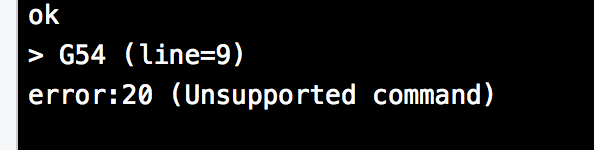
So my guess is that it is related to the way CNCJS sends the G53 command, but its also related to the way the post processor makes the nc file..
I will try to use standard GRBL file and see what that does.
Thanks for the help!
PS:If it does not work, il post the file no problem!
#3 – neilferreri 于 2017-08-07
@kikolobo That error is likely from a tool change (M6) command. I remove them manually when using cncjs,but you can ignore it (as long as you are comfortable with that error).
The easel post has a 15mm Z-lift after going to a starting XY. Based on your video, you don’t have room for that. Your starting Z-height is only 7.4mm down from your max Z. There really shouldn’t be a reference to G53 in your code at all. Did you look at the g-code and see a G53 somewhere? G53 refers to the absolute machine coordinates. All of your work is done in your WCS, or Work coordinate system.
Try the default grbl post as it will lift to a height set by your CAM operation in Fusion, a combination of “Clearance Height” and “Retract Height” depending on how you have those set up. Your ramping settings could cause those to change as well.
Basically, that foam is too thick for your current settings and setup.
#4 – cheton 于 2017-08-07
CNCjs will not break a line into two or multiple lines, so you won’t see G53 G0 Z-10 being separated to G53 and G0 Z-10. To see what commands being sent to Grbl, you can run cnc -vvv to watch the output.
The character-counting streaming protocol is used by CNCjs for streaming a G-code program to Grbl, this method will delay the ok or error response, in certain cases the reported line may not be the actual line of error. Just as @neilferreri mentioned, the actual error might be caused by a M6 tool change command.
Could you post your G-code using the post-processor? Thanks.
#5 – nsfilho 于 2017-08-22
Probably the cause is in the Post Processor. I use Fusion 360 to do CAM too. After test many of them (post processors), I discovery of some of than, like xcarve.cpl needs changed before you use this file.
Some parameters is harded code, i.e. about homing before start and the position after the end of gcode default program.
An important thing: in the xcarve.cpl the direction of Z axis are inverted to start and stop. Be sure to read the xcarve.cpl and configure properly the parameters before use this king of gcode….
#6 – nsfilho 于 2017-08-22
If you would, I can attach my post processor for fusion 360 for you…. and in this way, you for you test to see if this solve your problem.
![[gnea/grbl-Mega Issue#1] $ command extentions](https://www.grblhal.com/wp-content/themes/gitphp/timthumb.php?src=https://www.grblhal.com/wp-content/themes/gitphp/assets/img/pic/4.jpg&h=110&w=185&q=90&zc=1&ct=1)
![[gnea/grbl-Mega Issue#2] Better interrupt priorities](https://www.grblhal.com/wp-content/themes/gitphp/timthumb.php?src=https://www.grblhal.com/wp-content/themes/gitphp/assets/img/pic/2.jpg&h=110&w=185&q=90&zc=1&ct=1)
![[gnea/grbl-Mega Issue#3] ATMega16U2 virtual com port on ATMega2560](https://www.grblhal.com/wp-content/themes/gitphp/timthumb.php?src=https://www.grblhal.com/wp-content/themes/gitphp/assets/img/pic/1.jpg&h=110&w=185&q=90&zc=1&ct=1)
![[gnea/grbl-Mega Issue#4] Real-time adjustable feedrates](https://www.grblhal.com/wp-content/themes/gitphp/timthumb.php?src=https://www.grblhal.com/wp-content/themes/gitphp/assets/img/pic/5.jpg&h=110&w=185&q=90&zc=1&ct=1)
#1 – neilferreri 于 2017-08-07
@kikolobo I use Fusion 360 with CNCJS all the time with no issues. Are you using the default GRBL post in Fusion? If not, use it. If you are, can you share your Fusion file?