
Controller Board
Sculpfun S30 Pro Max 20w Laser MKS DLC32
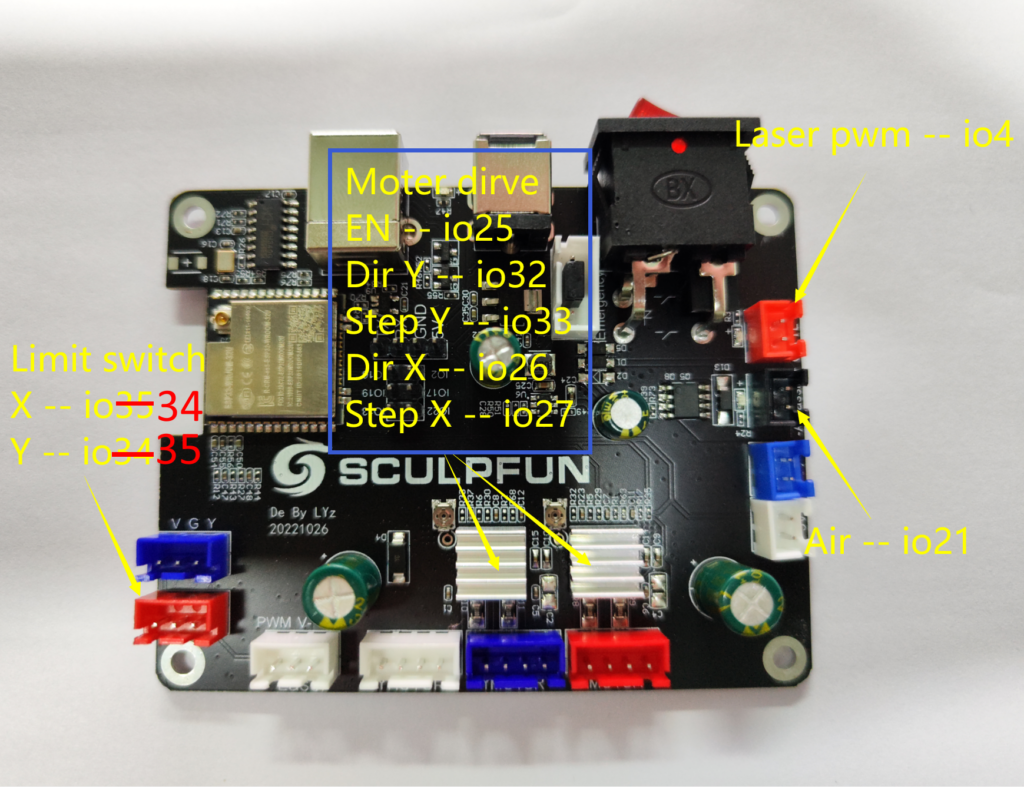
This is an image of the exact board in use
https://diode-laser-wiki.com/wp-content/uploads/2023/03/S30-Pinout-1024×787.png
Machine Description
Sculpfun S30 Pro Max 20w Laser with XY Extension 890mm x 900mm
Input Circuits
No response
Configuration file
board: XY-DLC32-MC V1.1
name: Sculpfun S30
meta: (06/20/2023) k. raab - S30 Pro Max 20w XY Extension - Refined Settings

arc_tolerance_mm: 0.002
junction_deviation_mm: 0.01
verbose_errors: false
report_inches: false

start:
  must_home: false
  deactivate_parking: true
  check_limits: false

stepping:
  engine: RMT
  idle_ms: 25
  pulse_us: 10
  dir_delay_us: 0
  disable_delay_us: 0
  segments: 12

axes:
  shared_stepper_disable_pin: gpio.25
  shared_stepper_reset_pin: NO_PIN

  x:
    steps_per_mm: 80.000
    max_rate_mm_per_min: 10000.000
    acceleration_mm_per_sec2: 1000.000
    max_travel_mm: 890.000
    soft_limits: true
    homing:
      cycle: 1
      allow_single_axis: true
      positive_direction: false
      mpos_mm: 0.000
      feed_mm_per_min: 200.000
      seek_mm_per_min: 3000.000
      settle_ms: 250
      seek_scaler: 1.100
      feed_scaler: 1.100

    motor0:
      limit_neg_pin: gpio.34:low
      limit_pos_pin: NO_PIN
      limit_all_pin: NO_PIN
      hard_limits: true
      pulloff_mm: 2.000
      stepstick:
        step_pin:  gpio.27
        #change direction using direction_pin: gpio.26:low
        direction_pin: gpio.26

  y:
    steps_per_mm: 80.000
    max_rate_mm_per_min: 10000.000
    acceleration_mm_per_sec2: 1000.000
    max_travel_mm: 900.000
    soft_limits: true
    homing:
      cycle: 1
      allow_single_axis: true
      positive_direction: false
      mpos_mm: 0.000
      feed_mm_per_min: 200.000
      seek_mm_per_min: 3000.000
      settle_ms: 250
      seek_scaler: 1.100
      feed_scaler: 1.100

    motor0:
      limit_neg_pin: gpio.35:low
      limit_pos_pin: NO_PIN
      limit_all_pin: NO_PIN
      hard_limits: true
      pulloff_mm: 2.000
      stepstick:
        step_pin: gpio.33
        #change direction using direction_pin: gpio.32:low
        direction_pin: gpio.32


coolant:
  flood_pin: gpio.21
  delay_ms: 0

Laser:
  pwm_hz: 1500
  output_pin: gpio.4
  enable_pin: NO_PIN
  disable_with_s0: false
  s0_with_disable: true
  tool_num: 0
  speed_map: 0=0.000% 1000=100.000%
  off_on_alarm: true

#user outputs can be controlled with M64 P0 (turn P0 on) and M65 P0 (turn P0 off)
#http://wiki.fluidnc.com/en/config/user_outputs
#it seems only 4 ports work at a time, but all pins work
#on command makes pin 3.3V (high), off command 0V (low)
#available pins: 2, 13, 16, 17, 19, 22
user_outputs:
#  digital0_pin: gpio.2
#  digital1_pin: gpio.13
#  digital2_pin: gpio.16
#  digital3_pin: gpio.17

#define user inputs
control:
  #all the following pins can have be assigned those pins:
  #gpio.2:low:pu; # Pin 2, logic is active low (connected switch should pull to GND when pressed) and pull-up resistor activated
  #available pins: 2, 13, 16, 17, 19, 22
  safety_door_pin: NO_PIN
  reset_pin: NO_PIN
  feed_hold_pin: NO_PIN
  cycle_start_pin: NO_PIN
  macro0_pin: gpio.22:low:pu
  macro1_pin: gpio.17:low:pu
  macro2_pin: gpio.2:low:pu
  macro3_pin: gpio.16:low:pu

#executed when macro_pin is activated
macros:
  startup_line0:
  startup_line1:
  #example commands to jog the laser +-10mm for x and y
  macro0: $J=G91 G21 F1000 Y10
  macro1: $J=G91 G21 F1000 Y-10
  macro2: $J=G91 G21 F1000 X10
  macro3: $J=G91 G21 F1000 X-10

#if you want to connect a small display to the board, define I2C bus and oled sections
#http://wiki.fluidnc.com/en/config/displays
#this configuration uses the SDA/SCL labeled pins available on the DLC32 board.
i2c0:
   sda_pin: gpio.19
   scl_pin: gpio.13

oled:
   i2c_num: 0
   i2c_address: 60
   width: 128
   height: 64
   radio_delay_ms: 1000
Startup Messages
I have a photo of the startup msg, but photos are not allowed. And this is the default startup message so I didnt think to hand type it all in here. If interested let me know and I can send the image. Too bad I cannot copy and paste the text or put the image here. I actually attached it below in the main description, if you don't see it there let me know.
User Interface Software
Lightburn
What happened?
I ran a job in Lightburn and it failed, multiple times. Seems that Wifi connection is slow which causes the X axis to forget what its doing.


You can see here how slow the Wifi connection is compared to USB.
This is operating over Wifi, you can see the belts shaking violently and how slow it is to frame the job.
https://youtube.com/shorts/TymS4qBxlb0
This is operating directly over USB/Serial and appears to have much smoother movement.
https://www.youtube.com/shorts/4KRMixaf-WA
Other Information
No response
![[gnea/grbl-Mega Issue#1] $ command extentions](https://www.grblhal.com/wp-content/themes/gitphp/timthumb.php?src=https://www.grblhal.com/wp-content/themes/gitphp/assets/img/pic/12.jpg&h=110&w=185&q=90&zc=1&ct=1)
![[gnea/grbl-Mega Issue#2] Better interrupt priorities](https://www.grblhal.com/wp-content/themes/gitphp/timthumb.php?src=https://www.grblhal.com/wp-content/themes/gitphp/assets/img/pic/5.jpg&h=110&w=185&q=90&zc=1&ct=1)
![[gnea/grbl-Mega Issue#3] ATMega16U2 virtual com port on ATMega2560](https://www.grblhal.com/wp-content/themes/gitphp/timthumb.php?src=https://www.grblhal.com/wp-content/themes/gitphp/assets/img/pic/2.jpg&h=110&w=185&q=90&zc=1&ct=1)
Activity
breiler commented on Jun 20, 2023
What is your settings from
$S?breiler commented on Jun 20, 2023
How are you connecting over WiFi in Lightburn, which protocol are you using?
lugeral commented on Jun 20, 2023
I am seeing the same thing on 3.7.1, thru the UI , a single jog click is taking up to 30 seconds.
breiler commented on Jun 20, 2023
@lugeral what is the output from the jog command?
anon65453 commented on Jun 21, 2023
Using the default IP connection in Lightburn. Add New Device, choose GRBL, then IP Connection, using static IP xxx.xxx.xxx.3
Framing a job in Lightburn over Wifi with Lucid 3.7.1 is causing the machine to make a lot of sounds and move in a terrible manner. It appears the webpage may be the issue. It sounds similar to another post I have mentioned. Using the same firmware but over USB results in much smoother operation. Also jobs don’t fail!
Here is the contents of running $S
$S
$Start/Message=Grbl \V [FluidNC \B (\R) \H]
$Firmware/Build=
$SD/FallbackCS=-1
$Report/Status=3
$Config/Filename=config.yaml
$Message/Level=Warning
$Notification/Type=NONE
$Notification/T1=
$Notification/T2=
$Notification/TS=
$Telnet/Enable=ON
$Telnet/Port=23
$HTTP/BlockDuringMotion=ON
$HTTP/Enable=ON
$HTTP/Port=80
$WiFi/Mode=STA
$Sta/SSID=Casa
$Sta/Password=******
$Sta/MinSecurity=WPA2-PSK
$WiFi/FastScan=ON
$Sta/IPMode=Static
$Sta/IP=192.168.1.3
$Sta/Gateway=192.168.1.1
$Sta/Netmask=255.255.255.0
$AP/Country=US
$AP/SSID=FluidNC
$AP/Password=******
$AP/IP=192.168.1.3
$AP/Channel=1
$Hostname=fluidnc
ok
You can see here how slow the Wifi connection is compared to USB below.
This is operating over Wifi, you can see the belts shaking violently and how slow it is to frame the job.
https://youtube.com/shorts/TymS4qBxlb0
This is operating directly over USB/Serial and appears to have much smoother movement.
https://www.youtube.com/shorts/4KRMixaf-WA
lugeral commented on Jun 21, 2023
…
breiler commented on Jun 21, 2023
I gave Lightburn a try and generate dithered laser gcode from an image: circuit.txt
When running this file from LB over WiFi I notice that I get a couple of IDLE states. To me, this suggests that the FluidNC planner is starving. Your first video where you outline the work it makes an ellipse around the work. If this ellipse is done using small line segments it could mean that the controller is starving.
You have set the max speed to 10000 mm/min (166 mm/sec) and the acceleration to 1000 mm/sec2. Which means (if I did my calculations correct) it will reach the max speed (or stop from full speed) in 0.166 seconds.
So the horrible motion that you see in your first video is probably caused by a quite agressive acceleration setting together with a starving planner buffer. This would probably also make the machine to lose steps which could be the cause for distorted images.
The next question is why it is starving. By looking at my gcode it has ~3 gcode lines per mm with around 10 bytes per line which gives us ~30 bytes per mm. Your max rate is set to 10000mm/min, but let us run things a bit slower 6000mm/min => 100mm/sec. That would require the planner buffer to handle 30 * 100 = 3Kb/s.
closed this as completedon Jun 22, 2023
anon65453 commented on Jun 22, 2023
The only difference between the sloppy movements and the smooth is WiFi vs USB. I have left the acceleration and speeds the exact same. These figures came from the default settings from the laser firmware.
Closing the webpage helps or turning off 50ms grbl reporting over WiFi but is not enough to get a job to complete without error. Specifically it’s always the X axis that gets confused, not the Y axis. This is somewhat odd. Why only X?
I have many jobs complete over WiFi previously but now on 3.7.1 they all fail at a point due to X axis shifting.
Using USB has avoided this issue.
Ugh accidentally clicked the closed button. GitHub on mobile do not suggest.
reopened this on Jun 22, 2023
anon65453 commented on Jun 29, 2023
It appears maybe something else is going on? My last job was interupted, due to panic.
Is this related to the wifi?
Layer Design
Guru Meditation Error: Core 0 panic’ed (InstrFetchProhibited). Exception was unhandled.
Core 0 register dump:
PC : 0x00000000 PS : 0x00060030 A0 : 0x800f33d2 A1 : 0x3ffe7560
A2 : 0x3ffcb628 A3 : 0x3ffcb4d5 A4 : 0x00000000 A5 : 0x00000000
A6 : 0x3ffcab80 A7 : 0x00000000 A8 : 0x800f3270 A9 : 0x3ffe7540
A10 : 0x3ffee2a4 A11 : 0x3ffee2a4 A12 : 0x3ffbc170 A13 : 0x00000000
A14 : 0x00000000 A15 : 0x00060023 SAR : 0x0000001a EXCCAUSE: 0x00000014
EXCVADDR: 0x00000000 LBEG : 0x4008b6c4 LEND : 0x4008b6da LCOUNT : 0xffffffff
Backtrace: 0xfffffffd:0x3ffe7560 0x400f33cf:0x3ffe7590 0x400f0707:0x3ffe75b0
ELF file SHA256: c0232e7857604a85
Rebooting…
ets Jul 29 2019 12:21:46
rst:0xc (SW_CPU_RESET),boot:0x13 (SPI_FAST_FLASH_BOOT)
configsip: 0, SPIWP:0xee
clk_drv:0x00,q_drv:0x00,d_drv:0x00,cs0_drv:0x00,hd_drv:0x00,wp_drv:0x00
mode:DIO, clock div:1
load:0x3fff0030,len:1184
load:0x40078000,len:13220
ho 0 tail 12 room 4
load:0x40080400,len:3028
entry 0x400805e4
[MSG:ERR: Skipping configuration file due to panic]
Grbl 3.7 [FluidNC v3.7.1 (wifi) ‘$’ for help]
here are the last moves from the console
<Run|WPos:258.325,186.137,0.000|Bf:0,256|FS:3351,0|Ov:100,100,100|A:C>
<Run|WPos:259.150,186.238,0.000|Bf:0,256|FS:6941,0>
[GC:G1 G54 G17 G21 G91 G94 M4 M8 T0 F16000 S650]
[GC:G1 G54 G17 G21 G91 G94 M4 M8 T0 F16000 S0]
<Run|WPos:257.362,186.238,0.000|Bf:0,256|FS:9596,0>
[GC:G1 G54 G17 G21 G91 G94 M4 M8 T0 F16000 S650]
[GC:G1 G54 G17 G21 G91 G94 M4 M8 T0 F16000 S0]
<Run|WPos:252.962,186.238,0.000|Bf:0,256|FS:12298,0>
[GC:G1 G54 G17 G21 G91 G94 M4 M8 T0 F16000 S650]
[GC:G1 G54 G17 G21 G91 G94 M4 M8 T0 F16000 S0]
[GC:G1 G54 G17 G21 G91 G94 M4 M8 T0 F16000 S650]
[GC:G1 G54 G17 G21 G91 G94 M4 M8 T0 F16000 S0]
<Run|WPos:245.850,186.238,0.000|Bf:0,256|FS:15019,610>
[GC:G1 G54 G17 G21 G91 G94 M4 M8 T0 F16000 S650]
$Report/Interval=0
[GC:G1ok
<Alarm|WPos:0.000,0.000,0.000|Bf:15,256|FS:0,0|WCO:0.000,0.000,0.000>
<Alarm|WPos:0.000,0.000,0.000|Bf:15,256|FS:0,0|Ov:100,100,100>
<Alarm|WPos:0.000,0.000,0.000|Bf:15,256|FS:0,0>
<Alarm|WPos:0.000,0.000,0.000|Bf:15,256|FS:0,0>
<Alarm|WPos:0.000,0.000,0.000|Bf:15,256|FS:0,0>
<Alarm|WPos:0.000,0.000,0.000|Bf:15,256|FS:0,0>
<Alarm|WPos:0.000,0.000,0.000|Bf:15,256|FS:0,0>
changed the title
[-]Problem: Wifi is very slow[/-][+]Problem: Moving too fast for Wifi to keep up streaming[/+] on Jun 29, 2023anon65453 commented on Jun 30, 2023
Please start your own problem issue, so we can see your setup
Originally posted by @bdring in #936 (comment)
mentioned this on Jun 30, 2023
MitchBradley commented on Jul 5, 2023
@anon65453 Based on your sucessful report at #936, can we close this ticket?
15 remaining items
MitchBradley commented on Jul 8, 2023
Why do you have an oled section in your config file?
anon65453 commented on Jul 8, 2023
I can comment out and re-test if that is potential issue. It was taken from Melvin’s site, I have made minimal changes.
MitchBradley commented on Jul 8, 2023
It is not a good idea to have unused sections. It is also not a good idea to take someone else’s config file without looking at everything in it – unless you are sure that your system is exactly the same, which is almost never the case.
anon65453 commented on Jul 8, 2023
Understood, I have already reviewed the file in its complete form when originally flashed the device.
I did not realize this was the issue here. And this was on purpose, the more things that change the harder troubleshooting becomes. I like to change one thing at a time.
MitchBradley commented on Jul 8, 2023
I don’t know if oled is related to your problem, but I do know that I have not tested the case where there is an oled section with no oled.
anon65453 commented on Jul 8, 2023
Nope, not related. Still an issue framing as the first video and mine from earlier today. Just tested again, here the current config now.
This pastes like junk, can’t get the code or the quote thing working on github. Too many spaces. Oh well here it is, I can reupload as zip if needed.
board: XY-DLC32-MC V1.1
name: Sculpfun S30
meta: (06/20/2023) k. raab – S30 Pro Max 20w XY Extension – Refined Settings
arc_tolerance_mm: 0.002
junction_deviation_mm: 0.01
verbose_errors: false
report_inches: false
start:
must_home: false
deactivate_parking: true
check_limits: false
stepping:
engine: RMT
idle_ms: 250
pulse_us: 4
dir_delay_us: 0
disable_delay_us: 0
segments: 12
axes:
shared_stepper_disable_pin: gpio.25
shared_stepper_reset_pin: NO_PIN
x:
steps_per_mm: 80.000
max_rate_mm_per_min: 24000.000
acceleration_mm_per_sec2: 1000.000
max_travel_mm: 890.000
soft_limits: true
homing:
cycle: 1
allow_single_axis: true
positive_direction: false
mpos_mm: 0.000
feed_mm_per_min: 200.000
seek_mm_per_min: 3000.000
settle_ms: 250
seek_scaler: 1.100
feed_scaler: 1.100
y:
steps_per_mm: 80.000
max_rate_mm_per_min: 24000.000
acceleration_mm_per_sec2: 1000.000
max_travel_mm: 900.000
soft_limits: true
homing:
cycle: 1
allow_single_axis: true
positive_direction: false
mpos_mm: 0.000
feed_mm_per_min: 200.000
seek_mm_per_min: 3000.000
settle_ms: 250
seek_scaler: 1.100
feed_scaler: 1.100
coolant:
flood_pin: gpio.21
delay_ms: 0
Laser:
pwm_hz: 1500
output_pin: gpio.4
enable_pin: NO_PIN
disable_with_s0: false
s0_with_disable: true
tool_num: 0
speed_map: 0=0.000% 1000=100.000%
off_on_alarm: true
#user outputs can be controlled with M64 P0 (turn P0 on) and M65 P0 (turn P0 off)
#http://wiki.fluidnc.com/en/config/user_outputs
#it seems only 4 ports work at a time, but all pins work
#on command makes pin 3.3V (high), off command 0V (low)
#available pins: 2, 13, 16, 17, 19, 22
user_outputs:
digital0_pin: gpio.2
digital1_pin: gpio.13
digital2_pin: gpio.16
digital3_pin: gpio.17
#define user inputs
control:
#all the following pins can have be assigned those pins:
#gpio.2:low:pu; # Pin 2, logic is active low (connected switch should pull to GND when pressed) and pull-up resistor activated
#available pins: 2, 13, 16, 17, 19, 22
safety_door_pin: NO_PIN
reset_pin: NO_PIN
feed_hold_pin: NO_PIN
cycle_start_pin: NO_PIN
macro0_pin: gpio.22:low:pu
macro1_pin: gpio.17:low:pu
macro2_pin: gpio.2:low:pu
macro3_pin: gpio.16:low:pu
#executed when macro_pin is activated
macros:
startup_line0:
startup_line1:
#example commands to jog the laser +-10mm for x and y
macro0: $J=G91 G21 F1000 Y10
macro1: $J=G91 G21 F1000 Y-10
macro2: $J=G91 G21 F1000 X10
macro3: $J=G91 G21 F1000 X-10
#if you want to connect a small display to the board, define I2C bus and oled sections
#http://wiki.fluidnc.com/en/config/displays
#this configuration uses the SDA/SCL labeled pins available on the DLC32 board.
MitchBradley commented on Jul 9, 2023
Here is my attempt to duplicate your problem. It works fine for me. This one is with 3.7.1 at 20000 mm/min.
https://youtube.com/shorts/6uPyMOeNbL8
This is v3.7.1-pre3. Again, the motion is smooth
https://youtube.com/shorts/nY921dVrqNw
The controller board is Fysetc E4 with this config file:
e4_issue917.txt
I spent a lot of time instrumenting the Telnet/TCP code to see if it was behaving badly. I did not find any problems.
anon65453 commented on Jul 9, 2023
Interesting, I have done a bunch of testing here. Please let me know your thoughts on this, its seems my acceleration was initially set too low at 1000mm/s2 ??????!
Rubber band frame w/ acceleration at 500mm/s2 (notice how there is no laser showing)
https://youtube.com/shorts/Jwnp45qbe5U?feature=share
Rubber band frame w/ acceleration at 1000mm/s2 (notice how laser is flashing rapidly)
https://youtube.com/shorts/gSkuoJbZmHs?feature=share
Rubber band frame w/ acceleration at 1500mm/s2 (notice how laser is flashing LESS than before)
https://youtube.com/shorts/MEyu2N-ER_Q?feature=share
Rubber band frame w/ acceleration at 2000mm/s2 (notice how laser is almost smooth)
https://youtube.com/shorts/n0l3j8h-zIo?feature=share
Rubber band frame w/ acceleration at 2500mm/s2 (notice how laser seems the best?)
https://youtube.com/shorts/xRQ1sylKVRE?feature=share
Riddle me this!? ISN’T 2500mm/s2 way too fast? Thats 150,000mm/m !?!?!?!?! I’m a bit confused here. What are your thoughts?
Here is a config file from when I first got the machine and it was running the OG firmware. It appeared back then as 1000 too! So confused….
And even Melvin’s site recommends keeping this below 1000…..
TBH I dont even know how it was working this well over USB if its related to the acceleration.. They use the same config file!!
https://youtube.com/shorts/WoeVQ4yfGvE?feature=share
Now im really confused.!!!
MitchBradley commented on Jul 9, 2023
Have you tried increasing pwm_hz to say 5000? That will make it possible to modulate the laser power faster.
High acceleration is not necessarily bad if your machine can handle it mechanically. It seems that you have linear rails which should help to keep the machine from shaking. At 2500 mm/sec2, it takes 160 ms to go from 0 to 24000 mm/min (=400 mm/sec). If the motors are strong enough to do that without stalling and the machine is stiff enough not to shake, then I don’t see a problem with that acceleration.
I just did some testing on my cheap gantry. On the X axes I can do 14000 mm/min @ 8000 mm/sec2 without shaking. At higher speeds I hear a whining sound, perhaps from the rollers, and at higher acceleration I hear a clunking sounds when it starts and stops. I did not test the Y axis this time, but I know from previous tests that it cannot go as fast, likely because of more moving mass.
MitchBradley commented on Jul 9, 2023
Update – Y is quiet at 10000/2500 and starts to whine a bit when the rate goes above that, and clunks with higher accel. It’s an EleksLaser gantry with roller bearings, NEMA17 motors (dual drivers on Y), 370×295 working area. Pretty low end gear.
anon65453 commented on Jul 9, 2023
No luck, the laser behaves worse at 5000pwm/hz.
MitchBradley commented on Jul 10, 2023
Streaming GCode over WiFi is inherently unpredictable. WiFi maximum transfer speeds are higher than serial, but only for long payloads, and the latency and predictability are much worse. For short packets, WiFi has very high overhead. The GRBL protocol was designed for serial on an 8-bit microprocessor with limited RAM, so the transfer length is very short – limited to 128 bytes outstanding. At 128 byte payload lengths, WiFi is very inefficient. I do not think that is possible to guarantee good performance when streaming GCode over WiFi using the GRBL line protocol. That is why WebUI only supports running GCode from a local SD card.
In principle, it would be possible to define a streaming protocol that is tuned to work well over WiFi, but it would require changes at both the controller and sender ends. It is an uncommon use case in the GRBL world so it is unlikely that developers at either end would be willing to implement it, and implementing on just one end would be useless.
At this point I have already spent too much time investigating this, to the detriment of other tasks that benefit more users.
melvinisken commented on Jul 10, 2023
Maybe a few things to add from my side:
My bottom line is, you are trying to run the laser far beyond specifications and all the problems mentioned here are neither Fluid nor hardware related. It’s just the way things are. There was nothing really unexpected in your videos. WiFi is not suited for this task and the hardware is not meant to be run that fast.
Of course, you can try to run it at these speeds (and if you find a fitting configuration, that would be great!), but it’s up to you to find those parameters. There is not much that can be done from the software backend side.
anon65453 commented on Jul 10, 2023
Thank you Mitch and Melvin for your considerable time on this and exploring all the options here. I will close this.
closed this as completedon Jul 10, 2023