
Here are the steps I follow to reproduce the issue:
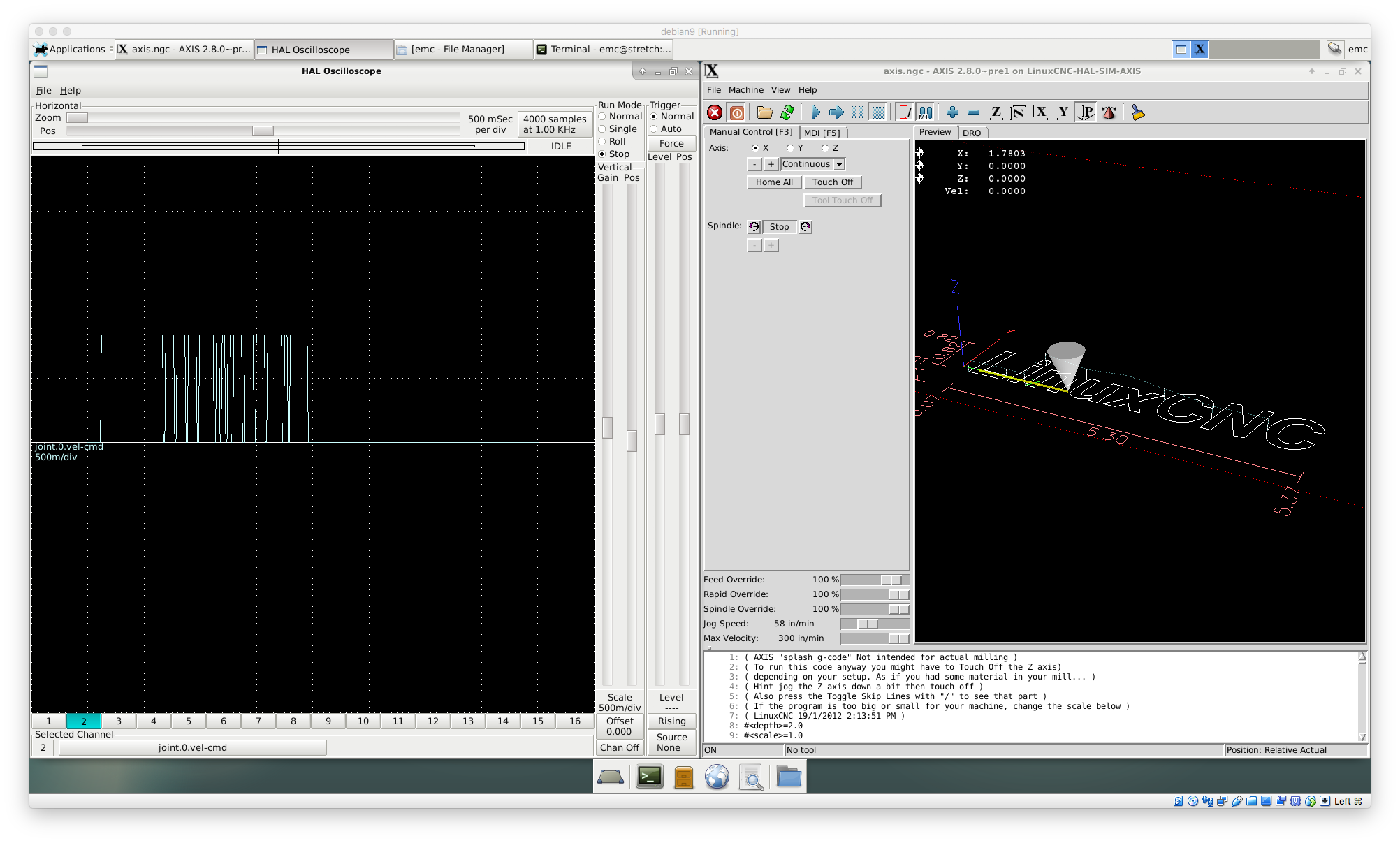
1. start sim/axis/axis.ini
2. plot joint.0.vel_cmd
3. jog in x
This is what I expected to happen:
continuous vel cmd
This is what happened instead:
vel command sometimes dropping to 0
It worked properly before this:
I dont know if this ever worked, most configs dont use that pin.
Information about my hardware and software:
d459474 on stretch
评论 (10)
#2 – rene-dev 于 2018-05-04
ah! Im using the arrow keys. does not happen when I use the +- buttons.
I also noticed that it does not happen in gmoccapy.
so some axis key handling bug?
#3 – rene-dev 于 2018-05-05
I cannot reproduce it on my real machine, only in my dev environment in virtual box.
can someone confirm that?
#4 – andypugh 于 2018-05-08
I can’t even reproduce it on VMWare
#5 – jepler 于 2018-05-08
In X, holding a key actually causes a stream of KeyRelease/KeyPress events. Tk does not filter these, but sends them each to the porogram. AXIS infers that a key is held when a KeyRelease is followed immediately by a KeyPress event, it represents a held key. This seems to work well enough when Linux is not virtualized and the AXIS UI is running locally to the computer where it is displayed.
However, when remote X, other remoting software such as VNC, or virtualization software such as Virtualbox are involved, the expectations of AXIS may be violated.
I think that roughly you can test to see that this is the case by using the ‘xev’ program. Run ‘xev’, then position the window so you can focus it while still seeing the terminal where you launched it. Hold down any key. In the xev window, you should see these repeated events, and for each KeyRelease event and the immediately following KeyPress event, the ‘time’ field should contain the same timestamp. If the timestamp is sometimes different, then AXIS will probably detect this as a “real” key release event.
For more information, see https://stackoverflow.com/questions/2100654/ignore-auto-repeat-in-x11-applications though due to limitations of the Tk API, AXIS does not implement exactly the algorithm described there. AXIS can’t call APIs like XPending and XPeekEvent directly, but the use of afteridle in axis.py:def jogoff should mean that as long as the KeyPress event is pending when the KeyRelease event is received, the call to jogoffactual will be canceled before it would occur, due to fielding the subsequent KeyPress event in the Tk event loop.
In modern X servers, there is apparently also XkbSetDetectableAutoRepeat which allows control over how auto repeat events are delivered on a per-client basis. However, again this is not directly usable from AXIS without writing a Tcl extension. There are few mentions of this function on the internet, but it clearly dates to at least 2010 (though that thread described that it did not work reliably). Investigation would be required before deciding that XkbSetDetectableAutoRepeat was a viable alternative to the heuristic AXIS uses now on all the platforms we want to support. This could also affect how repeating keys behave e.g., if you want to hold left arrow in the MDI entry field. https://nikit.tcl-lang.org/page/Disable+autorepeat+under+X11 offers a Tcl/Tk extension for calling XkbSetDetectableAutoRepeat.
#6 – narogon 于 2019-10-17
This problem happens also without using virtualbox.
With this keyboard (using other doesn’t occurs)
“
I: Bus=0003 Vendor=0a81 Product=0205 Version=0110

N: Name="CHESEN PS2 to USB Converter"

P: Phys=usb-0000:00:14.0-8/input0

S: Sysfs=/devices/pci0000:00/0000:00:14.0/usb1/1-8/1-8:1.0/0003:0A81:0205.0001/input/input15

U: Uniq=

H: Handlers=sysrq kbd leds event12

B: PROP=0

B: EV=120013

B: KEY=1000000000007 ff980000000007ff febeffdfffefffff fffffffffffffffe

B: MSC=10

B: LED=7
When you mantain pressed a key it starts producing this events (using evtest):
Event: time 1571303245.869988, type 1 (EVKEY), code 103 (KEYUP), value 1
Event: time 1571303245.869988, ————– SYN_REPORT ————
^[[AEvent: time 1571303246.137605, type 1 (EVKEY), code 103 (KEYUP), value 2
Event: time 1571303246.137605, ————– SYN_REPORT ————
^[[AEvent: time 1571303246.177572, type 1 (EVKEY), code 103 (KEYUP), value 2
Event: time 1571303246.177572, ————– SYN_REPORT ————
The last one is repeated during some time ( ~1 sec) and the jog is smooth but after that a new event (EV_MSC) starts to appear and the jog stops and runs repeatly till you release and press again the key.
Event: time 1571303246.817607, ————– SYN_REPORT ————
^[[A^[[AEvent: time 1571303246.857571, type 1 (EVKEY), code 103 (KEYUP), value 2
Event: time 1571303246.857571, ————– SYN_REPORT ————
^[[AEvent: time 1571303246.885929, type 4 (EVMSC), code 4 (MSCSCAN), value 70052
Event: time 1571303246.885929, type 1 (EVKEY), code 103 (KEYUP), value 0
Event: time 1571303246.885929, ————– SYN_REPORT ————
Event: time 1571303247.005935, type 4 (EVMSC), code 4 (MSCSCAN), value 70052
Event: time 1571303247.005935, type 1 (EVKEY), code 103 (KEYUP), value 1
Event: time 1571303247.005935, ————– SYN_REPORT ————
^[[AEvent: time 1571303247.069981, type 4 (EVMSC), code 4 (MSCSCAN), value 70052
Event: time 1571303247.069981, type 1 (EVKEY), code 103 (KEYUP), value 0
Event: time 1571303247.069981, ————– SYN_REPORT ————
Event: time 1571303247.181979, type 4 (EVMSC), code 4 (MSCSCAN), value 70052
Event: time 1571303247.181979, type 1 (EVKEY), code 103 (KEYUP), value 1
`
Could be possible to disable the key binding to jog in axis gui and use the hal_input component with a debouncing?
#7 – andypugh 于 2019-10-17
Is it possible to try with a different keyboard?
Is this a real machine? Is there any possibility of adding physical jog buttons that interface through the HAL pins rather than the GUI?
#8 – narogon 于 2019-10-17
> Is it possible to try with a different keyboard?
Yes, it doesn’t happens with different keyboard
> Is this a real machine? Is there any possibility of adding physical jog buttons that interface through the HAL pins rather than the GUI?
Yes, it is a real machine with an industrial metallic keyboard. We have a pendant that solves the problem but this behaviour is weird.
Is it possible to disable keyboard jogging in axis gui?
I could use hal_input component and debounce outputs.
#9 – narogon 于 2019-10-17
I’ve created a component that filter the signal from hal_input key pin and avoid this behaviour.
But I have to use unbinding keys.
I can just comment this lines in axis.py but it would be better create a pin that disable/enable the jogging from axis gui. Could be it possible?
Edit: Would it work? https://github.com/narogon/linuxcnc-1/commit/17f6859f93789558e710478ed4c5f7b7a5731350
#10 – andypugh 于 2019-10-17
You should be able to unbind the pins using a .axisrc file:
You might find some clues here: https://forum.linuxcnc.org/21-axis/29735-axis-modifications?start=0
![[gnea/grbl-Mega Issue#1] $ command extentions](https://www.grblhal.com/wp-content/themes/gitphp/timthumb.php?src=https://www.grblhal.com/wp-content/themes/gitphp/assets/img/pic/11.jpg&h=110&w=185&q=90&zc=1&ct=1)
![[gnea/grbl-Mega Issue#2] Better interrupt priorities](https://www.grblhal.com/wp-content/themes/gitphp/timthumb.php?src=https://www.grblhal.com/wp-content/themes/gitphp/assets/img/pic/8.jpg&h=110&w=185&q=90&zc=1&ct=1)
![[gnea/grbl-Mega Issue#3] ATMega16U2 virtual com port on ATMega2560](https://www.grblhal.com/wp-content/themes/gitphp/timthumb.php?src=https://www.grblhal.com/wp-content/themes/gitphp/assets/img/pic/2.jpg&h=110&w=185&q=90&zc=1&ct=1)
![[gnea/grbl-Mega Issue#4] Real-time adjustable feedrates](https://www.grblhal.com/wp-content/themes/gitphp/timthumb.php?src=https://www.grblhal.com/wp-content/themes/gitphp/assets/img/pic/4.jpg&h=110&w=185&q=90&zc=1&ct=1)
#1 – jepler 于 2018-05-04
@rene-dev When you say “jog in x”, do you mean you are using the right-arrow key? clicking and holding the “+” jog button?