
Here are the steps I follow to reproduce the issue:
1. Start the Axis Simulator
2. Click on the File Open Button
3. Click on the Cancel Button
This is what I expected to happen:
I expected the File Dialog to close without an error.
This is what happened instead:
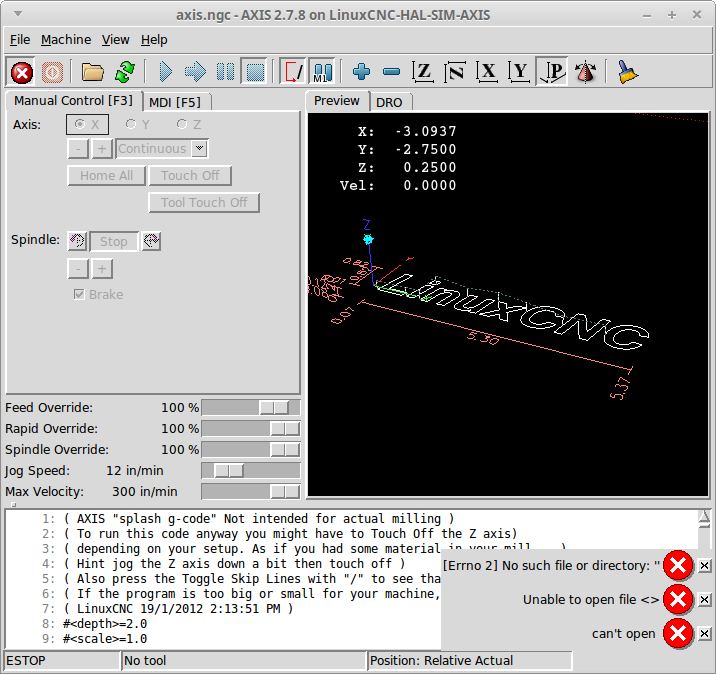
I got 3 Errors
[Error 2] No such file or directory: “”
Unable to open file <>
can’t open
Information about my hardware and software:
* I am using this Linux distribution and version Linux Mint 17.3 Rosa
* I am using this kernel version 3.4-9-rtai-686-pae #1 SMP PREEMPT
* I am running …
* [x] A binary version from linuxcnc.org (including buildbot.linuxcnc.org)
* [ ] A binary I built myself
* [ ] A binary version from some other source besides linuxcnc.org
* I am using this LinuxCNC version 2.7.8
* I am using this user interface AXIS
* I am using this interface Simulator
评论 (4)
#2 – jethornton 于 2018-03-04
Confirmed it only happens on the second cancel… something must be left hanging on the first cancel.
#3 – SebKuzminsky 于 2018-03-05
@jethornton, @samcoinc: can you see if this is fixed in v2.7.12-24-ga13f0d5acb?
#4 – rene-dev 于 2018-11-10
looks like it is fixed.
![[gnea/grbl-Mega Issue#1] $ command extentions](https://www.grblhal.com/wp-content/themes/gitphp/timthumb.php?src=https://www.grblhal.com/wp-content/themes/gitphp/assets/img/pic/7.jpg&h=110&w=185&q=90&zc=1&ct=1)
![[gnea/grbl-Mega Issue#3] ATMega16U2 virtual com port on ATMega2560](https://www.grblhal.com/wp-content/themes/gitphp/timthumb.php?src=https://www.grblhal.com/wp-content/themes/gitphp/assets/img/pic/5.jpg&h=110&w=185&q=90&zc=1&ct=1)
#1 – samcoinc 于 2018-03-03
It only happens to me on the second cancel…