
Hello,
I am building a CNC machine with an Arduino Mega 2560, a CNC shield, 3 DRV8825 modules and 3 Nema 17.
I uploaded firmware grbl-Mega_v1.1f.20170802.hex but can’t get it to work. The commands always return OK but nothing moves and the consumption is 0.75 A. The motor servos are blocked and refuse to move even by hand.
“
feeder> G91

feeder > G0 X1

feeder > G90

okay

okay
“
The problem does not seem to come from hardware because I tested by replacing the Arduino Mega with the Arduino Uno and the firmare grbl_v1.1h.20190825.hex and it works perfectly.
For my final assembly I need more free communication bus. That’s why I have to use the Arduino Mega.
Can you tell me what’s wrong?
Thank you
评论 (10)
#2 – fra589 于 2022-01-25
Hello @manuel-masiello,
What is your CNC shield?
The grbl-Mega default shield is the RAMPS 1.4 board. This shield doesn’t have the same pinout than the classical “Arduino CNC shield V3”.
You need to modify the mapping definition in the cpu_map.h file to adjust the mapping of the grbl-Mega firmware to your shield.
@++;
Gauthier.
#3 – manuel-masiello 于 2022-01-25
Hello @fra589
Thx for your replay 
I use AZDelivery CNC Shield V3 Development Board for A4988.
I will test with changing cpu_map.h.
Best,
Manuel
#4 – manuel-masiello 于 2022-02-11
Hello @fra589
Finally, I bought a RAMPS 1.4 card. However, I still can’t get it to work. The firmware still responds OK but the motors don’t move and they don’t resist either. I have a consumption of 0.12A in 12Volt. I set the voltage of the DRV8825 to 0.7 Volts.
Picture of the assembly:
https://i.ibb.co/d20tCLH/PXL-20220211-093435726-MP.jpg
I don’t understand what I did wrong.
Thanks for your help.
Manuel
#5 – golan11 于 2022-02-16
@manuel-masiello #6 – fra589 于 2022-02-16 Hi @manuel-masiello, @golan11, In config.h, you should comment the lines 37 & 38 like this: @++;
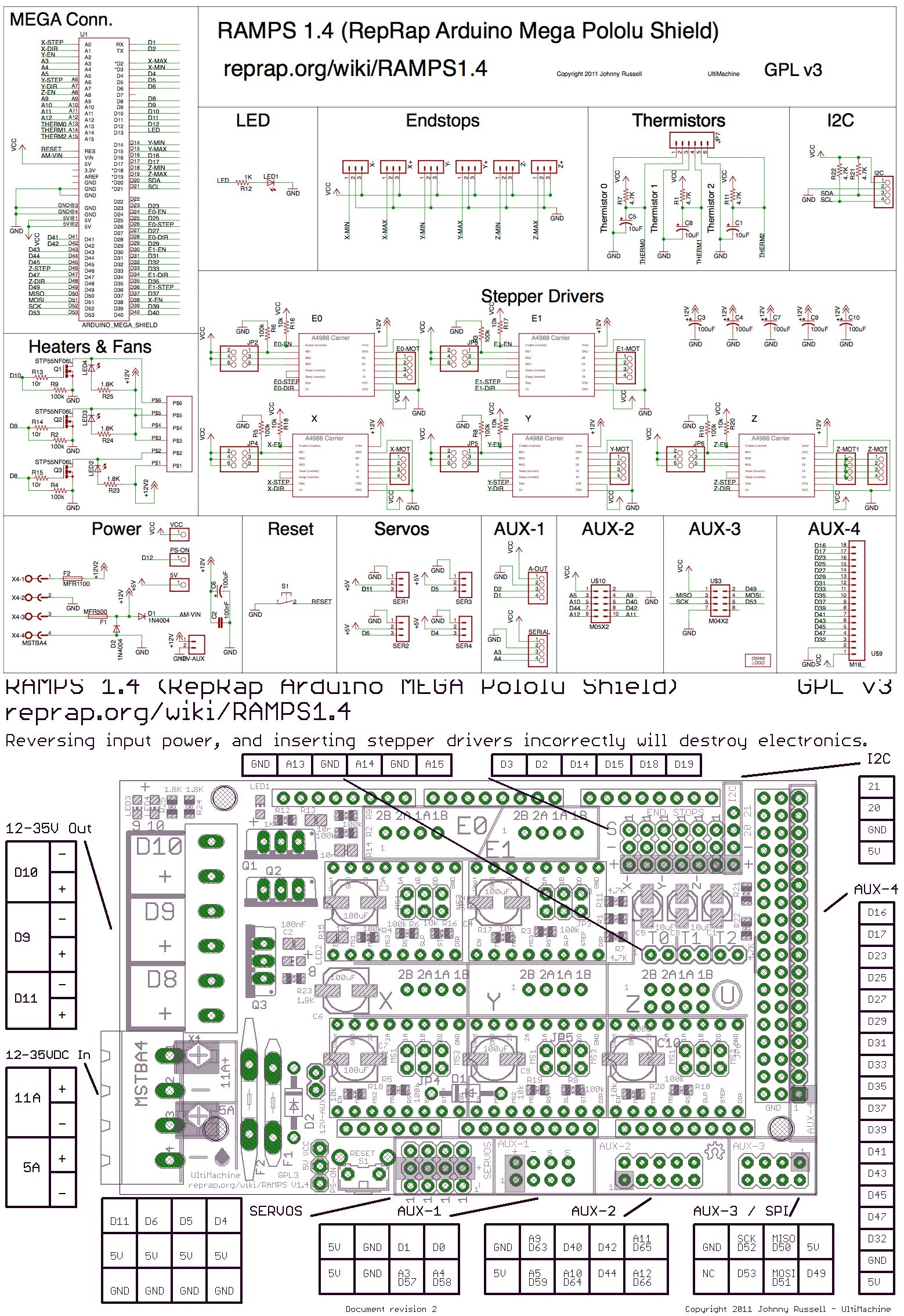
I dont think you did anything wrong. according to these schemes:
https://user-images.githubusercontent.com/26955383/34589604-dbd41b72-f16e-11e7-99a5-c91d116a0bd9.png
“
//#define DEFAULTS_GENERIC

//#define CPUMAP2560_INITIAL
and uncomment lines 41 & 42 like this:
#define DEFAULTSRAMPSBOARD

#define CPUMAP2560RAMPSBOARD
to enable the correct port and pins definitions for the RAMPS board shield.
Gauthier.
#7 – golan11 于 2022-02-16
@fra589
Well I missed that the wrong pins are in a different board definition…
But after uploading with these lines uncommented (and the generic board and INITIAL commented), I don’t get any response from the board. It looks like the upload went fine, but nothing get send or received from the serial port…
Previously I saw “GRBL 1.1 … ” or something similar when starting. now I get nothing.
#8 – golan11 于 2022-02-16
OK I figured what I did wrong…
Turns out there was a grbl folder in my library folder that’s in ‘my Documents’…
Once I’ve replaced it with the one in this reop, the upload went fine and the motors are turning as expected 
@manuel-masiello make sure that the correct library is in your main library folder
#9 – guerillaengineer 于 2022-12-08
@golan11 thank you for this. I uploaded the grbl library to my Arduino ide then completely forgot about them in that location and was having a hell of a time editing files in a different folder, uploading, and wondering why nothing would be different.
you’re my savior!
#10 – manuel-masiello 于 2023-11-28
> OK I figured what I did wrong… Turns out there was a grbl folder in my library folder that’s in ‘my Documents’… Once I’ve replaced it with the one in this reop, the upload went fine and the motors are turning as expected @manuel-masiello make sure that the correct library is in your main library folder
Sorry for the late response. That works well. Thx.
![[gnea/grbl-Mega Issue#1] $ command extentions](https://www.grblhal.com/wp-content/themes/gitphp/timthumb.php?src=https://www.grblhal.com/wp-content/themes/gitphp/assets/img/pic/11.jpg&h=110&w=185&q=90&zc=1&ct=1)
![[gnea/grbl-Mega Issue#2] Better interrupt priorities](https://www.grblhal.com/wp-content/themes/gitphp/timthumb.php?src=https://www.grblhal.com/wp-content/themes/gitphp/assets/img/pic/6.jpg&h=110&w=185&q=90&zc=1&ct=1)
![[gnea/grbl-Mega Issue#3] ATMega16U2 virtual com port on ATMega2560](https://www.grblhal.com/wp-content/themes/gitphp/timthumb.php?src=https://www.grblhal.com/wp-content/themes/gitphp/assets/img/pic/4.jpg&h=110&w=185&q=90&zc=1&ct=1)
![[gnea/grbl-Mega Issue#4] Real-time adjustable feedrates](https://www.grblhal.com/wp-content/themes/gitphp/timthumb.php?src=https://www.grblhal.com/wp-content/themes/gitphp/assets/img/pic/2.jpg&h=110&w=185&q=90&zc=1&ct=1)

. </p>
</div>
<hr>
<div class=)
#1 – manuel-masiello 于 2022-01-25
Hello,
I have just compiled the sources of the Mega version and the behavior is identical…
Can we use the non-mega version?