
You can use CNCjs Events to trigger all kinds of things.
For this demonstration we are going to start & stop a video recording on job start & stop.
This is done by calling ~/record.sh start & ~/record.sh stop (as seen in the top of the screenshot)
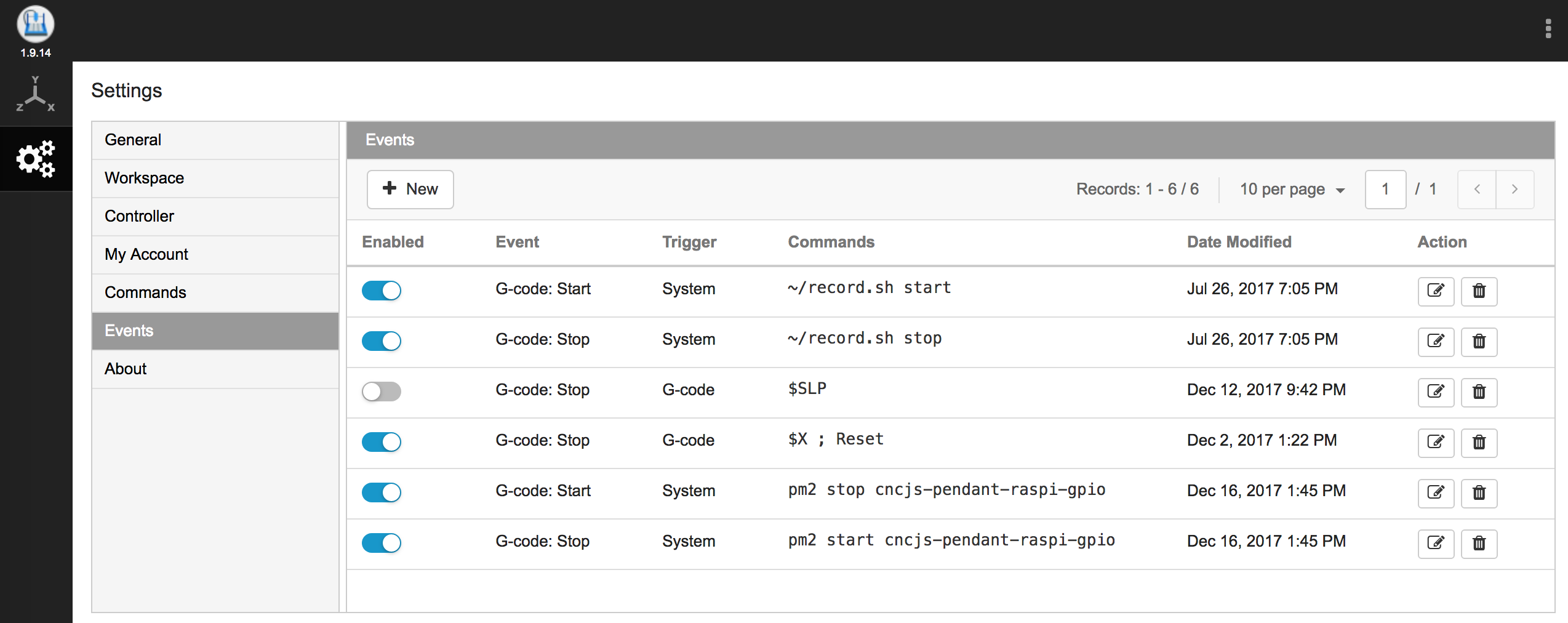
- First, you will want to follow Setup Guide: Raspberry Pi | MJPEG Streamer Install & Setup, and FFMpeg Recording
- After you have MJPEG Streamer & FFMpeg setup and working. Configure and place the script below to
~/record.sh. - set the ~/record.sh to be executable ‘chmod +x ~/record.sh’
- Setup the CNCjs Events as show in the screenshot above.
- Event to start recording on Job Start
- Event to stop recording on Job Stop
#!/bin/bash
# MJPEG Streamer Recorder w/ FFMpeg - v1
# chmod +x record.sh
# sh ~/record.sh start

FFMPEG_STREAMER_BIN="$(which ffmpeg)"

INPUT_OPTIONS="-y -f mjpeg -re"
SOURCE_STREAM="http://localhost:8080/?action=stream"

OUTPUT_OPTIONS="-q:v 10"
DESTINATION_DIRECTORY="/home/pi/Videos"
DESTINATION_FILE="xcarve-recording_$(date +'%Y%m%d_%H%M%S').mpeg"

# ==========================================================
function running() {
    if ps aux | grep ${FFMPEG_STREAMER_BIN} | grep "${SOURCE_STREAM}" >/dev/null 2>&1; then
        return 0
    else
        return 1
    fi
}

function start() {
    if running; then
        echo "already started"
        return 1
    fi

    export LD_LIBRARY_PATH="$(dirname $FFMPEG_STREAMER_BIN):."

	echo "Starting:  ${FFMPEG_STREAMER_BIN} ${INPUT_OPTIONS} -i \"${SOURCE_STREAM}\" ${OUTPUT_OPTIONS} \"${DESTINATION_DIRECTORY}/${DESTINATION_FILE}\""
	#${FFMPEG_STREAMER_BIN} ${INPUT_OPTIONS} -i "${SOURCE_STREAM}" ${OUTPUT_OPTIONS} "${DESTINATION_DIRECTORY}/${DESTINATION_FILE}"  </dev/null >/dev/null 2>record_ffmpeg.log &  # https://trac.ffmpeg.org/wiki/PHP
	${FFMPEG_STREAMER_BIN} ${INPUT_OPTIONS} -i "${SOURCE_STREAM}" ${OUTPUT_OPTIONS} "${DESTINATION_DIRECTORY}/${DESTINATION_FILE}" >/dev/null 2>/dev/null &  # No Log File

    sleep 1

    if running; then
#         if [ "$1" != "nocheck" ]; then
#             check_running & > /dev/null 2>&1 # start the running checking task
#             check_hanging & > /dev/null 2>&1 # start the hanging checking task
#         fi

        echo "started"
        return 0

    else
        echo "failed to start"
        return 1

    fi
}

function stop() {
    if ! running; then
        echo "not running"
        return 1
    fi

    own_pid=$$

    if [ "$1" != "nocheck" ]; then
        # stop the script running check task
        ps aux | grep $0 | grep start | tr -s ' ' | cut -d ' ' -f 2 | grep -v ${own_pid} | xargs -r kill
        sleep 0.5
    fi

    # stop the process
    ps aux | grep ${FFMPEG_STREAMER_BIN} | grep "${SOURCE_STREAM}" | tr -s ' ' | cut -d ' ' -f 2 | grep -v ${own_pid} | xargs -r kill

    echo "stopped"
    return 0
}

function check_running() {
    echo "starting running check task" >> ${MJPG_STREAMER_LOG_FILE}

    while true; do
        sleep ${RUNNING_CHECK_INTERVAL}

        if ! running; then
            echo "server stopped, starting" >> ${MJPG_STREAMER_LOG_FILE}
            start nocheck
        fi
    done
}

function check_hanging() {
    echo "starting hanging check task" >> ${MJPG_STREAMER_LOG_FILE}

    while true; do
        sleep ${HANGING_CHECK_INTERVAL}

        # treat the "error grabbing frames" case
        if tail -n2 ${MJPG_STREAMER_LOG_FILE} | grep -i "error grabbing frames" > /dev/null; then
            echo "server is hanging, killing" >> ${MJPG_STREAMER_LOG_FILE}
            stop nocheck
        fi
    done
}

function help() {
    echo "Usage: $0 [start|stop|restart|status]"
    return 0
}

if [ "$1" == "start" ]; then
    start && exit 0 || exit -1

elif [ "$1" == "stop" ]; then
    stop && exit 0 || exit -1

elif [ "$1" == "restart" ]; then
    stop && sleep 1
    start && exit 0 || exit -1

elif [ "$1" == "status" ]; then
    if running; then
        echo "running"
        exit 0
    else
        echo "stopped"
        exit 1
    fi
else
    help
fi
本文转载自: https://github.com/cncjs/cncjs/wiki/Setup-Guide:-Raspberry-Pi-%7C-Recording-Triggered-by-Events
![[gnea/grbl-Mega Issue#1] $ command extentions](https://www.grblhal.com/wp-content/themes/gitphp/timthumb.php?src=https://www.grblhal.com/wp-content/themes/gitphp/assets/img/pic/2.jpg&h=110&w=185&q=90&zc=1&ct=1)
![[gnea/grbl-Mega Issue#2] Better interrupt priorities](https://www.grblhal.com/wp-content/themes/gitphp/timthumb.php?src=https://www.grblhal.com/wp-content/themes/gitphp/assets/img/pic/4.jpg&h=110&w=185&q=90&zc=1&ct=1)
![[gnea/grbl-Mega Issue#3] ATMega16U2 virtual com port on ATMega2560](https://www.grblhal.com/wp-content/themes/gitphp/timthumb.php?src=https://www.grblhal.com/wp-content/themes/gitphp/assets/img/pic/8.jpg&h=110&w=185&q=90&zc=1&ct=1)
![[gnea/grbl-Mega Issue#4] Real-time adjustable feedrates](https://www.grblhal.com/wp-content/themes/gitphp/timthumb.php?src=https://www.grblhal.com/wp-content/themes/gitphp/assets/img/pic/10.jpg&h=110&w=185&q=90&zc=1&ct=1)