
Windows 7, Cncjs at 1.9.7, xPro v3, Com6 installed.
When Cncjs is invoked, the comport is opened and “cncjs 1.9.7 [grbl]” is posted.
However, Grbl 1.1f is not posted and the Idle mode is not set.
I must issue the command: $C twice until MSG:Disabled is returned. At that point, Grbl 1.1f is posted and the Idle mode is engaged.
评论 (22)
#2 – cheton 于 2017-08-23
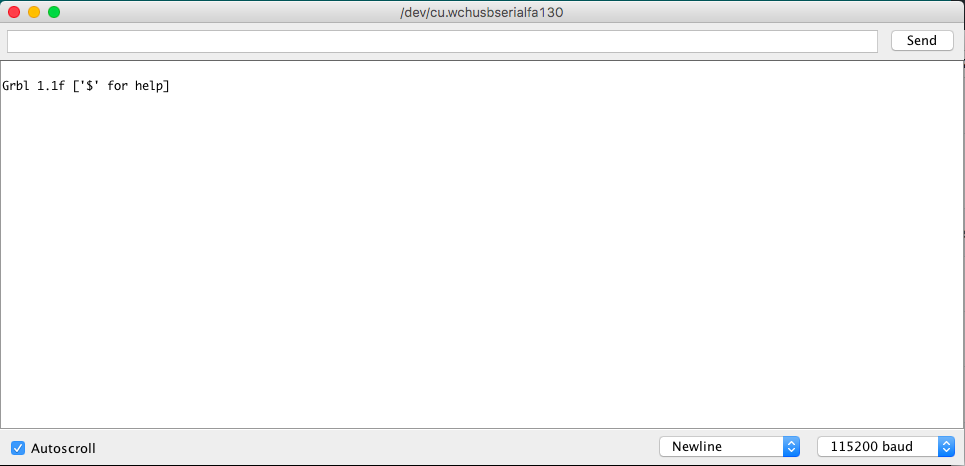
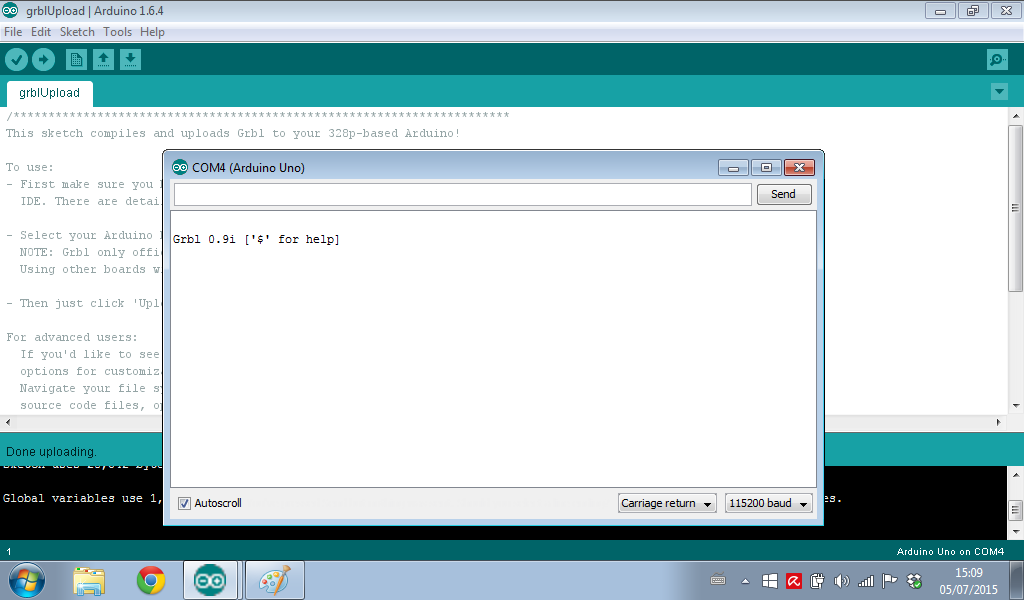
What’s your result when opening Serial Monitor from Arduino IDE, will you see a Grbl welcome message like below?
#3 – cheton 于 2017-08-23
If it just works well on an Arduino IDE, try the troubleshooting guide at https://github.com/cncjs/cncjs/wiki/Troubleshooting#troubleshoot-electron-app-on-windows to dump a verbose output on the console.
#4 – edalger 于 2017-08-23
As I mentioned in my issue entry, I;m using a Windows 7 App with an xPro controller.When I invoke Cncjs with autoconnect checked, I do not get the Grbl 1.1f posted. I only get the Cncjs posting.I found that clicking the “Reset” button, the Grbl 1.1f is posted and Grbl Idle runs OK.
On Tuesday, August 22, 2017 8:38 PM, Cheton Wu
If it just works well on an Arduino IDE, try the troubleshooting guide at https://github.com/cncjs/cncjs/wiki/Troubleshooting#troubleshoot-electron-app-on-windows to dump a verbose output on the console.—
You are receiving this because you authored the thread.
Reply to this email directly, view it on GitHub, or mute the thread.
#5 – cheton 于 2017-08-25
I upgraded Electron 1.4.16 to 1.7.5 for the latest version of CNCjs 1.9.8. You can try again, if the problem persists, try recording a video if possible.
Some questions for you:
1. Are you able to see Grbl welcome message when re-connecting the serial port? That is, Close and Open again?
2. Will it behave normally if you don’t enable the “Auto connect” checkbox?
3. If either of above doesn’t work, try other software like Universal G-code Sender, or open in Arduino IDE’s serial monitor, and check if your board will automatically reset when establishing a connection.
#6 – edalger 于 2017-08-25
I upgraded CNCJS to 1.9.8. I see no difference in the way CNCJS goes to idle.
I’ve attached 2 pictures. The first is as CNCJS opens. Auto connect is checked.
The second picture is after the “Reset” button is clicked. It shows Grbl 1.1f is posted.
Clicking “Close” and “Open” again has no effect. “Reset” must be clicked.
enable/disable Auto connect also has no effect.
#7 – edalger 于 2017-08-25
Also, in the second picture above, see that in Cncjs 1.9.8, the left and right widgets take up more room than in previous versions, squeezing the upload grbl section. I didn’t see a way of adjusting this?
#8 – cheton 于 2017-08-26
You can drag all widgets from the right pane to the left pane or remove all widgets on the right pane, and then you can minimize the right pane, this allows you to have a wider view that fits your display.
Regarding your issue, did you encounter similar problem when using other softwares like UGS or ChiliPeppr?
#9 – edalger 于 2017-08-26
Cncjs is the only software I’ve used as another member of my family is using the same setup as mine with great sucess.
#10 – cheton 于 2017-08-26
One of the possible cause might be electrical noise during the startup cycle and boot loader. If possible, you can try disconnecting power from spindle and motors, and run again.
Another way to identify whether it is related to CNCjs or hardware wiring, is to install Arduino IDE on your laptop and see the serial monitor output. If it is not a cause of electrical noise, you should see G
rbl welcome message without seeing any garbage characters, as shown below:
#11 – cheton 于 2017-08-27
> Also, in the second picture above, see that in Cncjs 1.9.8, the left and right widgets take up more room than in previous versions, squeezing the upload grbl section. I didn’t see a way of adjusting this?
After comparing the difference between CNCjs 1.9.7 and 1.9.8, it looks that Electron 1.7 will have a large content size on app start, you can zoom in/out using keyboard shortcuts as below:
#12 – edalger 于 2017-08-27
Thank you Cheton for the info for Zooming. That did make the UI visible.
Regarding the Idle mode “condition”:
I connected the xPro controller to CNCJS stand-alone and it did not affect the way Idle mode is started.
I have not tried Arduino IDE yet but will get it installed and do the check as you describe.
#13 – edalger 于 2017-08-28
Cheton, I installed the Arduino IDE for Windows.
I ran the Arduino.exe and then run the Serial Port. I did not see the Grbl welcome message.
However, I sent $$ and the xPro sent back the Grbl commands $1 through $131 OK.
#14 – cheton 于 2017-08-29
@edalger CNCjs relies on the welcome message Grbl 1.1f ['$' for help] to indicate Grbl has initialized. As you mentioned earlier, another member of your family is using the same setup with success. Does he use the same xPro controller?
I suggest you post another issue on https://github.com/gnea/grbl/issues, some people there might know how to make it work during startup for the xPro controller.
#15 – edalger 于 2017-08-29
Thanks Cheton for the comments. I do get the Grbl 1.1f posted but only after I click the “Reset” button.
Yes my Son uses the same xPro card at version 3 as I do.
#16 – neilferreri 于 2017-08-30
@edalger Are you using Inventables’ grbl fork?
#17 – edalger 于 2017-08-31
No, I’m not. Why do you ask?
#18 – cheton 于 2017-08-31
Hi @chamnit,
@edalger encountered an issue with his xPro v3, he never see a Grbl welcome message on startup, unless he performs a soft reset (^x). May I ask under what circumstances that it won’t automatically trigger the reset? Thanks.
#19 – chamnit 于 2017-08-31
The Arduino boot loader should auto-reset Grbl upon a connection. If there is no boot loader, Grbl will just boot when the micro controller is powered. So when you connect, Grbl will just be running. No welcome message.
#20 – neilferreri 于 2017-08-31
@edalger I was thinking of the X-controller when I read your post. I have seen similar issues with custom / OEM firmware.
#21 – edalger 于 2017-08-31
OK, I’ll forward this info to xPro persons.
Ed…
#22 – edalger 于 2017-09-11
I purchased a new Asus laptop: i5 P254OU to drive the xPro v3 + Cncjs. The combination works find and the xPro/Cncjs goes to Idle mode upon starting Cncjs. Thanks for the info on the issue.
Ed…
![[gnea/grbl-Mega Issue#1] $ command extentions](https://www.grblhal.com/wp-content/themes/gitphp/timthumb.php?src=https://www.grblhal.com/wp-content/themes/gitphp/assets/img/pic/6.jpg&h=110&w=185&q=90&zc=1&ct=1)
![[gnea/grbl-Mega Issue#2] Better interrupt priorities](https://www.grblhal.com/wp-content/themes/gitphp/timthumb.php?src=https://www.grblhal.com/wp-content/themes/gitphp/assets/img/pic/8.jpg&h=110&w=185&q=90&zc=1&ct=1)
![[gnea/grbl-Mega Issue#3] ATMega16U2 virtual com port on ATMega2560](https://www.grblhal.com/wp-content/themes/gitphp/timthumb.php?src=https://www.grblhal.com/wp-content/themes/gitphp/assets/img/pic/10.jpg&h=110&w=185&q=90&zc=1&ct=1)
![[gnea/grbl-Mega Issue#4] Real-time adjustable feedrates](https://www.grblhal.com/wp-content/themes/gitphp/timthumb.php?src=https://www.grblhal.com/wp-content/themes/gitphp/assets/img/pic/3.jpg&h=110&w=185&q=90&zc=1&ct=1)



#1 – edalger 于 2017-08-22
I found that the Cncjs “Reset” button engages the Idle mode just file.