
I’m trying to install cnc.js on CHIP Pro, ARM based debian. I’m getting an integrity checksum failure,
~~~~
6967 verbose Linux 4.4.30-pro
6968 verbose argv “/home/chip/.nvm/versions/node/v4.8.3/bin/node” “/home/chip/.nvm/versions/node/v4.8.3/bin/npm” “install” “-g” “cncjs”
6969 verbose node v4.8.3
6970 verbose npm v5.0.3
6971 error code EINTEGRITY
6972 error sha1-UIwZDsSVggcyOw0+TvzkJ2t65qk= integrity checksum failed when using sha1: wanted sha1-UIwZDsSVggcyOw0+TvzkJ2t65qk= but got sha1-vRS6qdSUXbRUi4Ccv9QD5oPYjHQ=. (327680 bytes)
6973 verbose exit [ 1, true ]
~~~~
I didn’t see that when installing on my x64 ubuntu
I’ve attached the log file for more details
I’ve seen a couple of posts showing the same failure with npm v5 here
https://github.com/npm/npm/issues/17146
https://github.com/npm/npm/issues/16861
did anyone face that problem?
#4 – pluggee 于 2017-06-15
tried npm cache --force clean on both RPi and CHIP, no luck
I also verified that the cache was clean before trying to install
#5 – olange 于 2017-06-15
@pluggee @nomykk Have you tried npm install --update-binary --no-shrinkwrap? I had luck with that command, after doing npm cache clean --force. And I regenerated and versionned a fresh npm-shrinkwrap.json after these operations.
#6 – pluggee 于 2017-06-15
no luck, I tried npm install --update-binary --no-shrinkwrap cncjs on rpi
#7 – pluggee 于 2017-06-17
@olange @nomykk
any idea what could be the offending package?
#8 – olange 于 2017-06-21
@pluggee I am not knowledgeable of the internals of NPM, it is as hard for me to point out the offending package, as for you probably.
Looking at your log file and searching for the SHA1 sha1-UIwZDsSVggcyOw0+TvzkJ2t65qk= that fails, I found these lines:
“
6198 silly pacote trying cncjs@https://registry.npmjs.org/cncjs/-/cncjs-1.9.5.tgz by hash: sha1-UIwZDsSVggcyOw0+TvzkJ2t65qk=

6199 silly extract webappengine@1.1.3

6200 silly pacote trying webappengine@https://registry.npmjs.org/webappengine/-/webappengine-1.1.3.tgz by hash: sha1-/OuwAQBhqKSDzgYdtVRPLRDxskI=

6201 silly pacote data for sha1-UIwZDsSVggcyOw0+TvzkJ2t65qk= not present. Using manifest.

6202 silly pacote data for sha1-/OuwAQBhqKSDzgYdtVRPLRDxskI= not present. Using manifest.
It is however unclear to me what to start with these lines.
#9 – cheton 于 2017-06-22
No sure what’s going wrong. Try manually removing ~/.npm and previously installed cncjs if you have, and then install again:
“
$ rm -rf ~/.npm

$ npm uninstall -g cncjs

$ npm cache verify

$ npm install -g cncjs@latest
#10 – nomykk 于 2017-06-22
@pluggee @olange
Deleting the cache manually from path “C:\Users\user-name\AppData\Roaming” (directories: npm , npm-cache) worked for me. After deleting directories npm install did the rest accurately.
#12 – pluggee 于 2017-06-22
hey @cheton , I tried removing ~/.npm and following your instructions, still the same problem
I have really no knowledge of npm (other that following instructions), did anyone try to install cncjs on a vanilla raspbian (released 2017-04-10)?
I followed instructions on a tiny intel box running ubuntu 16.04 and it went through, I only faced this problem with 2 systems running ARM cores, Raspberry Pi running Raspbian and C.H.I.P. Pro running debian
#13 – pluggee 于 2017-06-28
any other ideas??
#14 – anosikeosifo 于 2017-07-03
The following solved it for me:
rm -rf node_modules
rm package-lock.json
rm -rf ~/.npm
npm install –update-binary –no-shrinkwrap
*O.S: MacOS 10.12.5
NPM 5.0.4
#15 – SumeethPrabhakar 于 2017-07-19
I deleted the npm cache (folders npm , npm-cache) manually from path “C:\Users\user-name\AppData\Roaming”. worked for me.
#16 – taylorstine 于 2017-07-19
npm cache clean and deleting ~/.npm didn’t work for me.
I fixed this by running:
“
gpg --keyserver pool.sks-keyservers.net --recv-keys 94AE36675C464D64BAFA68DD7434390BDBE9B9C5

gpg --keyserver pool.sks-keyservers.net --recv-keys FD3A5288F042B6850C66B31F09FE44734EB7990E

gpg --keyserver pool.sks-keyservers.net --recv-keys 71DCFD284A79C3B38668286BC97EC7A07EDE3FC1

gpg --keyserver pool.sks-keyservers.net --recv-keys DD8F2338BAE7501E3DD5AC78C273792F7D83545D

gpg --keyserver pool.sks-keyservers.net --recv-keys C4F0DFFF4E8C1A8236409D08E73BC641CC11F4C8

gpg --keyserver pool.sks-keyservers.net --recv-keys B9AE9905FFD7803F25714661B63B535A4C206CA9

gpg --keyserver pool.sks-keyservers.net --recv-keys 56730D5401028683275BD23C23EFEFE93C4CFFFE

curl -O https://nodejs.org/dist/v8.1.4/SHASUMS256.txt.asc

gpg --verify SHASUMS256.txt.asc
I’ll be honest I’m not totally sure what it does (something with key signing obviously). I got this from the README included with the node binary downloads.
#17 – ghost 于 2017-07-23
I got error when I installing angular “npm install -g @angular/cli”
I removed @angular and @angular-cli from npm-cache ‘C:\Users\Engraved\AppData\Roaming\npm-cache’
now it’s working for me.
#18 – StavroMueller 于 2017-07-24
Was getting this error, but in my case it was fixed by first running npm cache clean, even though the output scolded me a bit.
#19 – hezhiwebworld 于 2017-08-08
npm ERR! sha512-vOk6uEMctu0vQrvuSqFdJyqj1Q0S5VTDL79qtjo+DhRr+1mmaD+tluFSCZqhvi/J
UhXSzoZN2BhtstaPEeE8cw== integrity checksum failed when using sha512: wanted sha
512-vOk6uEMctu0vQrvuSqFdJyqj1Q0S5VTDL79qtjo+DhRr+1mmaD+tluFSCZqhvi/JUhXSzoZN2Bht
staPEeE8cw== but got sha512-pd+s9UiGqI1iFyuo9HnBrpGNNOE1o0VThHvIcRX0ECoMjQkINlVo
PG4MNzp4eyTVcvRieTaIEt35aB5PCU+NuA==. (2233 bytes)
npm 更新之后就是这么的坑
#20 – pluggee 于 2017-08-09
@taylorstine I tried adding and verifying the keys, but still no luck, I’m getting the same error
#21 – AustinSaintAubin 于 2017-08-11
what is your node -v and npm -v ?
#22 – pluggee 于 2017-08-13
@AustinSaintAubin
npm -v = 5.0.3
there’s an update available to 5.3.0
node -v = v4.8.3
#23 – AustinSaintAubin 于 2017-08-13
Try updating to node v6.
#24 – cheton 于 2017-08-14
@pluggee
Try npm i -g npm@latest to update NPM to the latest version (5.3.0), and clean npm cache again before installation. I’m not sure if the checksum error can be resolved with the latest NPM, hope it works for you.
#25 – munael 于 2017-08-17
@cheton commented on Aug 14, 2017, 4:36 AM GMT+2:
> @pluggee
>
> Try npm i -g npm@latest to update NPM to the latest version (5.3.0), and clean npm cache again before installation. I’m not sure if the checksum error can be resolved with the latest NPM, hope it works for you.
Doing this was the first time I noticed this error, actually.
So I can’t update npm. On 5.0.3 right now.
#26 – onuar 于 2017-08-17
@cheton npm 5.3.0 still has the same problem.
#27 – gezzeg 于 2017-08-27
also have same problem here on fresh installation.
Try “npm cache –force clean” but no luck.
Then i remove project folder and reinstall. Luckily some how it works!.
#28 – cheton 于 2017-08-31
NPM v5 is still unstable and existed some known issues, for anyone who encountered installation problems with npm v5, try to downgrade the npm version to npm@4.6.1, clean npm cache, and continue the installation:
“sh`
npm i -g npm@4.6.1
rm -rf ~/.npm
Each time you do the installation, you can run npm cache verify to verify the npm cache:`
sh`
npm cache verify
npm install -g cncjs@latest # or 'sudo npm install --unsafe-perm -g cncjs@latest' for root account
Note: Do not install cncjs in a project folder containing a package.json file, Install cncjs globally with the -g` option, or it may cause unexpected result.
#29 – aliir74 于 2017-09-04
My problem solved with @taylorstine solution.
node version: 8.4.0
npm version: 5.4.0
#30 – AbhilashDawar 于 2017-09-04
Updated to the latest versions as mentioned by @aliir74 i.e.
node version: 8.4.0
npm version: 5.4.0
Then ran command prompt as administrator. It worked.
![[gnea/grbl-Mega Issue#1] $ command extentions](https://www.grblhal.com/wp-content/themes/gitphp/timthumb.php?src=https://www.grblhal.com/wp-content/themes/gitphp/assets/img/pic/10.jpg&h=110&w=185&q=90&zc=1&ct=1)
![[gnea/grbl-Mega Issue#2] Better interrupt priorities](https://www.grblhal.com/wp-content/themes/gitphp/timthumb.php?src=https://www.grblhal.com/wp-content/themes/gitphp/assets/img/pic/4.jpg&h=110&w=185&q=90&zc=1&ct=1)
![[gnea/grbl-Mega Issue#3] ATMega16U2 virtual com port on ATMega2560](https://www.grblhal.com/wp-content/themes/gitphp/timthumb.php?src=https://www.grblhal.com/wp-content/themes/gitphp/assets/img/pic/12.jpg&h=110&w=185&q=90&zc=1&ct=1)
![[gnea/grbl-Mega Issue#4] Real-time adjustable feedrates](https://www.grblhal.com/wp-content/themes/gitphp/timthumb.php?src=https://www.grblhal.com/wp-content/themes/gitphp/assets/img/pic/7.jpg&h=110&w=185&q=90&zc=1&ct=1)
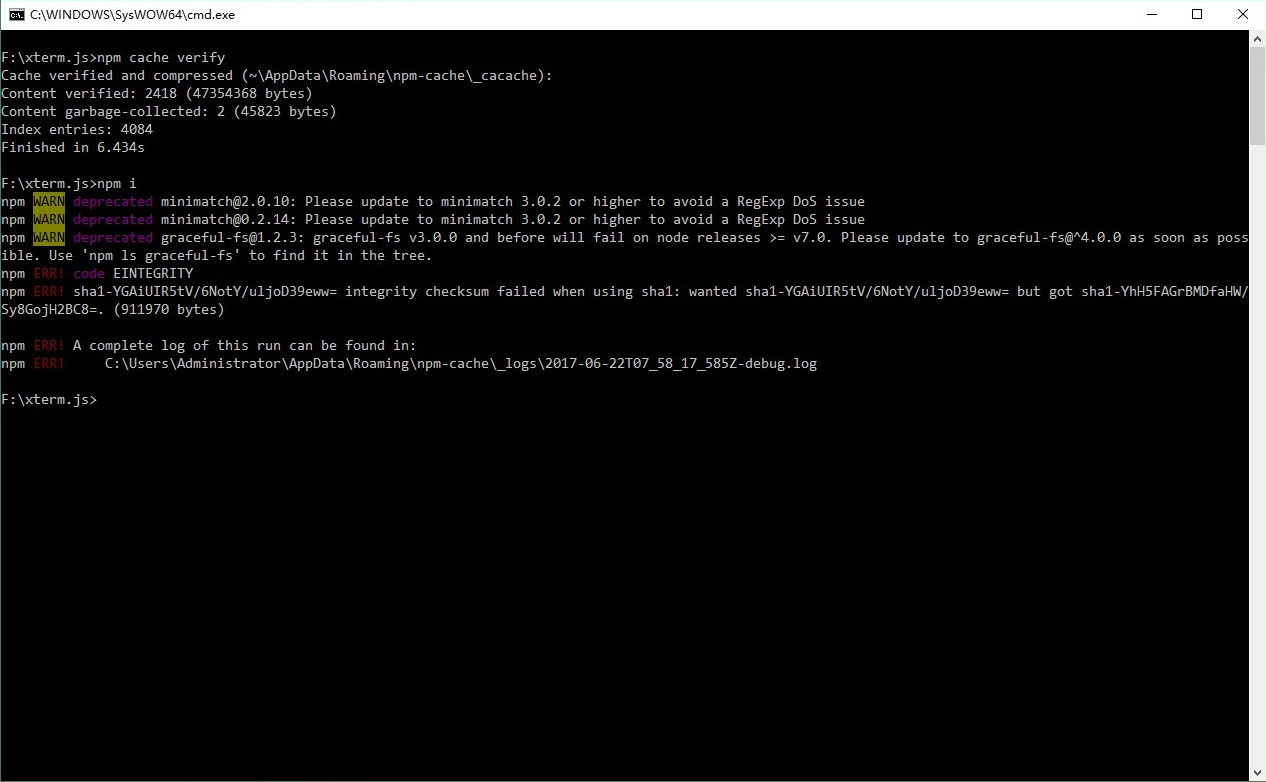

#3 – nomykk 于 2017-06-15
Getting the same error with current npm version on Windows 10.
After executing npm cache –force clean I got this error.
npm ERR! cb() never called!
npm ERR! This is an error with npm itself. Please report this error at:
npm ERR! <https://github.com/npm/npm/issues>