
Using Windows 7 with CNCJS Desktop version 1.9.5 connected to TinyG.
When switching between inch/mm mode, it would be nice if the UI would change the jog increment values by converting the current units to the new units.
When I start CNCJS and jog the units are in mm. After running a file with G20 (inch units) the default units are in inch. Jogging one step using the ‘1’ button actually moves 1 inch and not 1mm.
I guess another approach would be to return the GUI to the selected units after running a file that might switch the units.
评论 (5)
#2 – cheton 于 2017-06-10
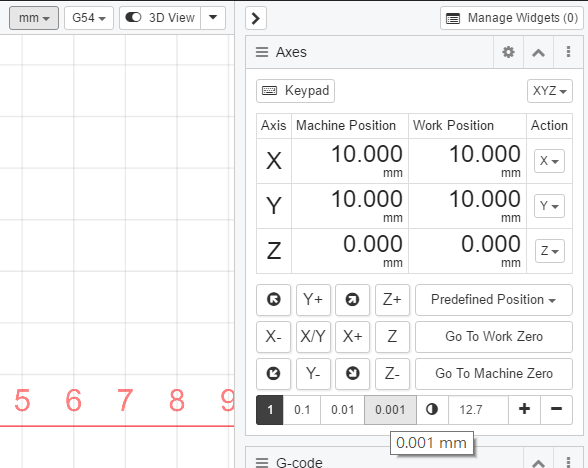
For your first question, there is a mouseover tooltip that shows the current unit of the increment button. The user input value will be updated when switching between G20 (inches) and G21 (mm). For example, 0.5 in <-> 12.7mm.
G20 inches mode
G21 mm mode
I can add units aside the number so it will be visible to users.
—
Second, there are some differences between Grbl controller and TinyG controller in CNCjs:
* The Grbl controller will send a software reset (ctrl-x) after running a file, so it will always force changing the units mode to G21 (mm).
“js`
'gcode:stop': () => {
this.event.trigger('gcode:stop');
this.workflow.stop();
const activeState = _.get(this.state, 'status.activeState', '');
const delay = 500; // 500ms
if (activeState === GRBLACTIVESTATE_RUN) {
this.write(socket, '!'); // hold
}
setTimeout(() => {
this.write(socket, '\x18'); // ctrl-x
}, delay);
}
* For TinyG controller, I didn't send a software reset, only queue flush and clear commands are sent once a job has finished:
`js`
'gcode:stop': () => {
this.event.trigger('gcode:stop');
this.workflow.stop();
this.writeln(socket, '!%'); // feedhold and queue flush
setTimeout(() => {
this.writeln(socket, '{clear:null}');
this.writeln(socket, '{"qr":""}'); // queue report
}, 250); // delay 250ms
}
Your suggestion is good, I can add configuration options that allows user to specify preferred units after running a file. For example:
`
Change the units after running a file:

[ ] Leave it as is

[ ] Revert changes to the previous units

[ ] Specify the units you want to use: G20 or G21
#3 – cheton 于 2017-06-10
> Its would also be nice if it also converted the probing increments, and maybe even the macro’s, as well.
@AustinSaintAubin
The user input value in the Probe widget will be updated when switching between G20 and G21, what did you mean for “converted the probing increments”?
#4 – tomauga 于 2017-06-10
This looks great Cheton. Thanks!
#5 – cheton 于 2018-02-03
Made some improvements to the axes widget in CNCjs 1.9.13, you will know the units that’s currently used.
![[gnea/grbl-Mega Issue#1] $ command extentions](https://www.grblhal.com/wp-content/themes/gitphp/timthumb.php?src=https://www.grblhal.com/wp-content/themes/gitphp/assets/img/pic/2.jpg&h=110&w=185&q=90&zc=1&ct=1)
![[gnea/grbl-Mega Issue#2] Better interrupt priorities](https://www.grblhal.com/wp-content/themes/gitphp/timthumb.php?src=https://www.grblhal.com/wp-content/themes/gitphp/assets/img/pic/6.jpg&h=110&w=185&q=90&zc=1&ct=1)
![[gnea/grbl-Mega Issue#3] ATMega16U2 virtual com port on ATMega2560](https://www.grblhal.com/wp-content/themes/gitphp/timthumb.php?src=https://www.grblhal.com/wp-content/themes/gitphp/assets/img/pic/4.jpg&h=110&w=185&q=90&zc=1&ct=1)


#1 – AustinSaintAubin 于 2017-06-09
Its would also be nice if it also converted the probing increments, and maybe even the macro’s, as well.