
I need to be able to run multiple files on the same work piece at the same coordinates and change tools between. (Using F-Engrave)
I haven’t found a way to energize/lock motors so this can be done without accidentally changing an axis. Is there UI for this?
I haven’t tried tool changes in a gcode file yet. Is this supported? If so are motors locked? How to resume etc.
评论 (21)
#2 – tomauga 于 2017-06-09
Thanks Patrick. How are you setting the home position? And which controller are you using?
In ChiliPeppr there is a button to energize the motors so you dont accidentally change the x/y.
-Tom
#3 – dirtdiver9 于 2017-06-09
I’m using the grbl controller and I have a known size aluminum block. http://triquetra-cnc.com/product/triquetra-p3-auto-zero-touch-plate-with-g-code-generator-copy/ <http://triquetra-cnc.com/product/triquetra-p3-auto-zero-touch-plate-with-g-code-generator-copy/>
Can’t say enough about Charlie and his stuff.
It came with a macro that lets you probe all 3 axis and then I have another macro that returns to X0,Y0,Z0 so I can verify the bit before I hit play.
When my machine is sitting there the motors have enough holding strength to let me change the bit.
> On Jun 9, 2017, at 12:25 PM, Tom Auga
>
> Thanks Patrick. How are you setting the home position? And which controller are you using?
>
> In ChiliPeppr there is a button to energize the motors so you dont accidentally change the x/y.
>
> -Tom
>
> —
> You are receiving this because you commented.
> Reply to this email directly, view it on GitHub <https://github.com/cncjs/cncjs/issues/166#issuecomment-307449604>, or mute the thread <https://github.com/notifications/unsubscribe-auth/ANeXdYdrz9MYFWYk7NET6QRVaKIybICLks5sCX_xgaJpZM4N1nSU>.
>
#4 – tomauga 于 2017-06-09
Which grbl controller are you using?
#5 – dirtdiver9 于 2017-06-09
The older X-carve one. Daughter card to the Arduino.
> On Jun 9, 2017, at 12:41 PM, Tom Auga
>
> Which grbl controller are you using?
>
> —
> You are receiving this because you commented.
> Reply to this email directly, view it on GitHub <https://github.com/cncjs/cncjs/issues/166#issuecomment-307453496>, or mute the thread <https://github.com/notifications/unsubscribe-auth/ANeXdfviFw0rkGhCDkgM2_tGiX4-Ux5wks5sCYO-gaJpZM4N1nSU>.
>
#6 – neilferreri 于 2017-06-09
I leave my steppers enabled all the time when connected using grbl. That said, if I change tools, I think it’s good practice to home the machine afterwards. Are all of your cuts starting at 0,0 or do you have them already arranged in your workspace?
#7 – tomauga 于 2017-06-09
My cuts all start at 0,0. I was just hoping Cheton could add a button that would energize the steppers. I can always use the $md/$me commands for TinyG. Just not very friendly.
Another problem (which I reported) is not all the software brings the spindle back to 0,0 when the file is finished and cncjs hasnt been working for me to set workspace 0,0.
#8 – cheton 于 2017-06-10
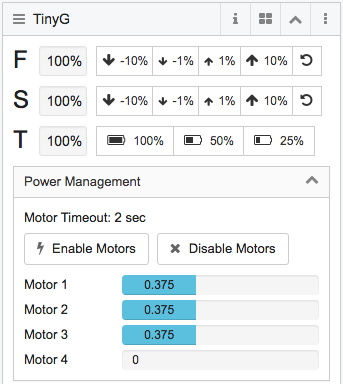
Sure! I will add Motor Enable ($me) and Motor Disable ($md) buttons in the next release.
#9 – rgallus 于 2017-06-13
Thanks cheton, I was going to make this same request.
#10 – cheton 于 2017-06-18
@tomauga @rgallus
May I confirm if you’re able to use {me:0} and {md:0} commands from your side as well as sending $me and $md commands? I’d like to send commands in JSON format, just want to make sure if can work for TinyG firmware v0.97.
#11 – rgallus 于 2017-06-18
Thank you for your response. I had forgotten about the $md and $me
commands. I reviewed the TinyG information and found them. I very much
like cncjs and want to thank you for its development. Looking forward to
the next update.
Rick
On Sun, Jun 18, 2017 at 12:20 PM, Cheton Wu
wrote:
> @tomauga <https://github.com/tomauga> @rgallus
> <https://github.com/rgallus>
>
> May I confirm if you’re able to use {me:0} and {md:0} commands from your
> side as well as sending $me and $md commands? I’d like to send commands
> in JSON format, just want to make sure if can work for TinyG firmware v0.97.
>
> —
> You are receiving this because you were mentioned.
> Reply to this email directly, view it on GitHub
> <https://github.com/cncjs/cncjs/issues/166#issuecomment-309287426>, or mute
> the thread
> <https://github.com/notifications/unsubscribe-auth/ADncS75lkSnKfdVx3mvUWjMdy1MSkmC3ks5sFU5lgaJpZM4N1nSU>
> .
>
#12 – tomauga 于 2017-06-19
@cheton Yes, I have access to both json and $ versions of the command. Please note that they are only active for the timeout period. ChiliPeppr gets around this by continually sending me until you press the un-energize button at which point he sends md.
#13 – cheton 于 2017-06-20
@tomauga
Thank you for reminding me. I will follow the same way for energizing motors:
https://github.com/chilipeppr/widget-tinyg/blob/master/widget.js#L674
#14 – rgallus 于 2017-06-20
I only have the ability to use $. For some reason I can’t energize Jason.
On Jun 18, 2017 12:20 PM, “Cheton Wu”
> @tomauga <https://github.com/tomauga> @rgallus
> <https://github.com/rgallus>
>
> May I confirm if you’re able to use {me:0} and {md:0} commands from your
> side as well as sending $me and $md commands? I’d like to send commands
> in JSON format, just want to make sure if can work for TinyG firmware v0.97.
>
> —
> You are receiving this because you were mentioned.
> Reply to this email directly, view it on GitHub
> <https://github.com/cncjs/cncjs/issues/166#issuecomment-309287426>, or mute
> the thread
> <https://github.com/notifications/unsubscribe-auth/ADncS75lkSnKfdVx3mvUWjMdy1MSkmC3ks5sFU5lgaJpZM4N1nSU>
> .
>
#15 – cheton 于 2017-06-20
@rgallus
Could you type $sys command to show your settings? You can try setting {ej:1}to enforce JSON mode.
#16 – rgallus 于 2017-06-20
Both systems now work. Did not know about using the bracket when writing
from the console.
Thank you
Rick
On Tue, Jun 20, 2017 at 12:04 PM, Cheton Wu
wrote:
> @rgallus <https://github.com/rgallus>
> Could you type $sys command to show your settings? You can try setting
> {ej:1}to enforce JSON mode.
>
> —
> You are receiving this because you were mentioned.
> Reply to this email directly, view it on GitHub
> <https://github.com/cncjs/cncjs/issues/166#issuecomment-309807189>, or mute
> the thread
> <https://github.com/notifications/unsubscribe-auth/ADncS6-9ECW84t2nvVTpdsaQ8YOd1VJpks5sF-2XgaJpZM4N1nSU>
> .
>
#17 – cheton 于 2017-06-21
Added in the commit a48de34fb178e17e4f9747974862c2de1ab23459. You can see a preview below. I will publish a new release in the next few days if no issues found.
#18 – rgallus 于 2017-06-21
Looks good. Can’t wait to try it.
Thanks,
Rick
On Wed, Jun 21, 2017 at 12:28 PM, Cheton Wu
wrote:
> Added in the commit a48de34
> <https://github.com/cncjs/cncjs/commit/a48de34fb178e17e4f9747974862c2de1ab23459>.
> You can see a preview below. I will publish a new release in the next few
> days if no issues found.
>
> [image: image]
> <https://user-images.githubusercontent.com/447801/27395182-7ae6466e-56e1-11e7-947b-33f00b9481e4.png>
>
> —
> You are receiving this because you were mentioned.
> Reply to this email directly, view it on GitHub
> <https://github.com/cncjs/cncjs/issues/166#issuecomment-310133582>, or mute
> the thread
> <https://github.com/notifications/unsubscribe-auth/ADncS59afvZ9uZw8yDBgrnh81pEex_9Gks5sGUTAgaJpZM4N1nSU>
> .
>
#19 – tomauga 于 2017-06-21
Great job, thanks Cheton!
#20 – cheton 于 2017-07-01
Added in 1.9.6
#21 – rgallus 于 2017-07-01
Thank you.
On Sat, Jul 1, 2017 at 7:51 AM, Cheton Wu
> Added in 1.9.6
>
> —
> You are receiving this because you were mentioned.
> Reply to this email directly, view it on GitHub
> <https://github.com/cncjs/cncjs/issues/166#issuecomment-312427840>, or mute
> the thread
> <https://github.com/notifications/unsubscribe-auth/ADncS59qwfzoKzy0GlUVVWpSgIRsQhYvks5sJjLUgaJpZM4N1nSU>
> .
>
![[gnea/grbl-Mega Issue#1] $ command extentions](https://www.grblhal.com/wp-content/themes/gitphp/timthumb.php?src=https://www.grblhal.com/wp-content/themes/gitphp/assets/img/pic/1.jpg&h=110&w=185&q=90&zc=1&ct=1)
![[gnea/grbl-Mega Issue#2] Better interrupt priorities](https://www.grblhal.com/wp-content/themes/gitphp/timthumb.php?src=https://www.grblhal.com/wp-content/themes/gitphp/assets/img/pic/2.jpg&h=110&w=185&q=90&zc=1&ct=1)
![[gnea/grbl-Mega Issue#3] ATMega16U2 virtual com port on ATMega2560](https://www.grblhal.com/wp-content/themes/gitphp/timthumb.php?src=https://www.grblhal.com/wp-content/themes/gitphp/assets/img/pic/9.jpg&h=110&w=185&q=90&zc=1&ct=1)
![[gnea/grbl-Mega Issue#4] Real-time adjustable feedrates](https://www.grblhal.com/wp-content/themes/gitphp/timthumb.php?src=https://www.grblhal.com/wp-content/themes/gitphp/assets/img/pic/4.jpg&h=110&w=185&q=90&zc=1&ct=1)
#1 – dirtdiver9 于 2017-06-09
I do this all the time where I have one path for a large tool, and a second for the vbit.
I load the first file, Home, position the bit, and hit play. When it is done, I home, switch the tool, position the bit, and play the second file.
When the first file is done the bit returns to what looks like work X0, Y0 and with Z elevated, but the display doesn’t show X0, Y0 so I haven’t trusted it which I why I re-home, and then position the bit with my 3 Axis block.
—Patrick
> On Jun 9, 2017, at 12:11 PM, Tom Auga wrote:
>
> I need to be able to run multiple files on the same work piece at the same coordinates and change tools between. (Using F-Engrave)
>
> I haven’t found a way to energize/lock motors so this can be done without accidentally changing an axis. Is there UI for this?
>
> I haven’t tried tool changes in a gcode file yet. Is this supported? If so are motors locked? How to resume etc.
>
> —
> You are receiving this because you are subscribed to this thread.
> Reply to this email directly, view it on GitHub <https://github.com/cncjs/cncjs/issues/166>, or mute the thread <https://github.com/notifications/unsubscribe-auth/ANeXdc-2TENf1kC6wfgciQHTIs7dwUL8ks5sCXypgaJpZM4N1nSU>.
>