
Hello,
I am having trouble running any .NC files from the SD card via the WEB-UI.
I suspect I have either forgotten to include something when compiling/setting up this build or there is something wrong with the way the UI is sending the $F commands, but I’ve begun to run out of ideas.
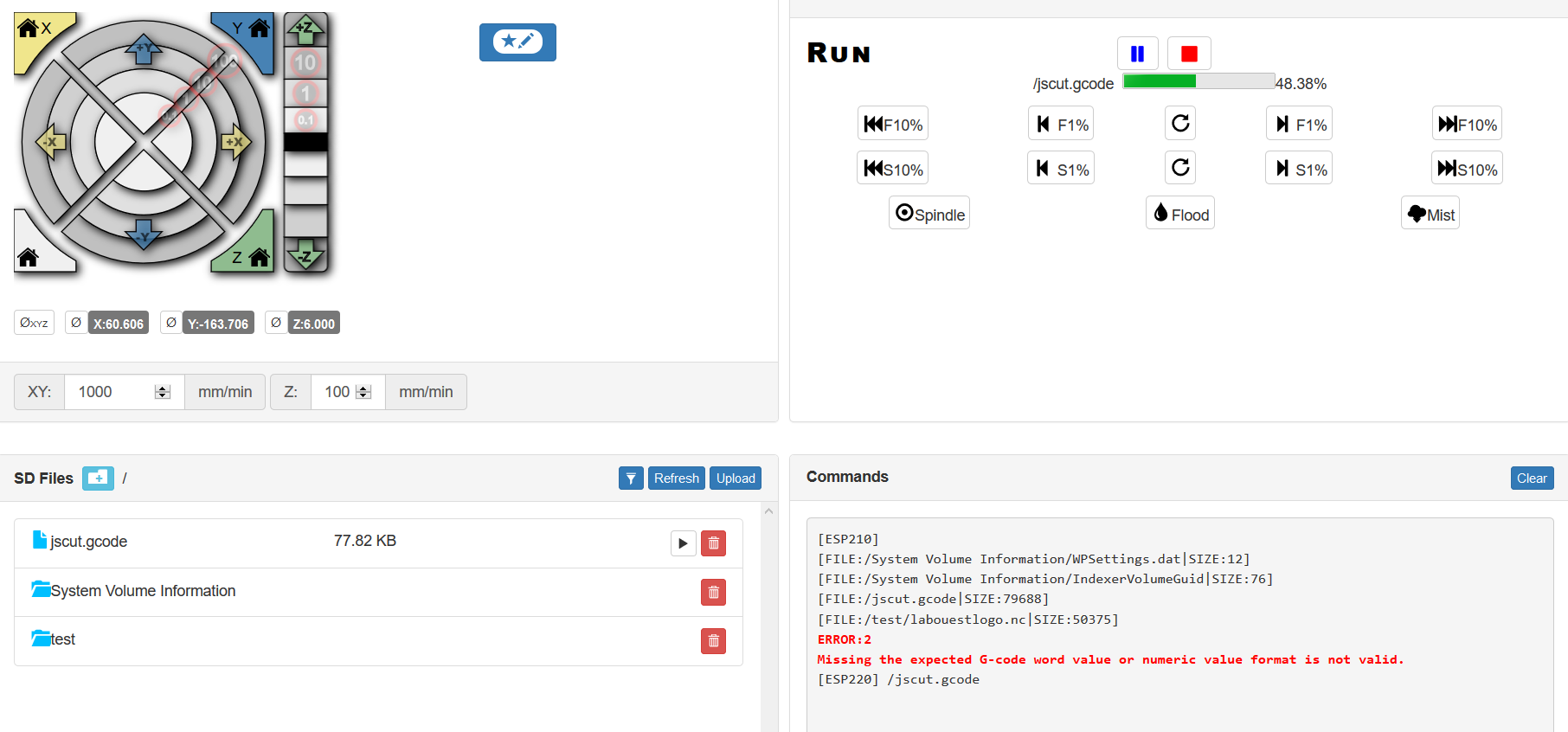
I can send simple jog commands via the UI, and I can manually copy and paste lines from my generated gcode directly into the send command window and everything moves okay, but I am unable to use the play button from the SD card window to actually run the full file. I continuously get the error:
> ERROR:2 Missing the expected G-code word value or numeric value format is not valid
To me, this error looks like the $F commands are not interpret-able by the underlying grbl code for some reason.
For reference, I am using:
* web-ui index.html.gz file from commit cddaa43939eb57d21172dca09e888f6255037bbb from the branch GRBL_ESP32 of luc’s repo.
* grbl_esp32 code from commit 38b4f177acd501e8e01ef04b028fa970ecc279aa from the branch WebUI of this repo
* Arduino 1.8.5 to build and upload
* esp32 Arduino board library version 1.0.1
I have also included a snapshot of my browser window in case that is useful
!esp3d-ui-snapshot
Thanks very much for any info, I hope this is just user error.
-Ellison
评论 (15)
#2 – eyasukochi 于 2019-02-28
Hey, thanks for getting back to me so quickly!
So, I went ahead and attempted to run my files via Universal Gcode Sender. While I did find some issues with my gcode (in the middle of some runs, with my use of G2/G3 commands), I did confirm that I can at least completely run a sample file I generated from your Hackaday template, which is attached below for posterity.
HADTemplate.zip
This same file, when uploaded via the WebUI, produces the same Error #2 issue.
I also noticed that trying to type $FM to list what was on the SD card would produce the same Error #2 when submitting via the UGS, though maybe I’m misunderstanding when that command should be functional.
For now I can get by with just using a USB connection, but I’d love to get the Web UI working completely, as I think it’s a great feature.
Please let me know what other information I can provide/things I can test out.
#3 – luc-github 于 2019-02-28
$F is no more supported in https://github.com/bdring/Grbl_Esp32/tree/WebUI
it has been replaced by [ESPXXX] command
“
* Get SD Card Status

[ESP200] pwd=
* Get SD Card Content
[ESP210] pwd=
* Print SD file
[ESP220]
“
unless you know what you are doing please stick to the index.html.gz present in data directory of
https://github.com/bdring/GrblEsp32/tree/WebUI/GrblEsp32/data
because it is sync with FW itself and will avoid command mismatch
Also ESP32 core is still in development and GIT repository got recent update for wifi tranfert, so we strongly suggest to use only latest GIT version, the 1.01 does not handle well telnet for example when latest GIT has the fix.
#4 – eyasukochi 于 2019-02-28
Well, so foolishly I never saw the index.html.gz inside the data directory because I had begun by reading the wiki which alludes to the file being available elsewhere (hence me downloading it from the separate repository). I have since updated my local copy, and the problem is resolved!
Thank you SO much for your help, Bart and Luc!
In the interest of helping others, I wanted to offer a change to the wiki, but I can’t make a fork of that so I’m not sure how I would make a pull request. Here is the section I would change inside of ESP3D-Web-UI-for-Grbl_ESP32.md
> On your first connection, you will be prompted to load the file that contains the WEBUI. The file is index.html.gz located inside of the Grbl_Esp32/data/ directory. Use the Choose Files button to select the index.html.gz file, then click the upload button. Once the file has loaded, refresh your browser.
Finally (and I don’t want to overstep my bounds here), I would suggest a rename of the data directory to something like web_ui for others like me who made the wrong assumption about what would be found in a folder called data
Thanks again!
#5 – bdring 于 2019-02-28
Glad to hear things are working now. Thanks for the input.
Most of the instructions are on this wiki page.
https://github.com/bdring/Grbl_Esp32/wiki/Compiling-the-firmware
I added a link to that page on the page you were talking about.
#6 – Geekoid85 于 2019-07-21
Hello,
I know it’s been a long time since this issue was open and the way we add index.html.gz as changed, but I encounter the same issue.
!image
I’m on the latest version of grbl esp32 and I use a freshly formated 16gb FAT32 sd card.
!image
What’s weird is that the file run fine from usb with cncjs or via the command line, but won’t run when I click the play button.
I tried to change the sd card for a 32gb (don’t have a <16gb) and reflash the firmware just to be sure I correctly followed the instructions.
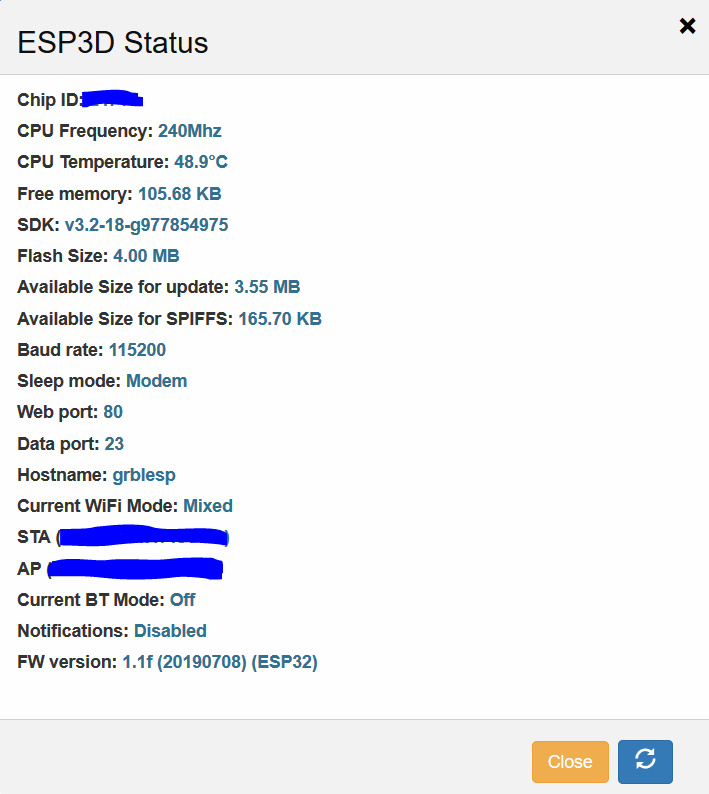
Maybe I'm on an old version of esp3d and it send some $F command instead of [ESP220]
#7 – luc-github 于 2019-07-21
if command line works but not the webUI the issue is in webUI version
what version do you use ?
and when you say command line is working, it is in serial or webui command ?
#8 – Geekoid85 于 2019-07-21
Starting a job from the sd card with the webui command line works. (See [ESP220] /jscut.gcode on the screenshot). However I can’t start the same job with the play button.
Just to be sure I downloaded the leatest version of the repo and copy paste the librairies folder into my arduino one, that changed nothing.
The webui version is 2.1b7
#9 – Geekoid85 于 2019-07-21
Correction, it’s a 8gb not 16gb
#10 – luc-github 于 2019-07-21
The version you use is very old and indeed use $F instead of [ESP220]
The current master use WebUI 2.1b39 so you are not using latest version of repo for sure
#11 – Geekoid85 于 2019-07-21
Okay that seem’s right.
Does the webui is updated every time I flash the esp with the arduino ide or I need to do it manually ?
The manual update menu request a .bin file so I guess it’s “automatic”
#12 – luc-github 于 2019-07-21
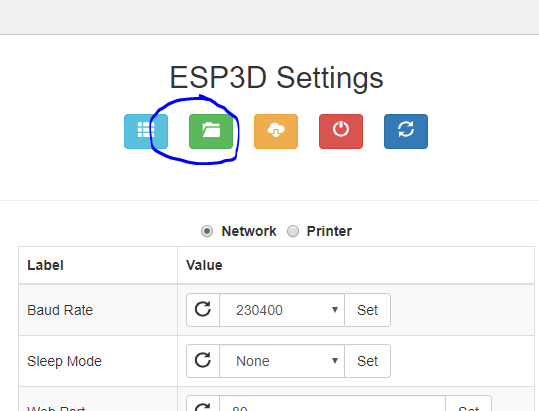
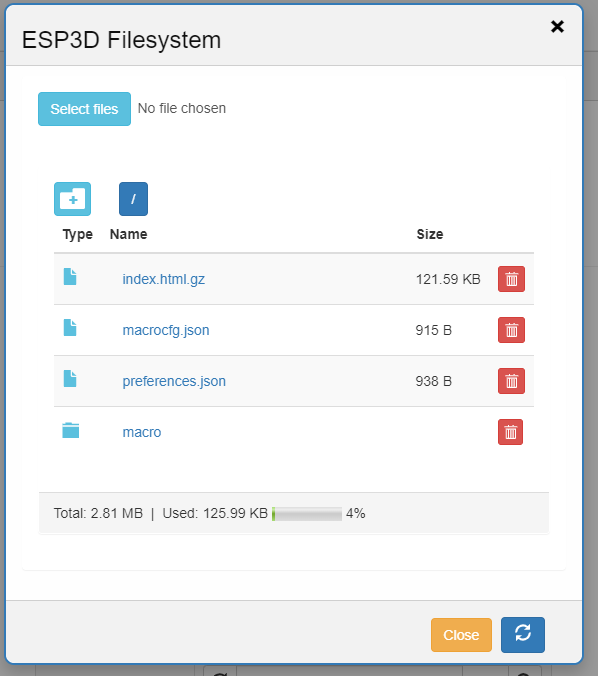
no they are different, need manual upload – go to ESP Filesystem and upload latest index.html.gz
!image
#13 – Geekoid85 于 2019-07-21
That fix it ! It was very a very clear explanation, Thanks luc :+1:
I wasn’t thinking uploading a new html file will automatically replace the old one. As said on the wiki, the webui wiki page really need to be updated. How can I contribute on that ?
On github if I remember correctly I can’t do a wiki pull request. Also maybe bart only want him to edit the wiki and I will understand that.
#14 – Geekoid85 于 2019-07-21
Oh one last concern. I only see a total of 165,7Ko available instead of 2,81Mo. Is that normal ? Maybe that’s an old screenshot.
#15 – luc-github 于 2019-07-21
Yes old screenshot when no BT stack with wifi in same fw
https://github.com/bdring/GrblEsp32/wiki/ESP3D-Web-UI-for-GrblESP32#esp3d-file-system-sspiff-not-sd-card, FS is explained there
And yes only @bdring can update wiki
![[gnea/grbl-Mega Issue#1] $ command extentions](https://www.grblhal.com/wp-content/themes/gitphp/timthumb.php?src=https://www.grblhal.com/wp-content/themes/gitphp/assets/img/pic/9.jpg&h=110&w=185&q=90&zc=1&ct=1)
![[gnea/grbl-Mega Issue#2] Better interrupt priorities](https://www.grblhal.com/wp-content/themes/gitphp/timthumb.php?src=https://www.grblhal.com/wp-content/themes/gitphp/assets/img/pic/7.jpg&h=110&w=185&q=90&zc=1&ct=1)
![[gnea/grbl-Mega Issue#3] ATMega16U2 virtual com port on ATMega2560](https://www.grblhal.com/wp-content/themes/gitphp/timthumb.php?src=https://www.grblhal.com/wp-content/themes/gitphp/assets/img/pic/11.jpg&h=110&w=185&q=90&zc=1&ct=1)
![[gnea/grbl-Mega Issue#4] Real-time adjustable feedrates](https://www.grblhal.com/wp-content/themes/gitphp/timthumb.php?src=https://www.grblhal.com/wp-content/themes/gitphp/assets/img/pic/6.jpg&h=110&w=185&q=90&zc=1&ct=1)

#1 – bdring 于 2019-02-26
It looks like there are some bad characters in the file. Can you paste the first few lines from the file into a reply?
Also, have you tried to stream the file over USB using something like Universal GCode sender? If that fails as well, it is likely the file.