
I’ve notice over the last couple days during hour long jobs, my CNC will make a single faint jolt noise and skip to a new position(not more than an inch from where it was) and continue cutting. When then first happened I was a stepper had lost steps due to some resistance.
However I stopped and hit “Return to Zero” in Universal Gcode Platform and it returned to the same 0,0,0 coordinates I set before the job was started. So if I didn’t loose steps, what could this be? I have put together what I have to describe this below.
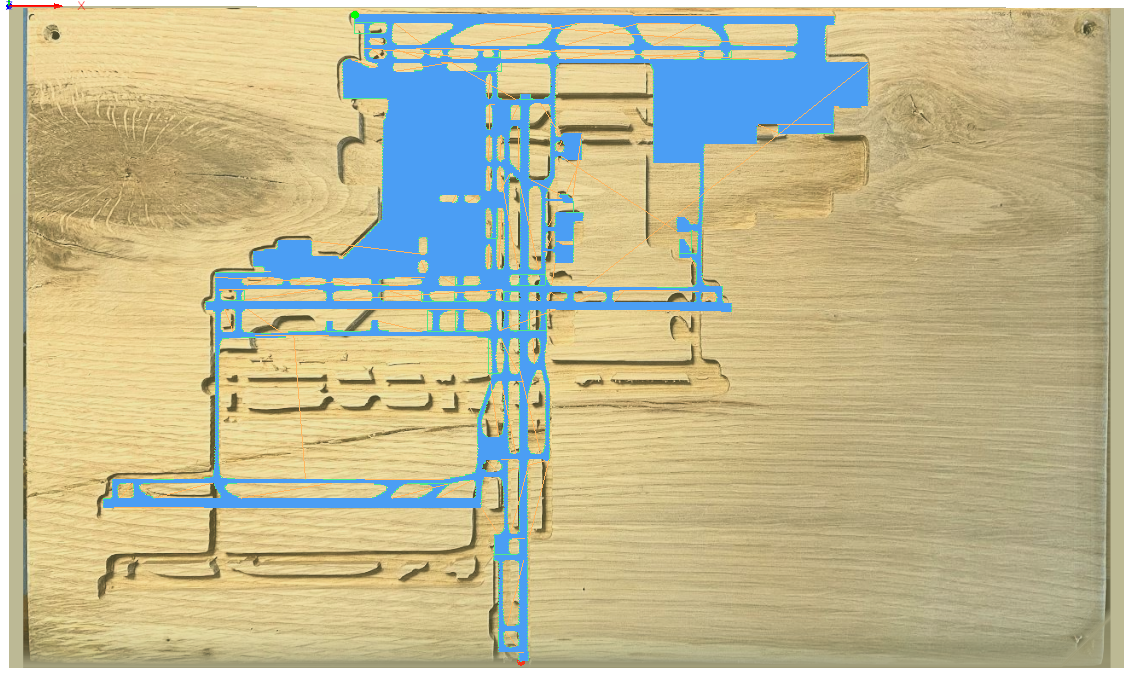
This is a test piece of oak for a new client. He wants a desk with an airport milled and filled with resin. The blue lines are the actual paths that are supposed to be taken. Sometime during the cut, my machine skipped to a new location and continued to cut. You can see if you move the paths down an inch where it decided to move to. After stopping the job and hitting “Return to Home” the router returned to it’s original position. NC file attached 1012.zip
!image
The happened last night as well while trying to surface the actual slab. I was doing an adaptive cut and for some reason I heard the jolt(I wouldve missed it if I wasn’t close) and looked up and the circle pattern had shifted. I hit stop and return to home and it returned to its orginal position. No lost steps. 1016.zip
Not a big deal but definitely worried this will happen on the actual cut of the airport.
GRBL_ESP32 [VER:1.3a.20201022:]
Windows 10.0.19041 Build 19041
Processor Intel(R) Core(TM) i5-7200U CPU @ 2.50GHz, 2701 Mhz, 2 Core(s), 4 Logical Processor(s)
Universal Gcode Platform Version 2.0
Thanks
评论 (18)
#2 – richardwpaul 于 2021-01-12
We had a $10k 4×8 machine at work that did the same thing. Manufacturer blamed it on a bad USB connection. A better shielded USB cord helped.
__
From: JAY
Sent: Sunday, January 10, 2021 1:22:17 PM
To: bdring/GrblEsp32
Cc: Subscribed
Subject: [bdring/Grbl_Esp32] Skipping To A New Position During Cutting But Didn’t Loose Home Position (#734)
I’ve notice over the last couple days during hour long jobs, my CNC will make a single faint jolt noise and skip to a new position(not more than an inch from where it was) and continue cutting. When then first happened I was a stepper had lost steps due to some resistance.
1012.zip<https://github.com/bdring/Grbl_Esp32/files/5793086/1012.zip>
However I stopped and hit “Return to Zero” in Universal Gcode Platform and it returned to the same 0,0,0 coordinates I set before the job was started. So if I didn’t loose steps, what could this be? I have put together what I have to describe this below.
This is a test piece of oak for a new client. He wants a desk with an airport milled and filled with resin. The blue lines are the actual paths that are supposed to be taken. Sometime during the cut, my machine skipped to a new location and continued to cut. You can see if you move the paths down an inch where it decided to move to. After stopping the job and hitting “Return to Home” the router returned to it’s original position. NC file attached
[image]<https://user-images.githubusercontent.com/603364/104131546-f0eede80-5344-11eb-8b95-7516e378560a.png>
The happened last night as well while trying to surface the actual slab. I was doing an adaptive cut and for some reason I heard the jolt(I wouldve missed it if I wasn’t close) and looked up and the circle pattern had shifted. I hit stop and return to home and it returned to its orginal position. No lost steps.
Not a big deal but definitely worried this will happen on the actual cut of the airport.
GRBL_ESP32 [VER:1.3a.20201022:]
Windows 10.0.19041 Build 19041
Universal Gcode Platform Version 2.0
Thanks
—
You are receiving this because you are subscribed to this thread.
Reply to this email directly, view it on GitHub<https://github.com/bdring/Grbl_Esp32/issues/734>, or unsubscribe<https://github.com/notifications/unsubscribe-auth/ACSMKRAQMG7UXO4JTE5WASTSZHV5TANCNFSM4V4TVDEQ>.
#3 – jaysettle 于 2021-04-12
This happened again on me last week. I had already replaced my usb cord with this one:
https://www.amazon.com/gp/product/B00C7SA21U/ref=ppxyodtbsearchasintitle?ie=UTF8&psc=1
The combination of gold-plated connectors, bare copper conductors, and foil & braid shielding provides superior cable performance and error-free data transmission via USB cable extension.
It is a 3.0 10ft extension usb A to B but is 2.0 capable. I don’t see anyone else having this problem otherwise they would have commented here so I have to assume it’s something with my setup.
#4 – jaysettle 于 2021-04-18
Could this issue I’m seeing be related to this?
https://discord.com/channels/780079161460916227/785937382548832256/827525017452544000
#5 – jaysettle 于 2021-04-25
This happened again last night. Cutting a sign for a client and the machine suddenly skipped to a new position.
I stopped the job and hit “Return To Zero” and it returned to the same point the job started at.
#6 – atsukita1969 于 2021-08-10
I had same problem with my laser, too.
My case, I got improvement with following change.
1. Add default stepping motor current setting “Machines/driver.h”
#define DEFAULTXCURRENT **
#define DEFAULTXHOLD_CURRENT **
(my case, machine has ganged Y axis, Y and Y2 also added.)
2 Motor current saving
during G code program, steeper motor had hot with max current.
I use 75% of default current and 40% of hold current instead of motor max current.
#7 – jaysettle 于 2021-08-10
Hey this was due to a “uart” coms bug. They fixed it in a firmware with a new uart driver.
I’m sorry I don’t know which version but I believe it was like 7 months ago or something. I had to flash my controller with the updated firmware and it hasn’t skipped yet.
-Jay
> On Aug 10, 2021, at 1:25 AM, atsukita1969 @.*> wrote:
>
>
> I had same problem with my laser, too.
> My case, I got improvement with following change.
>
> Add default stepping motor current setting “Machines/driver.h”
> #define DEFAULTXCURRENT **
> #define DEFAULTXHOLD_CURRENT **
> (my case, machine has ganged Y axis, Y and Y2 also added.)
> 2 Motor current saving
> during G code program, steeper motor had hot with max current.
> I use 75% of default current and 40% of hold current instead of motor max current.
>
>
>
> —
> You are receiving this because you authored the thread.
> Reply to this email directly, view it on GitHub, or unsubscribe.
> Triage notifications on the go with GitHub Mobile for iOS or Android.
#8 – atsukita1969 于 2021-08-11
You solved problem. Good news.
I had this movement error even latest firmware.
Thanks for your info.
#9 – jaysettle 于 2021-08-11
Oh no. I hope it never comes back.
-Jay
> On Aug 10, 2021, at 8:01 PM, atsukita1969 @.*> wrote:
>
>
> You solved problem. Good news.
>
> I had this movement error even latest firmware.
>
> Thanks for your info.
>
> —
> You are receiving this because you authored the thread.
> Reply to this email directly, view it on GitHub, or unsubscribe.
> Triage notifications on the go with GitHub Mobile for iOS or Android.
#10 – jaysettle 于 2021-09-07
Had the problem again last night. Very disappointed.
-Jay
> On Aug 10, 2021, at 8:07 PM, Jay Settle @.*> wrote:
>
> Oh no. I hope it never comes back.
>
>
> -Jay
>
>
>>> On Aug 10, 2021, at 8:01 PM, atsukita1969 @.*> wrote:
>>>
>>
>> You solved problem. Good news.
>>
>> I had this movement error even latest firmware.
>>
>> Thanks for your info.
>>
>> —
>> You are receiving this because you authored the thread.
>> Reply to this email directly, view it on GitHub, or unsubscribe.
>> Triage notifications on the go with GitHub Mobile for iOS or Android.
#11 – Bakafish 于 2021-09-08
Are you logging the command input and output? Either a command is getting dropped (due to electrical interference, or some other communication issue) or you are losing steps (a motor cord getting hung up on something, or debris temporarily jamming one of the axis.) Basic CNC’s do not have any way to know when they lose sync with the internal coordinate system. The best way to resolve this is to babysit it until it has an error, then stop it and determine if there was a comms issue (which should show up in the logs as an error) or some physical issue (motion problems or a stepper overheating, etc…)
There is support for G-Code checksums, but you will need to use a g-code sender that supports them. This will ensure that any communication errors that would still be parsable g-code are caught. You also may want to try using local storage (SD Card if you have one) as it isn’t going to suffer from the same kinds of interference.
#12 – bdring 于 2021-09-08
@jaysettle How are you compiling the firmware. Are you using the Arduino IDE or PlatformIO? You mention changing the UART driver. I am not sure what you mean by that, but the true solution is mentioned here.
https://github.com/bdring/Grbl_Esp32/wiki/Compiling-with-Arduino-IDE
Use ESP32 library version 1.0.3
#13 – jaysettle 于 2021-09-08
Check this video around the 3:40 minute mark. This is when my machine stopped. Look at the console. No errors.
https://photos.app.goo.gl/mwTUpewoENSwcL1DA
Also I was able “return to zero” and return to my original zero mark. Very odd.
-Jay
> On Sep 7, 2021, at 10:34 PM, Jason Benguerel @.*> wrote:
>
>
> Are you logging the command input and output? Either a command is getting dropped (due to electrical interference, or some other communication issue) or you are losing steps (a motor cord getting hung up on something, or debris temporarily jamming one of the axis.) Basic CNC’s do not have any way to know when they lose sync with the internal coordinate system. The best way to resolve this is to babysit it until it has an error, then stop it and determine if there was a comms issue (which should show up in the logs as an error) or some physical issue (motion problems or a stepper overheating, etc…)
>
> There is support for G-Code checksums, but you will need to use a g-code sender that supports them. This will ensure that any communication errors that would still be parsable g-code are caught. You also may want to try using local storage (SD Card if you have one) as it isn’t going to suffer from the same kinds of interference.
>
> —
> You are receiving this because you authored the thread.
> Reply to this email directly, view it on GitHub, or unsubscribe.
> Triage notifications on the go with GitHub Mobile for iOS or Android.
#14 – jaysettle 于 2021-09-08
I’m uploading via platform.io. As far as uart, I thought there was a fix for uart in the build I upload via platform.io. I can try another latest upload.
-Jay
> On Sep 7, 2021, at 11:11 PM, bdring @.*> wrote:
>
>
> @jaysettle How are you compiling the firmware. Are you using the Arduino IDE or PlatformIO? You mention changing the UART driver. I am not sure what you mean by that, but the true solution is mentioned here.
>
> https://github.com/bdring/Grbl_Esp32/wiki/Compiling-with-Arduino-IDE
>
> Use ESP32 library version 1.0.3
>
> —
> You are receiving this because you were mentioned.
> Reply to this email directly, view it on GitHub, or unsubscribe.
> Triage notifications on the go with GitHub Mobile for iOS or Android.
#15 – bdring 于 2021-09-08
PlatformIO should get the version correct.
#16 – jaysettle 于 2021-09-09
How do I know if I’m using Use ESP32 library version 1.0.3?
#17 – Bakafish 于 2021-09-09
If you compile the latest release version using PlatformIO in Visual Studio Code (with all the latest updates), the properly working library is used. Verifying what version of the library is used in whatever binary you may have is technically possible with the right developer tools and know-how, but telling you how to do that is beyond the scope of the proposed solution. The best way to ensure you have a fixed version is to build a ‘known good’ version as specified above.
#18 – bdring 于 2021-09-09
The boot messages tell you the SDK version. I do know know what number 1.0.3 is. Not at home this week.
![[gnea/grbl-Mega Issue#1] $ command extentions](https://www.grblhal.com/wp-content/themes/gitphp/timthumb.php?src=https://www.grblhal.com/wp-content/themes/gitphp/assets/img/pic/4.jpg&h=110&w=185&q=90&zc=1&ct=1)
![[gnea/grbl-Mega Issue#2] Better interrupt priorities](https://www.grblhal.com/wp-content/themes/gitphp/timthumb.php?src=https://www.grblhal.com/wp-content/themes/gitphp/assets/img/pic/10.jpg&h=110&w=185&q=90&zc=1&ct=1)
![[gnea/grbl-Mega Issue#3] ATMega16U2 virtual com port on ATMega2560](https://www.grblhal.com/wp-content/themes/gitphp/timthumb.php?src=https://www.grblhal.com/wp-content/themes/gitphp/assets/img/pic/9.jpg&h=110&w=185&q=90&zc=1&ct=1)
![[gnea/grbl-Mega Issue#4] Real-time adjustable feedrates](https://www.grblhal.com/wp-content/themes/gitphp/timthumb.php?src=https://www.grblhal.com/wp-content/themes/gitphp/assets/img/pic/7.jpg&h=110&w=185&q=90&zc=1&ct=1)


#1 – MitchBradley 于 2021-01-10
I would say that it is a very big deal! Here are some suggestions for isolating where the problem might be. Unfortunately, to be certain of any results, multiple test runs might be necessary, which could be time-consuming. In order to avoid continuous observation to detect “jolts”, you could let the program run to completion and check the final position.
1. Try an “air cut” of the surfacing pass with the spindle disconnected. If it succeeds (no jolt or ending position as expected), then the problem could be caused by electrical interference from the spindle wiring.
2. Try using a different gcode sender. If one sender consistently fails and another consistently succeeds, then there could be a flow control problem either in the sender or in grbl_esp32.