
Hello,
I’m trying to follow the steps listed here: https://github.com/bdring/Grbl_Esp32/wiki/StallGuard-Setup-and-Tuning
When I enable this for an axis, I do not get any additional information showing up in my Arduino Console (or webui.) I’ve tried sending the command through both the console and webui. I’ve tried these options:
$Report/StallGuard=X (Assuming this is my X Left)
$Report/StallGuard=Y (Assuming this is my X Right)
$Report/StallGuard=Z (Assuming this is my Y)
$Report/StallGuard=A (Assuming this is my Z Left)
$Report/StallGuard=B (Assuming this is my Z Right)
$Report/StallGuard=C (Not Used)
and tried to Home X and Y. (I’m running Dual X (in Slot 1&2) but Single Y (in Slot 3)
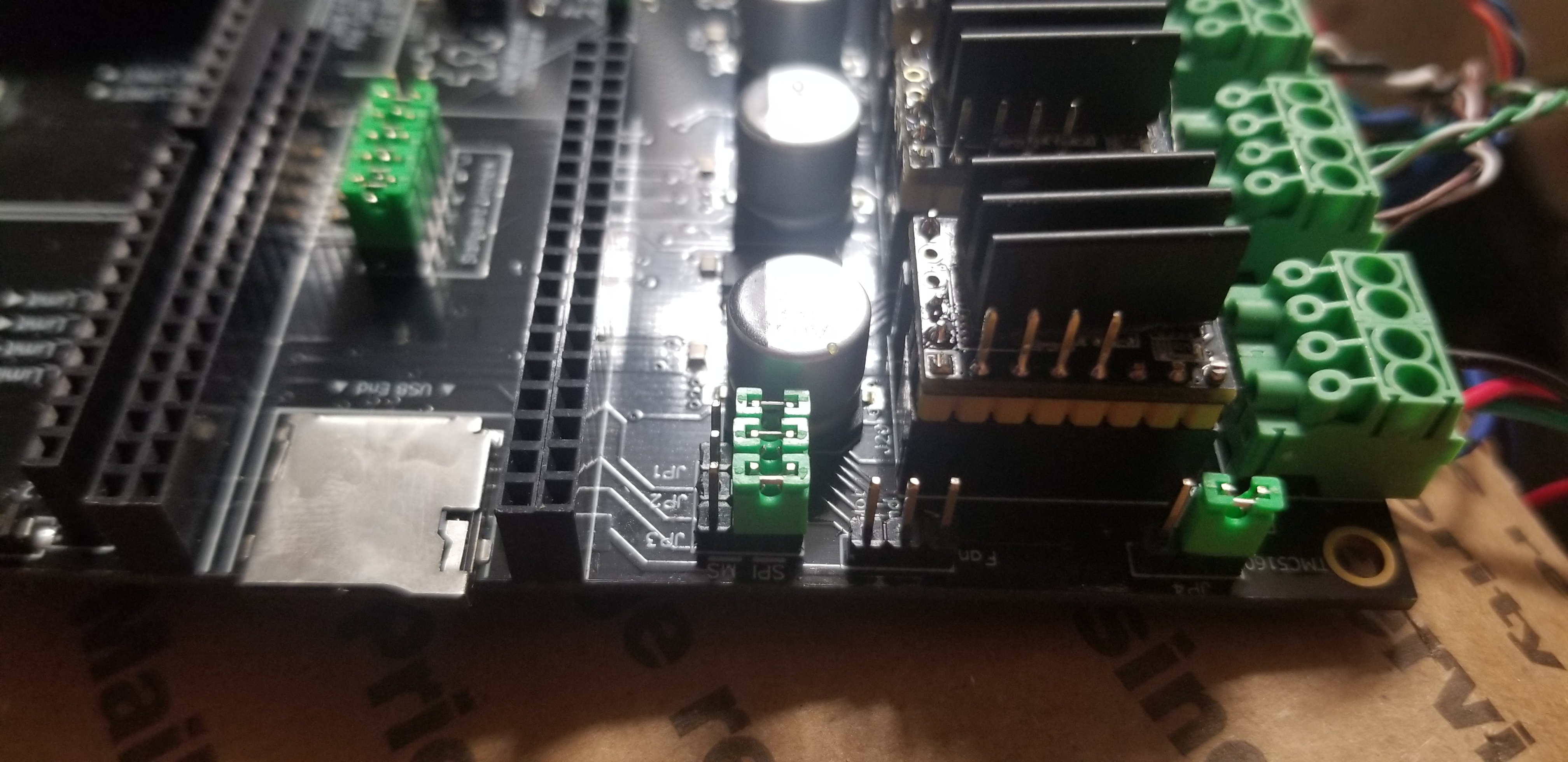
Here is how I have the jumpers configured:
!20201106_171229
I’ve set the stallguard super low (2) and high (20) but the machine reacts the same and again I don’t get anything out in the Arduino console. Here are all of the GRBL settings.
settings.txt
I’ve set both Homing and run mode to StallGuard. (When I used the option provided [TRINAMICMODESTALLGUARD], I couldn’t compile so I used this option that I found in the 6packtrinamic_stallguard.h example file in Machines.) #1 – bdring 于 2020-11-06 StallGuard is not supported for dual motor axes. $Report/StallGuard=X would report info for the X axis motor regardless of what socket it is in. Stallguard only reports when the axis is homing.
#3 – bdring 于 2020-11-06
I’ll configure a controller and test it here. It is late, so it will probably be tomorrow. Please post your startup messages and Settings in a reply.
#4 – GaryLyon 于 2020-11-06
Startup message is attached. Settings was in the first message. I’ve had the check motor power message before but when I do a full off and back on I don’t see it. Running BigTreeTech TMC5160 V1.2 on 24V. After the startup, the motors did move.
“
[MSG:Grbl_ESP32 Ver 1.3a Date 20200929]

[MSG:Compiled with ESP32 SDK:v3.2.3-14-gd3e562907]

[MSG:Using machine:6 Pack Controller XXYZ 5160 SW1 Relay3 V1]

[MSG:Axis count 3]

[MSG:I2S Steps, Stream]

[MSG:Init Motors]

[MSG:X  Axis Trinamic TMC5160 Step:I2SO(2) Dir:I2SO(1) CS:I2SO(3) Disable:I2SO(0) Index:-1 Limits(0.000,0.000)]

[MSG:X2 Axis Trinamic TMC5160 Step:I2SO(5) Dir:I2SO(4) CS:I2SO(6) Disable:I2SO(7) Index:-1 Limits(0.000,0.000)]

[MSG:Y  Axis Trinamic TMC5160 Step:I2SO(10) Dir:I2SO(9) CS:I2SO(11) Disable:I2SO(8) Index:-1 Limits(0.000,0.000)]

[MSG:Z  Axis Trinamic TMC5160 Step:I2SO(13) Dir:I2SO(12) CS:I2SO(14) Disable:I2SO(15) Index:-1 Limits(0.000,0.000)]

[MSG:Z2 Axis Trinamic TMC5160 Step:I2SO(18) Dir:I2SO(17) CS:I2SO(19) Disable:I2SO(16) Index:-1 Limits(0.000,0.000)]

[MSG:X  Trinamic driver test failed. Check motor power]

[MSG:X2 Trinamic driver test failed. Check motor power]

[MSG:Y  Trinamic driver test failed. Check motor power]

[MSG:Z  Trinamic driver test failed. Check motor power]

[MSG:Z2 Trinamic driver test failed. Check motor power]

[MSG:TMCStepper Library Ver. 0x000701]

[MSG:Stallguard debug enabled: 2]

[MSG:Relay spindle Output:GPIO(26), Enbl:None, Dir:None]
[MSG:Local access point GRBL_ESP started, 192.168.0.1]
[MSG:Captive Portal Started]
[MSG:HTTP Started]
[MSG:TELNET Started 23]
[MSG:X Axis limit switch on pin GPIO(33)]
[MSG:Y Axis limit switch on pin GPIO(32)]
[MSG:Z Axis limit switch on pin GPIO(35)]
Grbl 1.3a ['$' for help]
[MSG:'$H'|'$X' to unlock]
“
Is stallguard just not supported for homing but is when running with dual motor axis? I’ve had issues with missed steps in the past so I switched to this platform and picked up the 5160 steppers.
#5 – bdring 于 2020-11-07
What type of power supply are you using?
#6 – bdring 于 2020-11-07
Please post your settings. Send $S to see them and post them in the message…not attached please.
#7 – GaryLyon 于 2020-11-07
It is a generic 24v 15a power supply.
$0=4
$1=250
$2=0
$3=0
$4=0
$5=1
$6=0
$10=1
$11=0.010
$12=0.002
$13=0
$20=0
$21=0
$22=1
$23=3
$24=200.000
$25=2000.000
$26=250.000
$27=1.000
$30=1000.000
$31=0.000
$32=0
$N1=
$N0=
$100=100.000
$101=100.000
$102=100.000
$103=1666.000
$104=1666.000
$105=100.000
$110=1000.000
$111=1000.000
$112=1000.000
$113=1000.000
$114=1000.000
$115=1000.000
$120=200.000
$121=200.000
$122=200.000
$123=200.000
$124=200.000
$125=200.000
$130=300.000
$131=300.000
$132=300.000
$133=300.000
$134=300.000
$135=300.000
$140=1.500
$141=1.500
$142=1.500
$143=1.500
$144=1.500
$145=1.500
$150=0.800
$151=0.800
$152=0.800
$153=0.800
$154=0.800
$155=0.800
$160=16
$161=16
$162=16
$163=16
$164=16
$165=16
$170=20
$171=2
$172=2
$173=2
$174=2
$175=2
ok
$ESP100 => $Sta/SSID
$ESP101 => $Sta/Password
$ESP102 => $Sta/IPMode
$ESP105 => $AP/SSID
$ESP106 => $AP/Password
$ESP107 => $AP/IP
$ESP108 => $AP/Channel
$ESP112 => $System/Hostname
$ESP120 => $Http/Enable
$ESP121 => $Http/Port
$ESP130 => $Telnet/Enable
$ESP131 => $Telnet/Port
$ESP110 => $Radio/Mode
$ESP140 => $Bluetooth/Name
$0 => $Stepper/Pulse
$1 => $Stepper/IdleTime
$2 => $Stepper/StepInvert
$3 => $Stepper/DirInvert
$4 => $Stepper/EnableInvert
$5 => $Limits/Invert
$6 => $Probe/Invert
$10 => $Report/Status
$11 => $GCode/JunctionDeviation
$12 => $GCode/ArcTolerance
$13 => $Report/Inches
$20 => $Limits/Soft
$21 => $Limits/Hard
$22 => $Homing/Enable
$23 => $Homing/DirInvert
$24 => $Homing/Feed
$25 => $Homing/Seek
$26 => $Homing/Debounce
$27 => $Homing/Pulloff
$30 => $GCode/MaxS
$31 => $GCode/MinS
$32 => $GCode/LaserMode
$N1 => $GCode/Line1
$N0 => $GCode/Line0
$33 => $Spindle/PWM/Frequency
$34 => $Spindle/PWM/Off
$35 => $Spindle/PWM/Min
$36 => $Spindle/PWM/Max
$100 => $X/StepsPerMm
$101 => $Y/StepsPerMm
$102 => $Z/StepsPerMm
$103 => $A/StepsPerMm
$104 => $B/StepsPerMm
$105 => $C/StepsPerMm
$110 => $X/MaxRate
$111 => $Y/MaxRate
$112 => $Z/MaxRate
$113 => $A/MaxRate
$114 => $B/MaxRate
$115 => $C/MaxRate
$120 => $X/Acceleration
$121 => $Y/Acceleration
$122 => $Z/Acceleration
$123 => $A/Acceleration
$124 => $B/Acceleration
$125 => $C/Acceleration
$130 => $X/MaxTravel
$131 => $Y/MaxTravel
$132 => $Z/MaxTravel
$133 => $A/MaxTravel
$134 => $B/MaxTravel
$135 => $C/MaxTravel
$140 => $X/Current/Run
$141 => $Y/Current/Run
$142 => $Z/Current/Run
$143 => $A/Current/Run
$144 => $B/Current/Run
$145 => $C/Current/Run
$150 => $X/Current/Hold
$151 => $Y/Current/Hold
$152 => $Z/Current/Hold
$153 => $A/Current/Hold
$154 => $B/Current/Hold
$155 => $C/Current/Hold
$160 => $X/Microsteps
$161 => $Y/Microsteps
$162 => $Z/Microsteps
$163 => $A/Microsteps
$164 => $B/Microsteps
$165 => $C/Microsteps
$170 => $X/StallGuard
$171 => $Y/StallGuard
$172 => $Z/StallGuard
$173 => $A/StallGuard
$174 => $B/StallGuard
$175 => $C/StallGuard
ok
#8 – bdring 于 2020-11-07
As a test, try changing the current to 0.5A run and 0.25 hold. If it runs, it could be issues with your power supply.
$X/Current/Run=0.5
$X/Current/Hold=0.25
For all your axes.
#9 – GaryLyon 于 2020-11-07
I’ve got a beefy name brand 19V power supply I can try but the startup message still says the same thing
rst:0x1 (POWERONRESET),boot:0x13 (SPIFASTFLASHBOOT)
configsip: 0, SPIWP:0xee
clkdrv:0x00,qdrv:0x00,ddrv:0x00,cs0drv:0x00,hddrv:0x00,wpdrv:0x00
mode:DIO, clock div:1
load:0x3fff0018,len:4
load:0x3fff001c,len:1216
ho 0 tail 12 room 4
load:0x40078000,len:9720
ho 0 tail 12 room 4
load:0x40080400,len:6352
entry 0x400806b8
[MSG:Grbl_ESP32 Ver 1.3a Date 20200929]
[MSG:Compiled with ESP32 SDK:v3.2.3-14-gd3e562907]
[MSG:Using machine:6 Pack Controller XXYZ 5160 SW1 Relay3 V1]
[MSG:Axis count 3]
[MSG:I2S Steps, Stream]
[MSG:Init Motors]
[MSG:X Axis Trinamic TMC5160 Step:I2SO(2) Dir:I2SO(1) CS:I2SO(3) Disable:I2SO(0) Index:-1 Limits(0.000,0.000)]
[MSG:X2 Axis Trinamic TMC5160 Step:I2SO(5) Dir:I2SO(4) CS:I2SO(6) Disable:I2SO(7) Index:-1 Limits(0.000,0.000)]
[MSG:Y Axis Trinamic TMC5160 Step:I2SO(10) Dir:I2SO(9) CS:I2SO(11) Disable:I2SO(8) Index:-1 Limits(0.000,0.000)]
[MSG:Z Axis Trinamic TMC5160 Step:I2SO(13) Dir:I2SO(12) CS:I2SO(14) Disable:I2SO(15) Index:-1 Limits(0.000,0.000)]
[MSG:Z2 Axis Trinamic TMC5160 Step:I2SO(18) Dir:I2SO(17) CS:I2SO(19) Disable:I2SO(16) Index:-1 Limits(0.000,0.000)]
[MSG:X Trinamic driver test failed. Check motor power]
[MSG:X2 Trinamic driver test failed. Check motor power]
[MSG:Y Trinamic driver test failed. Check motor power]
[MSG:Z Trinamic driver test failed. Check motor power]
[MSG:Z2 Trinamic driver test failed. Check motor power]
[MSG:TMCStepper Library Ver. 0x000701]
[MSG:Stallguard debug enabled: 2]
[MSG:Relay spindle Output:GPIO(26), Enbl:None, Dir:None]
[MSG:Local access point GRBL_ESP started, 192.168.0.1]
[MSG:Captive Portal Started]
[MSG:HTTP Started]
[MSG:TELNET Started 23]
[MSG:X Axis limit switch on pin GPIO(33)]
[MSG:Y Axis limit switch on pin GPIO(32)]
[MSG:Z Axis limit switch on pin GPIO(35)]
Grbl 1.3a [‘$’ for help]
[MSG:’$H’|’$X’ to unlock]
$0=4
$1=250
$2=0
$3=0
$4=0
$5=1
$6=0
$10=1
$11=0.010
$12=0.002
$13=0
$20=0
$21=0
$22=1
$23=3
$24=200.000
$25=2000.000
$26=250.000
$27=1.000
$30=1000.000
$31=0.000
$32=0
$N1=
$N0=
$33=5000.000
$34=0.000
$35=0.000
$36=100.000
$100=100.000
$101=100.000
$102=100.000
$103=1666.000
$104=1666.000
$105=100.000
$110=1000.000
$111=1000.000
$112=1000.000
$113=1000.000
$114=1000.000
$115=1000.000
$120=200.000
$121=200.000
$122=200.000
$123=200.000
$124=200.000
$125=200.000
$130=300.000
$131=300.000
$132=300.000
$133=300.000
$134=300.000
$135=300.000
$140=0.500
$141=0.500
$142=0.500
$143=0.500
$144=0.500
$145=0.500
$150=0.250
$151=0.250
$152=0.250
$153=0.250
$154=0.250
$155=0.250
$160=16
$161=16
$162=16
$163=16
$164=16
$165=16
$170=20
$171=2
$172=2
$173=2
$174=2
$175=2
ok
#10 – bdring 于 2020-11-07
Can you attach your machine definition file?
#11 – GaryLyon 于 2020-11-07
It is triggering the protection on the 19v 7A power supply on startup/test. Is there an option to test one at a time?
#pragma once
// clang-format off
/*
6packtrinamic5160XXYYZinput1relay3_V1.h
5160 Drivers
XXYYZ motor arrangement
Switch module in #1
Relay Module in #3
V1 6_Pack Hardware
Part of Grbl_ESP32
Pin assignments for the ESP32 SPI 6-axis board
2020 – Bart Dring
Grbl_ESP32 is free software: you can redistribute it and/or modify
it under the terms of the GNU General Public License as published by
the Free Software Foundation, either version 3 of the License, or
(at your option) any later version.
Grbl is distributed in the hope that it will be useful,
but WITHOUT ANY WARRANTY; without even the implied warranty of
MERCHANTABILITY or FITNESS FOR A PARTICULAR PURPOSE. See the
GNU General Public License for more details.
You should have received a copy of the GNU General Public License
along with Grbl_ESP32. If not, see <http://www.gnu.org/licenses/>.
*/
#define MACHINE_NAME “6 Pack Controller XXYZ 5160 SW1 Relay3 V1”
#ifdef N_AXIS
#undef N_AXIS
#endif
#define N_AXIS 3
// === Special Features
// I2S (steppers & other output-only pins)
#define USEI2SOUT
#define USEI2SSTEPS
//#define DEFAULTSTEPPER STI2S_STATIC
#define I2SOUTBCK GPIONUM22
#define I2SOUTWS GPIONUM17
#define I2SOUTDATA GPIONUM21
// === motors
// Old Setting: Motors::TrinamicMode::CoolStep
#define TRINAMICRUNMODE Motors::TrinamicMode::StallGuard
#define TRINAMICHOMINGMODE Motors::TrinamicMode::StallGuard
#define XTRINAMICDRIVER 5160
#define XDISABLEPIN I2SO(0)
#define XDIRECTIONPIN I2SO(1)
#define XSTEPPIN I2SO(2)
#define XCSPIN I2SO(3)
#define XRSENSE TMC5160RSENSE_DEFAULT
#define X2TRINAMICDRIVER 5160
#define X2DIRECTIONPIN I2SO(4)
#define X2STEPPIN I2SO(5)
#define X2DISABLEPIN I2SO(7)
#define X2CSPIN I2SO(6)
#define X2RSENSE TMC5160RSENSE_DEFAULT
#define YTRINAMICDRIVER 5160
#define YDISABLEPIN I2SO(8)
#define YDIRECTIONPIN I2SO(9)
#define YSTEPPIN I2SO(10)
#define YCSPIN I2SO(11)
#define YRSENSE TMC5160RSENSE_DEFAULT
#define ZTRINAMICDRIVER 5160
#define ZDIRECTIONPIN I2SO(12)
#define ZSTEPPIN I2SO(13)
#define ZDISABLEPIN I2SO(15)
#define ZCSPIN I2SO(14)
#define ZRSENSE TMC5160RSENSE_DEFAULT
#define Z2TRINAMICDRIVER 5160
#define Z2DISABLEPIN I2SO(16)
#define Z2DIRECTIONPIN I2SO(17)
#define Z2STEPPIN I2SO(18)
#define Z2CSPIN I2SO(19)
#define Z2RSENSE TMC5160RSENSE_DEFAULT
// No 6th motor
// === CNC I/O Modules
//4x Input in Socket #1
#define XLIMITPIN GPIONUM33 // Wire both x switches N.O. here
#define YLIMITPIN GPIONUM32 // Wire both y switches N.O. here
#define ZLIMITPIN GPIONUM35
#define PROBEPIN GPIONUM_34
// Relay in Socket #3
#define SPINDLE_TYPE SpindleType::RELAY
#define SPINDLEOUTPUTPIN GPIONUM26
// === Default settings
#define DEFAULTSTEPPULSEMICROSECONDS I2SOUTUSECPER_PULSE
#12 – bdring 于 2020-11-07
Did you get an invite to Slack? Can we continue working on this there?
#13 – GaryLyon 于 2020-11-07
I’m fine with Slack but I don’t see an invite. Would it be here, gmail, tindie, or in slack? (I did check all of those places.)
#14 – GaryLyon 于 2020-11-07
The steps we followed to find the problem was remove all drivers except one. Power on, connect usb, reboot esp and check log messages. If successful, remove usb, remove power, add next driver and follow the steps again.
Issue occurred again to me once I added in my 6th stepper. I am not using that axis and just assumed it should be in there.
tldr – Don’t have a driver in an axis you aren’t using.
Thanks again for your help bdring!
![[gnea/grbl-Mega Issue#1] $ command extentions](https://www.grblhal.com/wp-content/themes/gitphp/timthumb.php?src=https://www.grblhal.com/wp-content/themes/gitphp/assets/img/pic/5.jpg&h=110&w=185&q=90&zc=1&ct=1)
![[gnea/grbl-Mega Issue#2] Better interrupt priorities](https://www.grblhal.com/wp-content/themes/gitphp/timthumb.php?src=https://www.grblhal.com/wp-content/themes/gitphp/assets/img/pic/6.jpg&h=110&w=185&q=90&zc=1&ct=1)
![[gnea/grbl-Mega Issue#4] Real-time adjustable feedrates](https://www.grblhal.com/wp-content/themes/gitphp/timthumb.php?src=https://www.grblhal.com/wp-content/themes/gitphp/assets/img/pic/3.jpg&h=110&w=185&q=90&zc=1&ct=1)
#2 – GaryLyon 于 2020-11-06
I just ran $Report/StallGuard=Y
Console said ok
$HY
And still nothing in the console.