
What version of the firmware are you using?
FW version:1.1f
Is the problem repeatable?
Yes
Under what conditions does the bug occur?
Streaming Gcode over Bluetooth serial from a windows machine
I would like to send Gcode by Bluetooth from a Windows machine and there are a few things I have noticed.
I am getting a lot of parsing errors
> G03 X 313.323 Y -15.311 Z -1.000 I 0.881 J 4.298 (line=41)
error:1 (Expected command letter)
> G03 X 314.926 Y -15.263 Z -1.000 I -0.093 J 29.853 (line=42)
error:33 (Invalid gcode ID:33)
and so on….
Is there somewhere I can read what are the Gcode parsing requirements for ESP32GRBL ? From what I have found in the wiki I can not see where the failure in the code is and I am not sure if the issue is the X 5 instead of X5 or something else. as the docs from Linux CNC have the following statement:
“Spaces and tabs are allowed anywhere on a line of code and do not change the meaning of the line, except inside comments. This makes some strange-looking input legal. The line G0X +0. 12 34Y 7 is equivalent to G0 x+0.1234 Y7, for example”
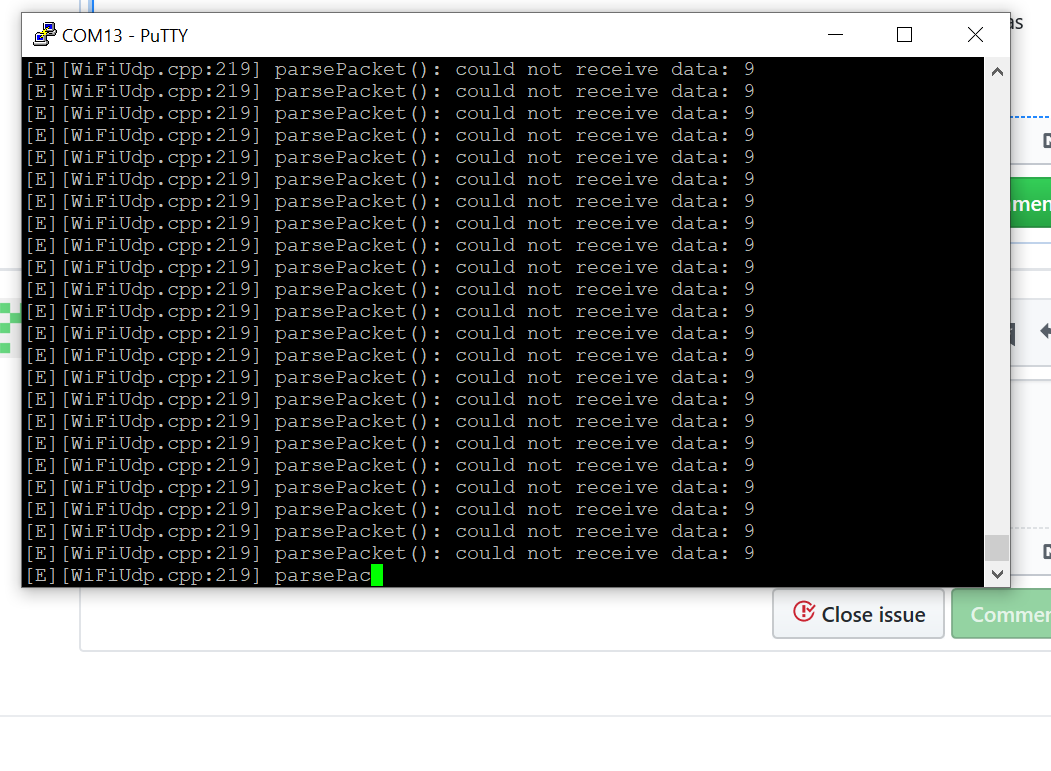
The other thing I do not understand is that if I look at the serial output while connected over Bluetooth there is a constant error steam about
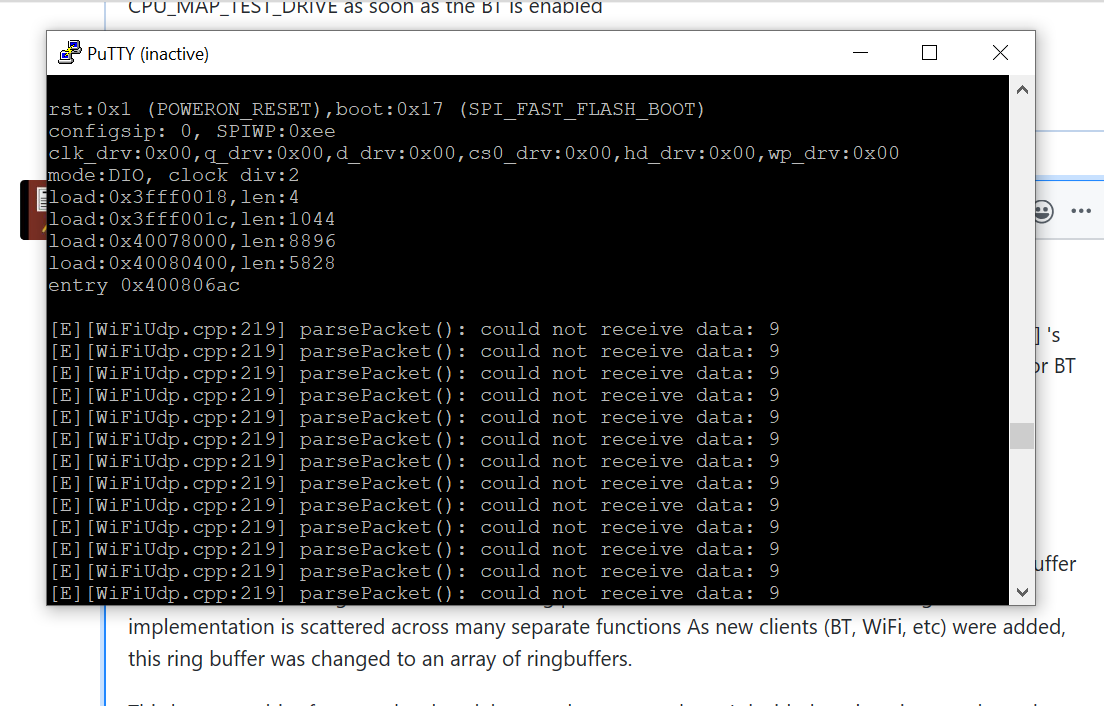
[E][WiFiUdp.cpp:219] parsePacket(): could not receive data: 9
Is there a way to stop this ?
评论 (22)
#2 – ithinkido 于 2020-02-03
Sure, here is the gcode file.
Wireless streaming is notoriously unreliable. Is there anything I can do on the Gcode side to improve performance ( like removing spaces ) ?
#3 – bdring 于 2020-02-03
I think the gcode is fine. It runs fine over serial port. Removing spaces is not required, but does speed up transfer and processing.
I ran the gcode over BT and had some issues too. I looks a bit random. It might be a buffer issue. I have not had issues with my gcode. I am adding some debug code to spit out the line it has a problem with. I’ll see if any characters are getting dropped or added.
#4 – bdring 于 2020-02-03
What are you using to generate the gcode? I am seeing some errors that suggest the arc calculations are incorrect.
Gcode uses a from/to format. The from is always the current location and the to is the line of gcode to be processed. Arcs (G2/G3) to the machine go to a specific location using a specified radius. Sometimes that is mathematically impossible. Grbl has an allowable tolerance for what it will accept. I am seeing the errors generated here.
Do you have the artwork in SVG or DXF where we could try another CAM program?
#5 – ithinkido 于 2020-02-03
I had seen the same thing, serial was good, BT was not so smooth. Very confusing. Same gcode file works well on serial, but is throwing out a ton of errors in BT,
I would really like to find a way to do this wirelessly, It would be a huge plus for my project. I can try telnet later aswell, but I think you mentioned that BT is more reliable.
I am generating the gcode on Inkscape – gcode tools, and I have done some small changes to the extension to reduce the number of decimal places to 3 ( there is a postprocessor feature that has the option for 4 points that I edited to 3) and stopped the output of comments. I was getting line over flow errors that I figured were related to the number of characters. . #6 – bdring 于 2020-02-03 I am seeing errors now on serial too. This is a new problem. It feels like a problem with the buffer. Maybe there is a condition where the filling and emptying of the buffer are getting out of order. I am working on it.
I had also increased the arc tolerance in GRBL to 0.05 with the same thought as you, that maybee the arcs were not defined well.
I have chosen inkscape extension as it is one of the few that I have found that outputs arcs ( G02 G03), and I thought it would be a good idea to help reduce the number of line of code to be sent.
Here is the SVG
#7 – bdring 于 2020-02-03
If you turn on REPORTECHOLINE_RECEIVED, you can see how Grbl sees the lines and where characters are out of place.
#8 – ithinkido 于 2020-02-04
> If you turn on REPORTECHOLINE_RECEIVED, you can see how Grbl sees the lines and where characters are out of place.
Ok , that is very useful. I will do that this evening. It will probably help me to understand what Gcode GRBL really wants so I can tweek the inkscape output.
#9 – bdring 于 2020-02-04
…still working on this. I rolled back the ESP32 core and the problems seem to have gone away.
#10 – bdring 于 2020-02-04
Status update: I spent a good portion of yesterday trying to debug the problem. I knew the streaming used to work fine, so I thought I broke something with a recent update. I rolled back recent changes, but nothing helped.
I decided to pull out an old test machine and it worked fine. The Grbl build date was 11/05/2019. I pulled in the code from that commit date, loaded it on a new ESP32 and it did not work.
I then pulled in a commit of the ESP32 Core from a date before that. GrblESP32 worked fine now, including with the latest GrblESP32 master branch. I have run dozens of files including your dreaded bunnies and it they all run fine.
I don’t know when the problem crept in, but the version of the core I am now running is 3.2.3. I have Grbl print the core version now on startup. (will push that soon)
[MSG:ESP32 Core Ver: v3.2.3]
#11 – ithinkido 于 2020-02-04
Sorry to bring this kind of issue, and thanks for all your work on solving it.
Could I ask two more questions, have I read correctly, GRBL is looking for G1 ( NOT G01) and NO spaces anywhere on the line , this would be the ideal eg G1X2Y3Z4F5 ?
The error that constantly runs when BT is active ,
[E][WiFiUdp.cpp:219] parsePacket(): could not receive data: 9
Does this not add overhead to the streaming, should I try and stop this , would it bring any improvements to streaming stability ?
#12 – bdring 于 2020-02-04
It does not care about G1 or G01. Gcode is always a letter follow by a number. It parse 01 and 1 the same.
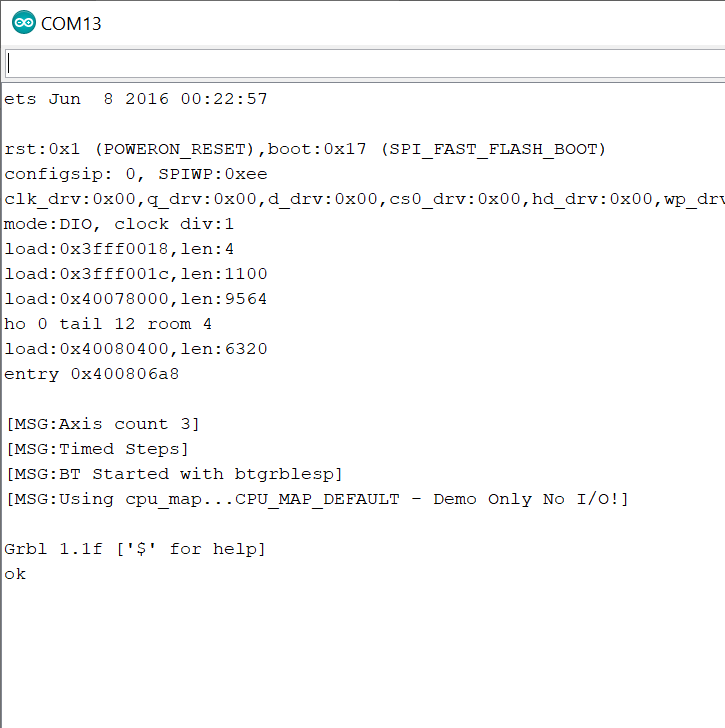
I do not see [E][WiFiUdp.cpp:219] parsePacket(): could not receive data: 9 on my setup. Can you send the startup messages on the serial port [MSG:…] stuff.
#14 – ithinkido 于 2020-02-04
Sure,
This is what I see when I am connected over BT and do a reset from the Gcode sender
[MSG:Using cpumap…CPUMAP_PLOTTER]
Grbl 1.1f [‘$’ for help]
client> $$
$0=3 (Step pulse time, microseconds)
$1=250 (Step idle delay, milliseconds)
$2=0 (Step pulse invert, mask)
$3=0 (Step direction invert, mask)
$4=0 (Invert step enable pin, boolean)
$5=1 (Invert limit pins, boolean)
$6=0 (Invert probe pin, boolean)
$10=0 (Status report options, mask)
$11=0.010 (Junction deviation, millimeters)
$12=0.002 (Arc tolerance, millimeters)
$13=0 (Report in inches, boolean)
$20=0 (Soft limits enable, boolean)
$21=0 (Hard limits enable, boolean)
$22=0 (Homing cycle enable, boolean)
$23=3 (Homing direction invert, mask)
$24=20000.000 (Homing locate feed rate, mm/min)
$25=10000.000 (Homing search seek rate, mm/min)
$26=250 (Homing switch debounce delay, milliseconds)
$27=1.000 (Homing switch pull-off distance, millimeters)
$30=1000.000 (Maximum spindle speed, RPM)
$31=0.000 (Minimum spindle speed, RPM)
$32=0 (Laser-mode enable, boolean)
$100=20.000 (X-axis travel resolution, step/mm)
$101=20.000 (Y-axis travel resolution, step/mm)
$102=100.000 (Z-axis travel resolution, step/mm)
$110=20000.000 (X-axis maximum rate, mm/min)
$111=20000.000 (Y-axis maximum rate, mm/min)
$112=2000.000 (Z-axis maximum rate, mm/min)
$120=2000.000 (X-axis acceleration, mm/sec^2)
$121=2000.000 (Y-axis acceleration, mm/sec^2)
$122=1000.000 (Z-axis acceleration, mm/sec^2)
$130=300.000 (X-axis maximum travel, millimeters)
$131=300.000 (Y-axis maximum travel, millimeters)
$132=100.000 (Z-axis maximum travel, millimeters)
ok
and this is the wired serial connection
I am seeing it when I open a wired serial connection ( I found it by chance while try to see what was happening on BT and looking for clues) and I can confirm that it also shows up on a fresh install running CPUMAPTEST_DRIVE as soon as the BT is enabled
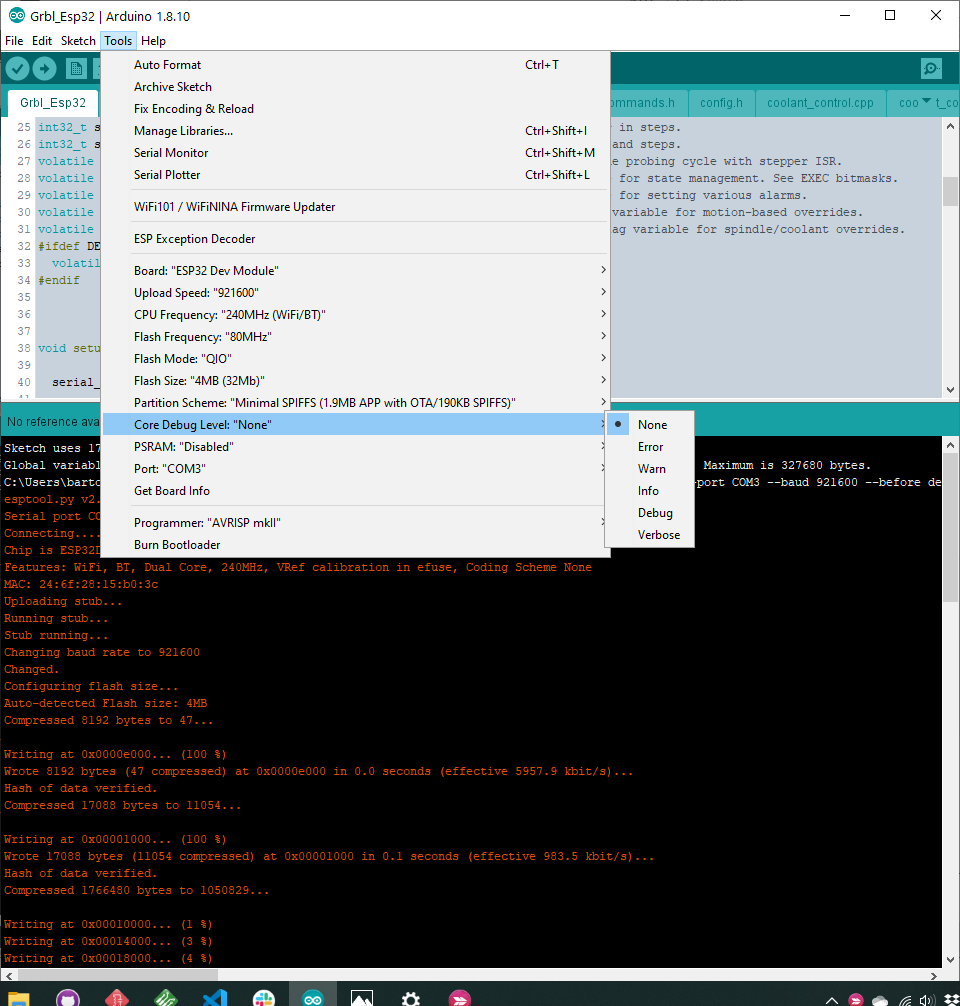
I am compiling on platformio and I do not remember having changed the debug setting so I am guessing – none
#15 – bdring 于 2020-02-06
WifiUdp…
Can you please give me that same printout, but from the serial port. Many of the debug [MSG: xxx] ‘s only go to the serial port. This is because it is always on and can capture info before the Wifi and/or BT are running yet.
I have not been able to repeat this problem, so I need to as much about your setup as possible.
Bluetooth.
Even after changing ESP SDK revisions, I still had some Bluetooth errors. Original Grbl uses a ringbuffer to to hold the incoming serial data after being parsed for realtime commands. This ring buffer implementation is scattered across many separate functions As new clients (BT, WiFi, etc) were added, this ring buffer was changed to an array of ringbuffers.
This became a bit of a mess, hard to debug, and not very robust. I decided to clean it up and use the InputBuffer class that was already in Grbl_ESP3. Now the code is a lot cleaner and it appears to have completely solved the Bluetooth problem.
The changes are on the DevT branch. This this is a major rewrite, I will not merge it to master for a few days. I don’t think this is related to the WifiUdp problem, so that will likely persist for a while.
#16 – ithinkido 于 2020-02-06
On serial , it starts into the WifiUdp problem imeadiatley
I will try a fresh install of visual studio/ platformIO.
I will try out the new branch once I have done a bit more digging into my current setup, I am curious as to where the issue is hidden.
(EDIT)
I had the quick idea to try and compile on Arduino IDE and the serial errors are gone
I will start digging into my PlatformIO.
#17 – bdring 于 2020-02-06
I can get those messages when I turn the debug level to “Error”. The leading “E” character made me think of that.
BTW: I also use platform.io via visual studio code and have not seen those errors. Maybe my debug level is different that yours.
#18 – ithinkido 于 2020-02-06
Sorry for the silly question, where can I check that ?
#19 – bdring 于 2020-02-06
I did not know either, but searched….
Add buildflags = -DCOREDEBUG_LEVEL=0 to your platformio.ini file. This section of mine looks like this now.
“
[env:nodemcu-32s]

platform = espressif32

board = nodemcu-32s

framework = arduino

upload_speed = 512000

boardbuild.partitions = minspiffs.csv

monitor_speed = 115200

buildflags = -DCOREDEBUG_LEVEL=0
That will suppress the problem, but there is still something running in the background that should not be. I am looking into it.
#20 – ithinkido 于 2020-02-06
Ok, I had seen the possibility to add a line in the ini file, but was a bit confused that you were not getting these messages after compling with the original ini file in Platform IO. I was using the original ini file too so i thought there was some menu selection that i had overseen in PlatformIO. This has been a very educating problem and thanks for the help.
#21 – bdring 于 2020-02-07
I think this is completely fixed now. @luc-github found some WiFi stuff still on with Bluetooth. Changes are in the master branch
#22 – ithinkido 于 2020-02-07
Many, many thanks. I am looking forward to this project.
![[gnea/grbl-Mega Issue#1] $ command extentions](https://www.grblhal.com/wp-content/themes/gitphp/timthumb.php?src=https://www.grblhal.com/wp-content/themes/gitphp/assets/img/pic/9.jpg&h=110&w=185&q=90&zc=1&ct=1)
![[gnea/grbl-Mega Issue#2] Better interrupt priorities](https://www.grblhal.com/wp-content/themes/gitphp/timthumb.php?src=https://www.grblhal.com/wp-content/themes/gitphp/assets/img/pic/1.jpg&h=110&w=185&q=90&zc=1&ct=1)
![[gnea/grbl-Mega Issue#3] ATMega16U2 virtual com port on ATMega2560](https://www.grblhal.com/wp-content/themes/gitphp/timthumb.php?src=https://www.grblhal.com/wp-content/themes/gitphp/assets/img/pic/10.jpg&h=110&w=185&q=90&zc=1&ct=1)
#1 – bdring 于 2020-02-03
Not sure what is the problem.
As the GCode is parsed the spaces are removed and the letters are converted to uppercase.
The parsing is done in gcode.cpp.
Could you attach the rest of the file or at least some of the preceding G0 or G1 moves. With arcs, you need to be at the correct location or the I J params don’t work.