
I have two steppers on my 8 foot long Y-axis. Naturally with larger machines there is a larger error in the build. My gantry is somewhat racked having up to a 5mm error and I’m wondering if GRBL for ESP32 supports autosquaring with dual endstops where as each Y-axis stepper has it’s own endstop. During homing, one Y-axis endstop might hit before the other allowing the other stepper to keep moving until it hit’s it’s own endstop. I’d like the software to true up the 5mm error on homing.
When I power my CNC off, the gantry kind of moves back to the 5mm error. I can “bend” it back and work on other ways to set it but I would like a reference point for my machine for accuracy and repeat-ability with autosquare.
Like this
https://www.v1engineering.com/auto-square-dual-endstops/
评论 (5)
#2 – bdring 于 2019-12-11
It uses (1) endstop I/O pin with (2) switches. (2) step i/O pins and (1) dir I/O pin per ganged axis.
It homes 3 times. The first looks for either side to touch. It then does a separate home for each side. If you set $1=255 the motors will stay energized and keep it square.
#3 – jaysettle 于 2019-12-12
Ok yes I see the “#ifdef CPUMAPLOWRIDER // !!!!!!!!!!!!!!!!! Warning: Untested !!!!!!!!!!!!!!!!! //” portion of the CPU_MAP.
How do I enable this mode? Thanks.
Update: Is it as simple as changing in config.h “#define CPUMAPESP32 ” to “CPUMAPLOWRIDER”?
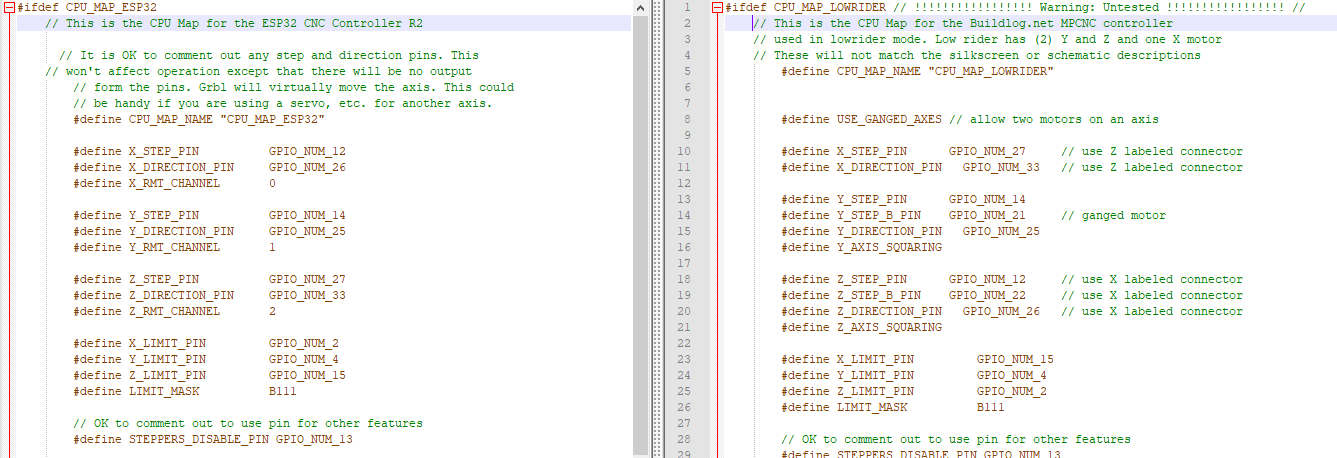
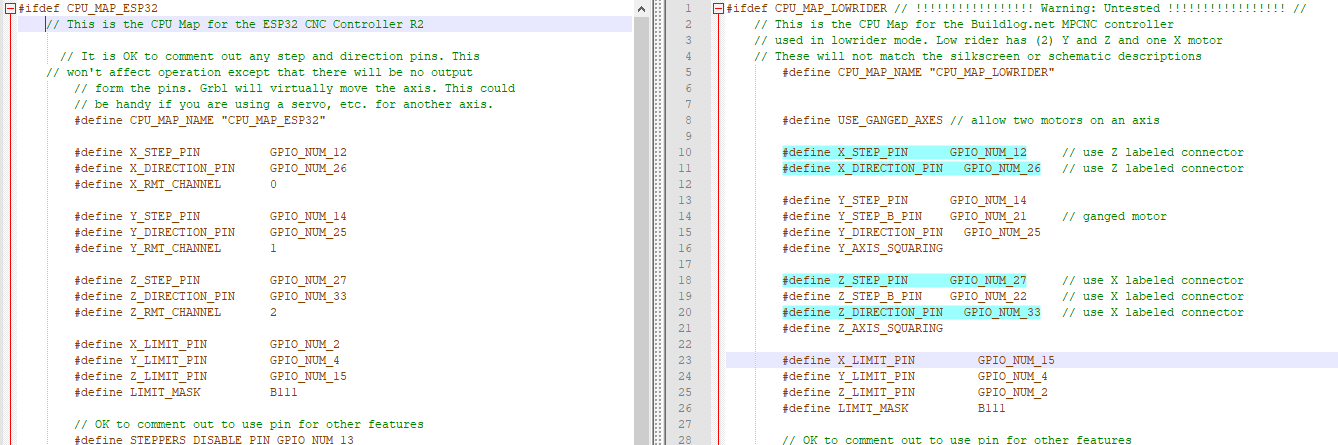
Also I see some pins change if I enable CPUMAPLOWRIDER. Can I make some CPUMAPLOWRIDER pins similar to CPUMAPESP32 so that I don’t have to solder up another board? Leaving x, y, and z step and direction pins the same as CPUMAPESP32 would save time. See below.
Original
!image
Changed pins highlighted
!image
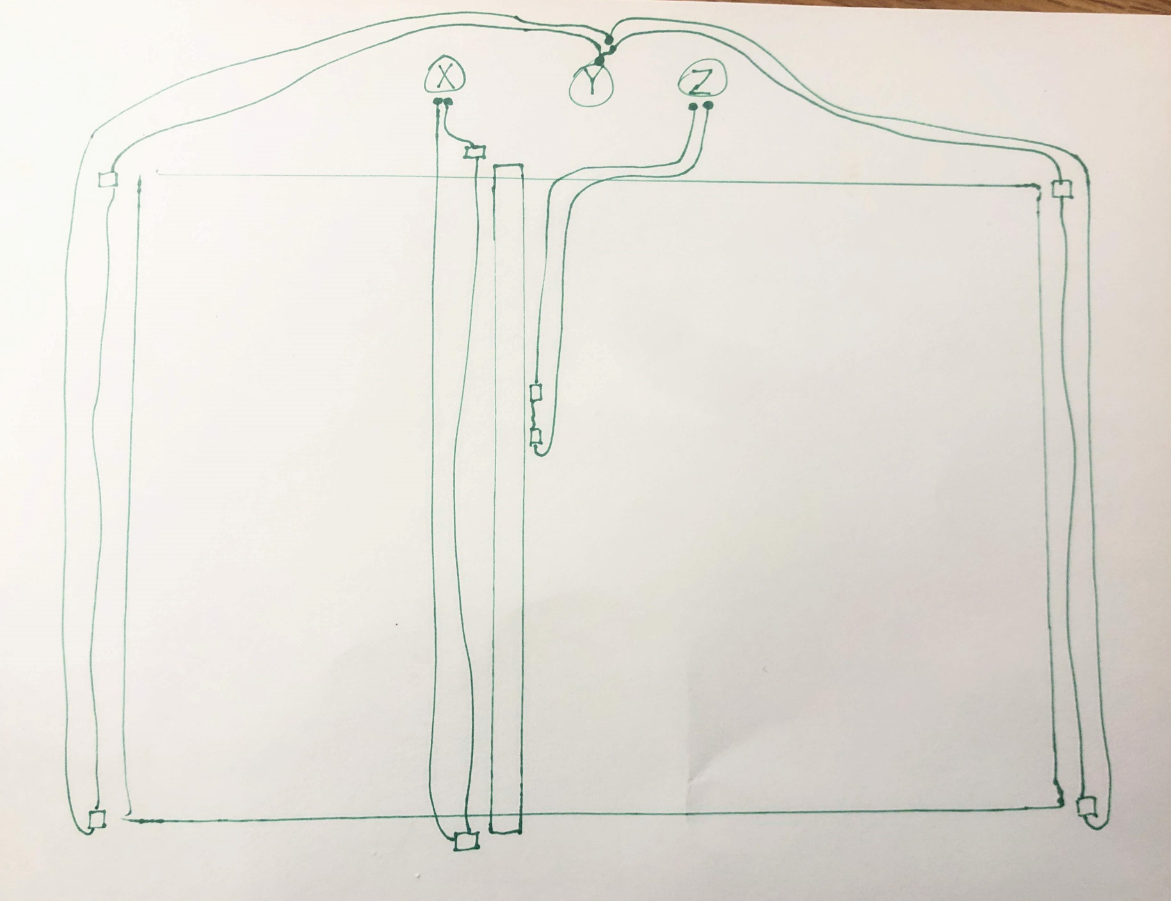
And just so I have the limit switches wired correctly, please correct me if I’m wrong(crappy drawing).
!image
#4 – jaysettle 于 2019-12-18
I got this working with a hiccup. I was very surprised the ganged y-axis is actually calibrating one at a time!
The hiccup is that while operating the homing cycle, the z-axis moves in the positive and triggers the z-axis end stop twice and the homing cycle stops and errors out.(See video)
An error was detecged while sending ‘$H’: (ALARM:9) Homing fail. Could not find limit switch within search distances. Try increasing max travel, decreasing pull-off…
https://photos.app.goo.gl/5kt33WkqgANNm5vWA
I found that if I manually press the z-axis end-stop twice the homing cycle continues and completes correctly on the x-axis and ganged y-axis. Homing cycle is not moving the z-axis motor in the negative direction for some reason. Any ideas why? I’m using the CPUMAPLOWRIDER map.
#5 – bdring 于 2019-12-18
Switches. Make sure it is reading correctly. Send ? command and check status for switch activation. Now try it with the switch pushed.
Z Axis:
Make sure the axis direction is right first.
clear homing error with $X
put in relative move mode with G91
Move up 5mm with G0Z5
Fix direction if it is wrong
![[gnea/grbl-Mega Issue#1] $ command extentions](https://www.grblhal.com/wp-content/themes/gitphp/timthumb.php?src=https://www.grblhal.com/wp-content/themes/gitphp/assets/img/pic/1.jpg&h=110&w=185&q=90&zc=1&ct=1)
![[gnea/grbl-Mega Issue#2] Better interrupt priorities](https://www.grblhal.com/wp-content/themes/gitphp/timthumb.php?src=https://www.grblhal.com/wp-content/themes/gitphp/assets/img/pic/12.jpg&h=110&w=185&q=90&zc=1&ct=1)
![[gnea/grbl-Mega Issue#3] ATMega16U2 virtual com port on ATMega2560](https://www.grblhal.com/wp-content/themes/gitphp/timthumb.php?src=https://www.grblhal.com/wp-content/themes/gitphp/assets/img/pic/5.jpg&h=110&w=185&q=90&zc=1&ct=1)
![[gnea/grbl-Mega Issue#4] Real-time adjustable feedrates](https://www.grblhal.com/wp-content/themes/gitphp/timthumb.php?src=https://www.grblhal.com/wp-content/themes/gitphp/assets/img/pic/11.jpg&h=110&w=185&q=90&zc=1&ct=1)

#1 – mac7988 于 2019-12-11
Hi Jay,
It does support it.
Please see CPUMAP and checkout the CPUMAPLOWRIDER as an example.
Cheers!