
I am getting ready to look into using an SD card to stream files. I need to determine the best command format.
Should I just mimic the marlin commands?
I think I will start with a small feature set and add features as they become necessary. What are the most basic features I need?
– Mounts at boot (no changing on the fly)
– List the files
– Select a file
– Run the file
– Get status (probably needs to follow Grbl reporting style)
评论 (22)
#2 – misan 于 2018-08-09
One of the things Marlin SD card users noticed is how painfully slow the uploading process was. Several factors contributed to that:
– one-bit (serial) SD card interface
– low-speed serial connection (not a big deal when you are printing)
– inefficient stop&wait protocol (for the long latencies involved)
If you go the same way, maybe you want to test first what is the optimistic SD write speed. If it is not good enough users may have to move the SD card to a computer for fast file transfers.
Or maybe you have already ruled wireless file uploads out entirely: not sure your command list was complete (as no mention of file transfer was done).
Adding a “skip lines” value as @DirtyEngineer suggests might be done with an ad-hoc command to be used before running the file.
#3 – luc-github 于 2018-08-09
For terrible upload speed by serial, the advantage of ESP32 is that the upload can be done by WiFi
#4 – bdring 于 2018-08-09
I think I’ll hold off on the upload feature. I have never used that feature with reraps because the speed is so slow. 115200 baud is the default.
Restart from line number could be confusing, because some people use gcode line numbers.
Also, the report function will report bytes sent/total sent. How do you know what line? It is hard to report lines because you would have to count the lines before running the file.
#5 – misan 于 2018-08-09
Now that I look at it, the M32 command in Marlin does include an optional offset value http://marlinfw.org/docs/gcode/M032.html
I do agree using such a feature may be risky but it should only be used that skilled users that will make it right eventually 
#6 – bdring 于 2018-08-09
Ya…if you skip over a G90, G21 M3, etc….you are in trouble.
#7 – bdring 于 2018-08-18
I started a wiki and added a proposed SD card system.
I want to code something simple and quick, so I learn all the issues involved. It is much more Grbl like than Marlin like so I am less like to annoy the senders I use.
#8 – bdring 于 2018-08-19
All of the features in the wiki are basically working.
I am having some weird issues with the SD card where changes I make to it in Windows are not displaying correctly when I list the files.
– I added a file called 1.nc. It does not show up when I list the files, but I can actually run a job from that file with $F=/1.nc
– I renamed a file, but it always displays the old name.
Is there a hidden table the ESP32 is using that Windows is not?
Other than that it works great. I am beginning testing with gcode senders to see if there are any issues.
#9 – misan 于 2018-08-19
Are you making sure to eject the card on Windows before removing it from
the PC?
El dom., 19 ago. 2018 22:58, bdring
> All of the features in the wiki are basically working.
>
> I am having some weird issues with the SD card where changes I make to it
> in Windows are not displaying correctly when I list the files.
>
> – I added a file called 1.nc. It does not show up when I list the
> files, but I can actually run a job from that file with $F=/1.nc
> – I renamed a file, but it always displays the old name.
>
> Is there a hidden table the ESP32 is using that Windows is not?
>
> Other than that it works great. I am beginning testing with gcode senders
> to see if there are any issues.
>
> —
> You are receiving this because you commented.
> Reply to this email directly, view it on GitHub
> <https://github.com/bdring/Grbl_Esp32/issues/19#issuecomment-414155370>,
> or mute the thread
> <https://github.com/notifications/unsubscribe-auth/AAccyCBvaW51iHut8HoHiE7mvHToVSPzks5uSdFjgaJpZM4V11Gx>
> .
>
#10 – bdring 于 2018-08-19
I am pretty good at ejecting. I have screwed up cards for my printer by not doing it.
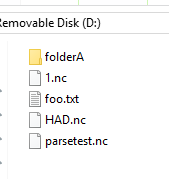
I found a weird clue….I am filtering the files for gcode file extensions (.nc , .txt, .gcode).
If I look at the card on Windows I see…
1.nc
foo.txt
parsetest.nc
1.nc
This is my output from the ESP32. It is changing some things to uppercase and probably failing to get through the filter. (I turned off the filter for this dump)
[FILE:/foo.txt SIZE:53]
[FILE:/HAD.NC SIZE:7864]
[FILE:/parsetest.nc SIZE:178]
[FILE:/1.NC SIZE:7864]
I can fix the filter but what is happening?
#11 – misan 于 2018-08-19
I would keep the filenames to the 8.3 format (.gcode extension is too long)
Upper or lower case used to be irrelevant for Windows filesystems. I do not
think that would prevent filename match.
On Mon, Aug 20, 2018 at 1:01 AM bdring
> I am pretty good at ejecting. I have screwed up cards for my printer by
> not doing it.
>
> I found a weird clue….I am filtering the files for gcode file extensions
> (.nc , .txt, .gcode).
>
> If I look at the card on Windows I see…
>
> 1.nc
> foo.txt
> parsetest.nc
> 1.nc
>
> This is my output from the ESP32. It is changing some things to uppercase
> and probably failing to get through the filter. (I turned off the filter
> for this dump)
>
> [FILE:/foo.txt SIZE:53]
> [FILE:/HAD.NC SIZE:7864]
> [FILE:/parsetest.nc SIZE:178]
> [FILE:/1.NC SIZE:7864]
>
> I can fix the filter but what is happening?
>
> —
> You are receiving this because you commented.
> Reply to this email directly, view it on GitHub
> <https://github.com/bdring/Grbl_Esp32/issues/19#issuecomment-414162223>,
> or mute the thread
> <https://github.com/notifications/unsubscribe-auth/AAccyOn0P188hLN6ZtN6D0lwbQH0pascks5uSe49gaJpZM4V11Gx>
> .
>
#12 – misan 于 2018-08-19
How is so Windows listing has two files named 1.nc?
#13 – bdring 于 2018-08-19
My mistake in typing. Here is a screenshot
The SD library does not appear to be case sensitive. I prefer the long format, but how to you force that 8.3 with the SD library?
#14 – bdring 于 2018-08-20
Whatever…It is no longer an issue. I made the filter case insensitive, so it shows all the files. The SD library is not case sensitive, so it does not matter how you send the command.
Holy Crap this is cool!
I tested with a few senders and they can all deal with it. Some have better feedback than others.
– Grbl Controller (Andriod via Bluetooth): I was able to home the machine and start the SD card job. It continues to ask status, so you can see the DROs during the job. If you turn on verbose output you can also see the percent complete in the console window, but it flies by pretty fast. It supresses a lot of messages, so you cannot see the output when you list the files.
– UGS (on Windows via USB): I was able to home the machine and start the job. If you turn on verbose output you can see the DRO’s and percent complete and even see the file listing.
– LaserGrbl (Windows via USB): I was able to home and start the job. It does not have verbose mode so you cannot see the percent complete, but you can see DROs and file listings.
With all three you can even close the program and the job keeps going. If you try to reconnect, some programs send grbl reset at startup. That kills the job.
I’ll try to make a video tomorrow.
#15 – misan 于 2018-08-20
Is SD code available on any branch? I would try and test some of it but I failed to find it, so I am mostly playing by ear here
#16 – bdring 于 2018-08-20
I create a branch soon. Things look stable enough.
#17 – bdring 于 2018-08-21
The branch has been pushed.
BTW: Sonny (Grbl Guy) sent me an email today after seeing my video. We talked about the protocol I created.
– He only suggested a minor tweak to the way I report the files on the SD. I changed a space to a comma.
– He approved the $F method and will reserve it for this use.
– He approved my characters B,S&W for Bluetooth, SD Card and WiFi for use in the $I {OPT:…] response.
#18 – luc-github 于 2018-08-22
Hi I have 1 question as I just jump in GRBL world:
about SD commands why not using standard SD M commands (https://reprap.org/wiki/G-code) ?
M20 M21 M24
this is well documented and widely used (reprap – marlin, repetier, smoothieware), and GRBL use some GCODE already , also no need to reserve $F on main stream for such usage
sorry if it is an already answered question
about SD file name: SD wiki describe $F=\FOO.NC should be $F=/FOO.NC like described up in this thread and in code no ?
#19 – bdring 于 2018-08-22
SD Wiki page updated, thanks
Grbl likes to have strict adherence to the NIST flavor of G and M codes. LinuxCNC has a good reference to that. The $ commands cover things that are not defined in the NIST flavor. For the SD feature I decided to adhere to that.
My main priority is to not break compatibility with existing gcode senders. With new features that Grbl is not likely to ever implement, we have some flexibility in what we do. I am definitely open to discussion on this, but I think having some setting be $xx=xx.x and some being Mxxx Pxxx is going to be a mess.
#20 – luc-github 于 2018-08-23
Thanks a lot for sharing and for the clarification, I also found the official reference https://ws680.nist.gov/publication/getpdf.cfm?pubid=823374 and checked p20 as described in code so I fully understand now that M commands are used for specific purpose and your decision.
#21 – bdring 于 2018-08-23
Yes, Grbl does have some special “parking” feature M codes that are disabled by default in config.h.
I think if we stick to the primary plan of “try not to break any senders”, we have flexibility when we decide how to implement new features.
I think if a new feature is added that would typically go in a gcode file, it should probably be a M command.
#22 – bdring 于 2018-09-08
This is now part of master…closing
![[gnea/grbl-Mega Issue#1] $ command extentions](https://www.grblhal.com/wp-content/themes/gitphp/timthumb.php?src=https://www.grblhal.com/wp-content/themes/gitphp/assets/img/pic/5.jpg&h=110&w=185&q=90&zc=1&ct=1)
![[gnea/grbl-Mega Issue#3] ATMega16U2 virtual com port on ATMega2560](https://www.grblhal.com/wp-content/themes/gitphp/timthumb.php?src=https://www.grblhal.com/wp-content/themes/gitphp/assets/img/pic/4.jpg&h=110&w=185&q=90&zc=1&ct=1)
![[gnea/grbl-Mega Issue#4] Real-time adjustable feedrates](https://www.grblhal.com/wp-content/themes/gitphp/timthumb.php?src=https://www.grblhal.com/wp-content/themes/gitphp/assets/img/pic/9.jpg&h=110&w=185&q=90&zc=1&ct=1)
#1 – DirtyEngineer 于 2018-08-09
Ability to resume a job at a specified line number of a file would be very handy.