
Hi, my machine is working perfect but when I send a g-code with a raspberry pi, I don´t know what I have to write in the G-Code to unlock the grbl. With WIndows and Universal Gcode Sender works with #H but without the Universal Gcode Sender, I can not start it. What I have to write in the code to unlock the machine?
Another thing that I would like to change is the behavior with G28. The machine goes to the start point but it do not touch the end stop. What I have to write in the gcode to do a proper Homing?
Thanks a lot!
评论 (14)
#2 – kikirikiki 于 2020-04-12
which gcode is homing (#H)? Because in my gcode I can not write #H
#3 – MeJasonT 于 2020-04-12
grbl will accept MDI instruction or a job file with the command.
not a good idea to add $H to the Gcode but it will work.
What User Interface are you using? you should have a command window where
you can type $H and send it
You should be able to open your gcode in a text editor such as notepad++
which will allow you to change and safe your code.
On Sun, 12 Apr 2020 at 17:45, kikirikiki
> which gcode is homing (#H)? Because in my gcode I can not write #H
>
> —
> You are receiving this because you are subscribed to this thread.
> Reply to this email directly, view it on GitHub
> <https://github.com/grbl/grbl/issues/1621#issuecomment-612643599>, or
> unsubscribe
> <https://github.com/notifications/unsubscribe-auth/AFFHK7BP4KP2NHZPDP6U3JLRMHV2BANCNFSM4MGPHFTQ>
> .
>
—
JJ Thompson Engineering & Marine Services
Westgarth Cottage
Hayton
Brampton
Cumbria
CA8 9HL
Telephone 01228 670430
#4 – kikirikiki 于 2020-04-12
What gcode do you recomend to unlock it and do homing?
#5 – MeJasonT 于 2020-04-12
$X – Kill alarm lock
Grbl’s alarm mode is a state when something has gone critically wrong, such as a hard limit or an abort during a cycle, or if Grbl doesn’t know its position. By default, if you have homing enabled and power-up the Arduino, Grbl enters the alarm state, because it does not know its position. The alarm mode will lock all G-code commands until the ‘$H’ homing cycle has been performed. Or if a user needs to override the alarm lock to move their axes off their limit switches, for example, ‘$X’ kill alarm lock will override the locks and allow G-code functions to work again.
But, tread carefully!! This should only be used in emergency situations. The position has likely been lost, and Grbl may not be where you think it is. So, it’s advised to use G91 incremental mode to make short moves. Then, perform a homing cycle or reset immediately afterwards.
As noted earlier, startup lines do not execute after a $X command. Always reset when you have cleared the alarm and fixed the scenario that caused it. When Grbl resets to idle, the startup lines will then run as normal.
$H – Run homing cycle
This command is the only way to perform the homing cycle in Grbl. Some other motion controllers designate a special G-code command to run a homing cycle, but this is incorrect according to the G-code standards. Homing is a completely separate command handled by the controller.
From here
https://github.com/gnea/grbl/wiki/Grbl-v1.1-Commands
#6 – MeJasonT 于 2020-04-12
What user interface/program are you using to control your machine.
If you are/were using serial monitor program to send commands dont forget to send a carriage return after commands
ok got it your using a banofee Pie to send commands.
#7 – kikirikiki 于 2020-04-12
I am trying with this Gcode:
!2
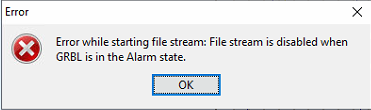
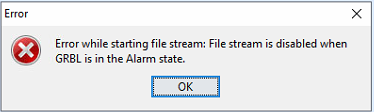
and I get this error.
I am using Universal Gcode Sender but without a GUI, that’s why I can not press the #H Button.
What solution do you have?
#8 – MeJasonT 于 2020-04-12
send $X
that should put your machine into idle
send $H
home your machine
try sending file again
if it wont work try
send $X
send $H
send $X
then try sending gcode file
Im still trying to remember how to do a software reset via command
book of words says
0x18 (ctrl-x) : Soft-Reset – what character is this pants.
On Sun, 12 Apr 2020 at 19:35, kikirikiki
> I am trying with this Gcode:
>
> [image: 2]
> <https://user-images.githubusercontent.com/47773428/79076570-76ccf300-7cfb-11ea-9f04-374cb3fe7976.PNG>
>
> and I get this error.
>
> [image: Captura]
> <https://user-images.githubusercontent.com/47773428/79076581-8ba98680-7cfb-11ea-8b79-f6cb6b7105a9.PNG>
>
> I am using Universal Gcode Sender but without a GUI, that’s why I can not
> press the #H Button.
> What solution do you have?
>
> —
> You are receiving this because you commented.
> Reply to this email directly, view it on GitHub
> <https://github.com/grbl/grbl/issues/1621#issuecomment-612657974>, or
> unsubscribe
> <https://github.com/notifications/unsubscribe-auth/AFFHK7GD4MVSTUTLDISUU63RMICVZANCNFSM4MGPHFTQ>
> .
>
—
JJ Thompson Engineering & Marine Services
Westgarth Cottage
Hayton
Brampton
Cumbria
CA8 9HL
Telephone 01228 670430
#9 – kikirikiki 于 2020-04-12
I need to send a file and automatically starts the process. I can not send comands without a file.
#10 – MeJasonT 于 2020-04-12
try this
Reset machine.txt
#11 – MeJasonT 于 2020-04-12
I think once you get going your file will crash anyways.
GRBL does not support line numbers N1, N2, N3 etc they should be removed and the A axis wont work as GRBL is built as a 3 axis machine X,Y,Z – then gnea/grbl with new hardware can do 5 axis buts thats probably a bit of a mind freeze at this point.
#12 – MeJasonT 于 2020-04-12
treat yourself – download https://notepad-plus-plus.org/
https://notepad-plus-plus.org/downloads/
#13 – kikirikiki 于 2020-04-12
This code is working perfect when I start it with windows and I press the button #H, the code works. The only problem is, I don’t know how to unlock the machine without this button.
I will try this file (Reset machine.txt), but I think the machine doesn’t read this kind of code.
Thanks for the advice but in the computer that I am running the Grbl with, I don’t have internet conexion and I can not download it
#14 – kikirikiki 于 2020-04-13
With the code “Reset machine” I get the same error
!Captura
Is there anyway to unlock the program in the GRBL code? I know is risky but I need it.
![[gnea/grbl-Mega Issue#1] $ command extentions](https://www.grblhal.com/wp-content/themes/gitphp/timthumb.php?src=https://www.grblhal.com/wp-content/themes/gitphp/assets/img/pic/1.jpg&h=110&w=185&q=90&zc=1&ct=1)
![[gnea/grbl-Mega Issue#2] Better interrupt priorities](https://www.grblhal.com/wp-content/themes/gitphp/timthumb.php?src=https://www.grblhal.com/wp-content/themes/gitphp/assets/img/pic/3.jpg&h=110&w=185&q=90&zc=1&ct=1)
![[gnea/grbl-Mega Issue#3] ATMega16U2 virtual com port on ATMega2560](https://www.grblhal.com/wp-content/themes/gitphp/timthumb.php?src=https://www.grblhal.com/wp-content/themes/gitphp/assets/img/pic/4.jpg&h=110&w=185&q=90&zc=1&ct=1)
![[gnea/grbl-Mega Issue#4] Real-time adjustable feedrates](https://www.grblhal.com/wp-content/themes/gitphp/timthumb.php?src=https://www.grblhal.com/wp-content/themes/gitphp/assets/img/pic/6.jpg&h=110&w=185&q=90&zc=1&ct=1)

#1 – jahnj0584 于 2020-04-12
G28 is home position (outside of switches) no matter what
On Sun, Apr 12, 2020, 1:36 PM kikirikiki, wrote:
> Hi, my machine is working perfect but when I send a g-code with a
> raspberry pi, I don´t know what I have to write in the G-Code to unlock the
> grbl. With WIndows and Universal Gcode Sender works with #H but without the
> Universal Gcode Sender, I can not start it. What I have to write in the
> code to unlock the machine?
> Another thing that I would like to change is the behavior with G28. The
> machine goes to the start point but it do not touch the end stop. What I
> have to write in the gcode to do a proper Homing?
> Thanks a lot!
>
> —
> You are receiving this because you are subscribed to this thread.
> Reply to this email directly, view it on GitHub
> <https://github.com/grbl/grbl/issues/1621>, or unsubscribe
> <https://github.com/notifications/unsubscribe-auth/AEEXGDE27VJGPOO63ZP5GB3RMHU2DANCNFSM4MGPHFTQ>
> .
>